microsoft / microsoft/onnxruntime
Import Error in Windows debug config with eager mode
@souptc is already working on this.
Since Jun 24, 2022.
- Dominant language
- C++
- Stars
- 21.9k
- Forks
- 4.2k
- Avg merge
- 4d 8h
- Merged PRs (30d)
- 179
Description
Describe the bug
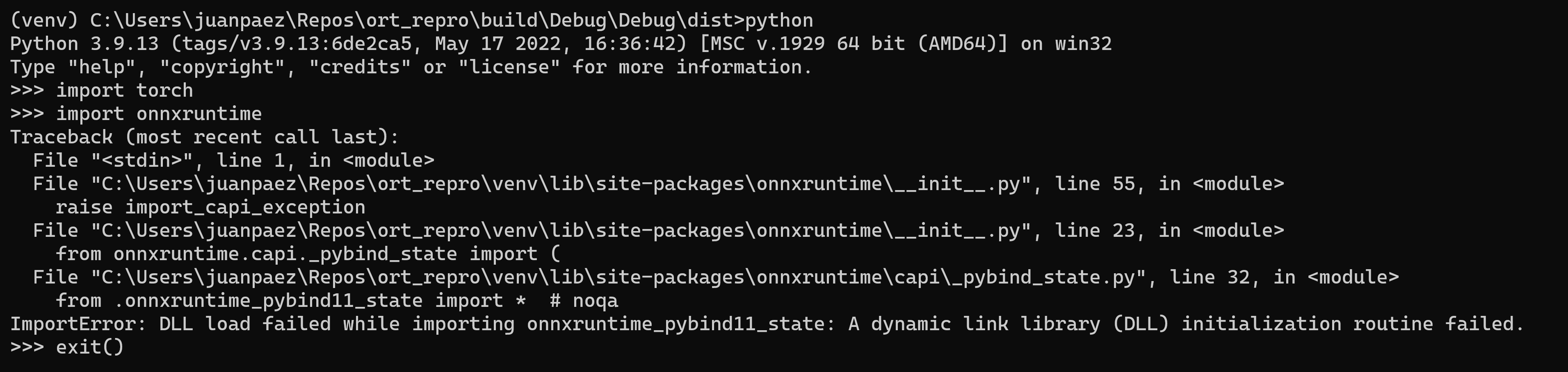
When importing onnxruntime built from source for Windows in debug config with eager mode, we get a DLL load error for the module onnxruntime_pybind11_state.
Urgency
Blocking testing in windows debug
System information
- OS Platform and Distribution (e.g., Linux Ubuntu 16.04): Windows 11
- ONNX Runtime installed from (source or binary): source
- ONNX Runtime version: 1.12.0
- Python version: 3.9.13
- Visual Studio version (if applicable): NA
- GCC/Compiler version (if compiling from source): Clang 14
- CUDA/cuDNN version: NA
- GPU model and memory: NA
To Reproduce
Build from source:
- Create and activate a venv
- Install prereqs:
pip install setuptools wheel numpy typing_extensions torch - Build for windows in debug mode:
python ..\onnxruntime\tools\ci_build\build.py --config Debug --build_dir .\build --build_eager_mode --enable_training --build_wheel --parallel
The build stage itself will succeed, but the python tests will fail with a similar DLL error.
To repro once build succeeds:
- Setup the python wheel (from Debug output dir):
python ..\..\..\..\onnxruntime\setup.py bdist_wheel --enable_training - pip install the wheel:
pip install "dist\onnxruntime_training-1.12.0+cpu-cp39-cp39-win_amd64.whl" - Try importing onnxruntime in interactive python shell
>>> import torch
>>> import onnxruntime
Expected behavior
Should be able to successfully import onnxruntime when built with Windows debug configuration and eager mode enabled
Screenshots
Error during python test stage of build:

Error during import after installing wheel:
Additional context
Both stack traces suggest that the error is specifically related to the onnxruntime_pybind11_state module.
Contributor guide
First steps
- Read the whole issue, then the project's contributing guide.
- Comment on the issue to say you are picking it up — it saves two people doing the same work.
- Fork the repository and make your change on a branch.
- Open a pull request that references the issue number.
Assessment
This issue has not been assessed yet.