microsoft / microsoft/nodejstools
Status bar indicates failure but output indicates success
Open
Nobody has claimed this yet.
- Dominant language
- C#
- Stars
- 1.8k
- Forks
- 355
- PR merge metrics
- No merged PRs in 30d
Description
- NTVS Version: 1.5.1011.1 Commit Hash:d8a8e25d28584ae3f64431b7a243c7c14d58247d
- Visual Studio Version: 28308.54.d16.0
- Node.js Version: 10.6 (from VS)
Steps to Reproduce
- Create a new "Basic Azure Node.js Express 4 Application" (JS or TS)
- Wait for npm install to finish
Actual Behavior
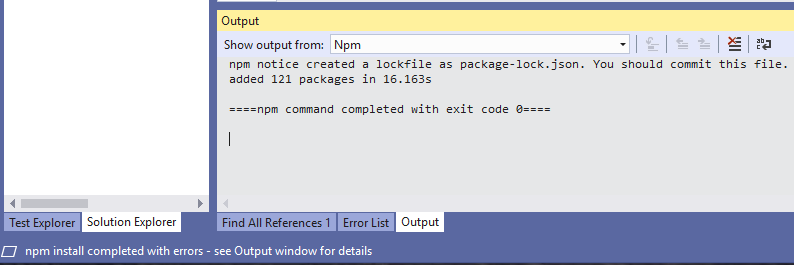
Expected Behavior
Either the status bar should indicate success or the output window should indicate what failure occurred.
Contributor guide
First steps
- Read the whole issue, then the project's contributing guide.
- Comment on the issue to say you are picking it up — it saves two people doing the same work.
- Fork the repository and make your change on a branch.
- Open a pull request that references the issue number.
Research direction
Reproduce the issue by creating a Basic Azure Node.js Express 4 Application and waiting for npm install to finish. Compare the Visual Studio status bar with the output window; done means they consistently report success or the output identifies the failure.
Written by the indexing model from the issue text.
Assessment
- Tech stack
- csharp, node.js
- Domain
- tooling
- Issue type
- Bug
- Difficulty
- 3/5
- Estimated time
- 1-2 days
- Activity status
- Stale
- Clarity
- Mostly clear
- Newbie friendliness
- 35/100