microsoft / microsoft/monaco-editor
[Bug] Japanese IME issue when using wordWrap
Open
Nobody has claimed this yet.
bug
editor-input-IME
- Dominant language
- JavaScript
- Stars
- 46.8k
- Forks
- 4.1k
- Avg merge
- 17h 58m
- Merged PRs (30d)
- 1
Description
Reproducible in vscode.dev or in VS Code Desktop?
- Not reproducible in vscode.dev or VS Code Desktop
Reproducible in the monaco editor playground?
- Not reproducible in the monaco editor playground
Monaco Editor Playground Link
Monaco Editor Playground Code
monaco.editor.create(document.getElementById("container"), {
	value: "function hello() {\n\talert('Hello world!');\n}",
	language: "javascript",
	wordWrap: "on"
});
Reproduction Steps
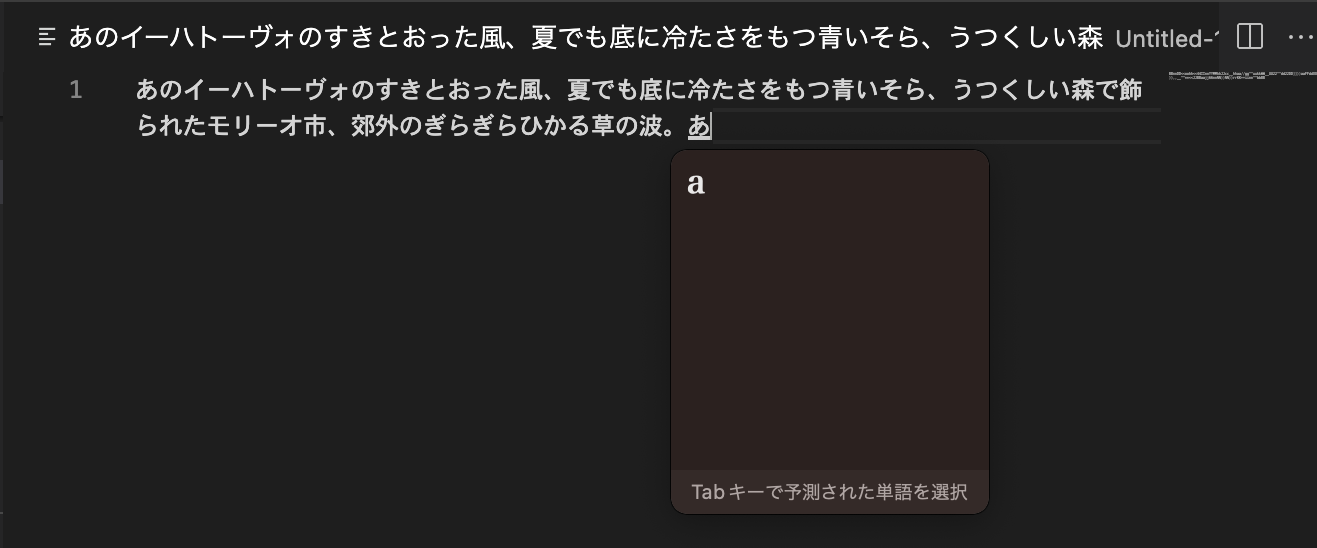
Input characters that overflow the line
like this
あのイーハトーヴォのすきとおった風、夏でも底に冷たさをもつ青いそら、うつくしい森で飾られたモリーオ市、郊外のぎらぎらひかる草の波。
and type text with IME.
Actual (Problematic) Behavior
On Monaco Editor Playground

Expected Behavior
It works right on Visual Studio Code.
Additional Context
No response
Contributor guide
First steps
- Read the whole issue, then the project's contributing guide.
- Comment on the issue to say you are picking it up — it saves two people doing the same work.
- Fork the repository and make your change on a branch.
- Open a pull request that references the issue number.
Research direction
Start with the linked Monaco Editor Playground and the provided wordWrap: "on" reproduction, then verify the Japanese IME behavior against the expected VS Code result. The work is done when typing overflowing Japanese text with IME behaves correctly while word wrapping is enabled, with the reproduction still covered.
Written by the indexing model from the issue text.
Assessment
- Tech stack
- javascript, typescript
- Domain
- frontend
- Issue type
- Bug
- Difficulty
- 4/5
- Estimated time
- 3-5 days
- Activity status
- Stale
- Clarity
- Mostly clear
- Newbie friendliness
- 38/100