microsoft / microsoft/monaco-editor
Option for receiving cursor position when existing hover range is active
Nobody has claimed this yet.
- Dominant language
- JavaScript
- Stars
- 46.8k
- Forks
- 4.1k
- Avg merge
- 17h 58m
- Merged PRs (30d)
- 1
Description
Thanks for the great work on monaco-editor.
I've noticed some hover behavior that I'd like to behave differently. This behavior looks to be by design and available in the Monaco Editor Playground, so that'll be my reference. I have a range of text to provide a hover for, like (1234). The hover for that range should activate when the cursor is on either the ( or ). Then, I add subranges within this that I would like different hovers for, whenever the cursor is on, e.g., 1.
I see that activating a hover for an outer range (i.e., one that encloses a subrange) activates that range and as long as the cursor stays in that range, the hover provider will not receive any updates to the cursor column. So, it's not possible to surface hovers for subranges in this context.
However, if the cursor first lands on a subrange, and then transitions to an outer range, the cursor position is updated (as expected). Visually:
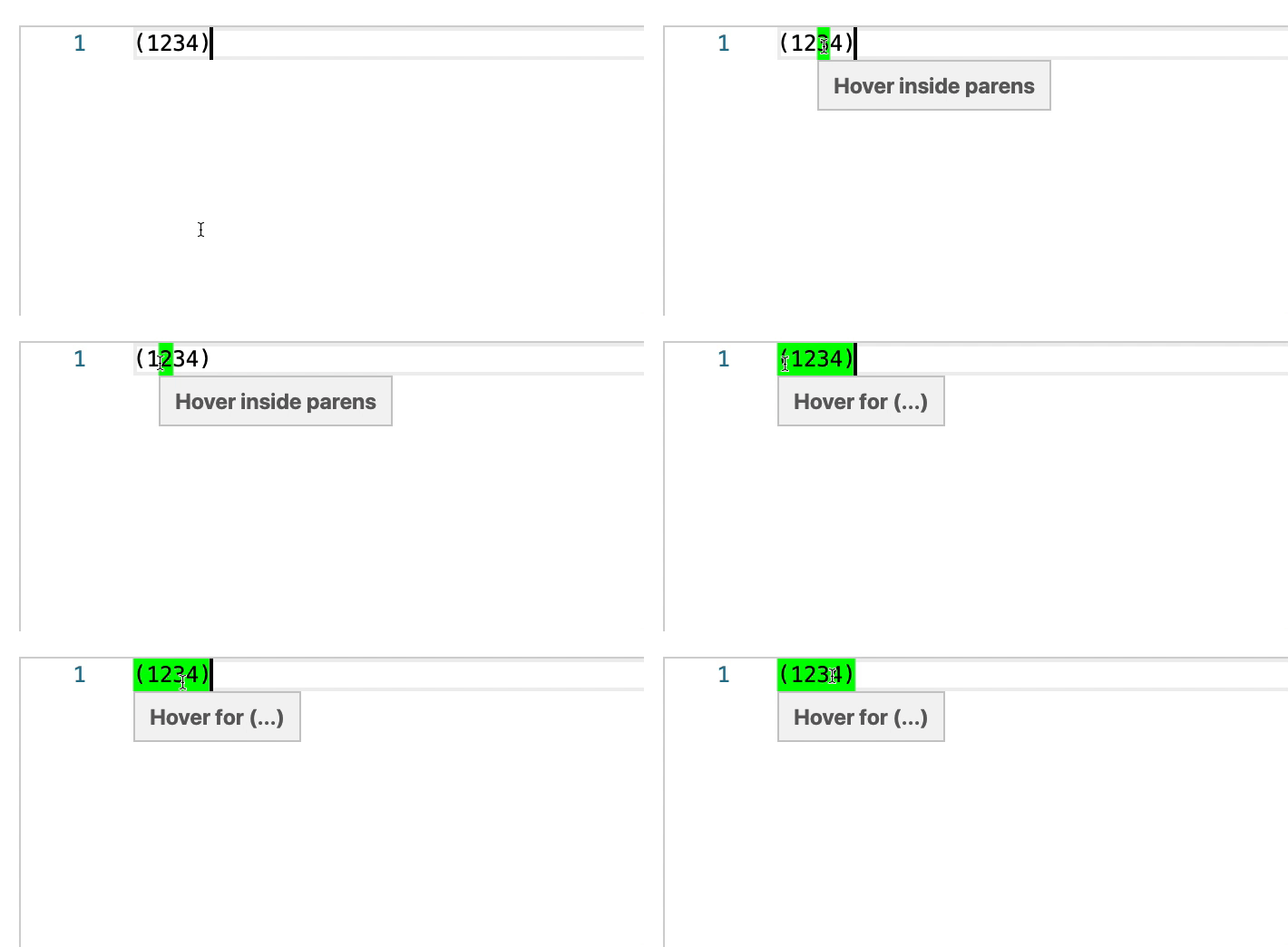
I'm looking for a setting (or approach) that will emit a cursor position in the hover provider when moving from the ( to a subrange of, say, 1234 and seeing the hover for any of 1234, at the stage when I'm wiggling the cursor back and forth in the GIF above. Maybe another way to phrase the desired behavior is "emit a cursor position change unconditionally in hoverProvider".
After spending quite a bit of time looking at the Monaco hovers options, I don't think there's a facility to do this. I'm finding that no cursor position update emits once a hover range is active, whether I try using multiple hover providers, or hovers via deltaDecorations.
Feel free to reject this feature request if it's out of scope for handling within Monaco, or if I'm completely missing something, but I'd appreciate understanding the limits of the design/behavior here.
Monaco editor playground code to produce above behavior
monaco.languages.register({ id: 'mySpecialLanguage' })

monaco.editor.defineTheme('my-theme', {
    base: 'vs',
    colors: {
        'editor.hoverHighlightBackground': '#00ff00',
    },
    rules: [],
})

monaco.editor.setTheme('my-theme')

monaco.languages.registerHoverProvider('mySpecialLanguage', {
    provideHover(model, position) {
        if (position.column === 1 || position.column === 6) {
            // Hover/highlight the whole range if the cursor is on a `(` or `)`.
            return {
                range: new monaco.Range(1, 1, 1, 7),
                contents: [{ value: '**Hover for (...)**' }],
            }
        }
        // Hover/highlight only a single char inside the `(...)`.
        return {
            range: new monaco.Range(1, position.column, 1, position.column + 1),
            contents: [{ value: '**Hover inside parens**' }],
        }
    },
})

monaco.editor.create(document.querySelector('#container'), {
    hover: { delay: 0 },
    value: '(1234)',
    language: 'mySpecialLanguage',
})
Contributor guide
First steps
- Read the whole issue, then the project's contributing guide.
- Comment on the issue to say you are picking it up — it saves two people doing the same work.
- Fork the repository and make your change on a branch.
- Open a pull request that references the issue number.
Research direction
Start with the Monaco Editor Playground code in the issue and reproduce the behavior using registerHoverProvider with the nested ranges shown. Trace the hover-provider and cursor-position behavior from that reproduction, then define done as receiving position updates while moving within an already active enclosing hover so subrange hovers can appear.
Written by the indexing model from the issue text.
Assessment
- Tech stack
- typescript
- Domain
- frontend
- Issue type
- Feature
- Difficulty
- 5/5
- Estimated time
- Over a week
- Activity status
- Stale
- Clarity
- Mostly clear
- Newbie friendliness
- 30/100