microsoft / microsoft/language-server-protocol
Idea: Add support for querying documentation
Nobody has claimed this yet.
- Dominant language
- TypeScript
- Stars
- 13k
- Forks
- 1k
- Avg merge
- 6d 1h
- Merged PRs (30d)
- 10
Description
When working in VSCode, a feature I routinely miss is a documentation browser like in Xcode:
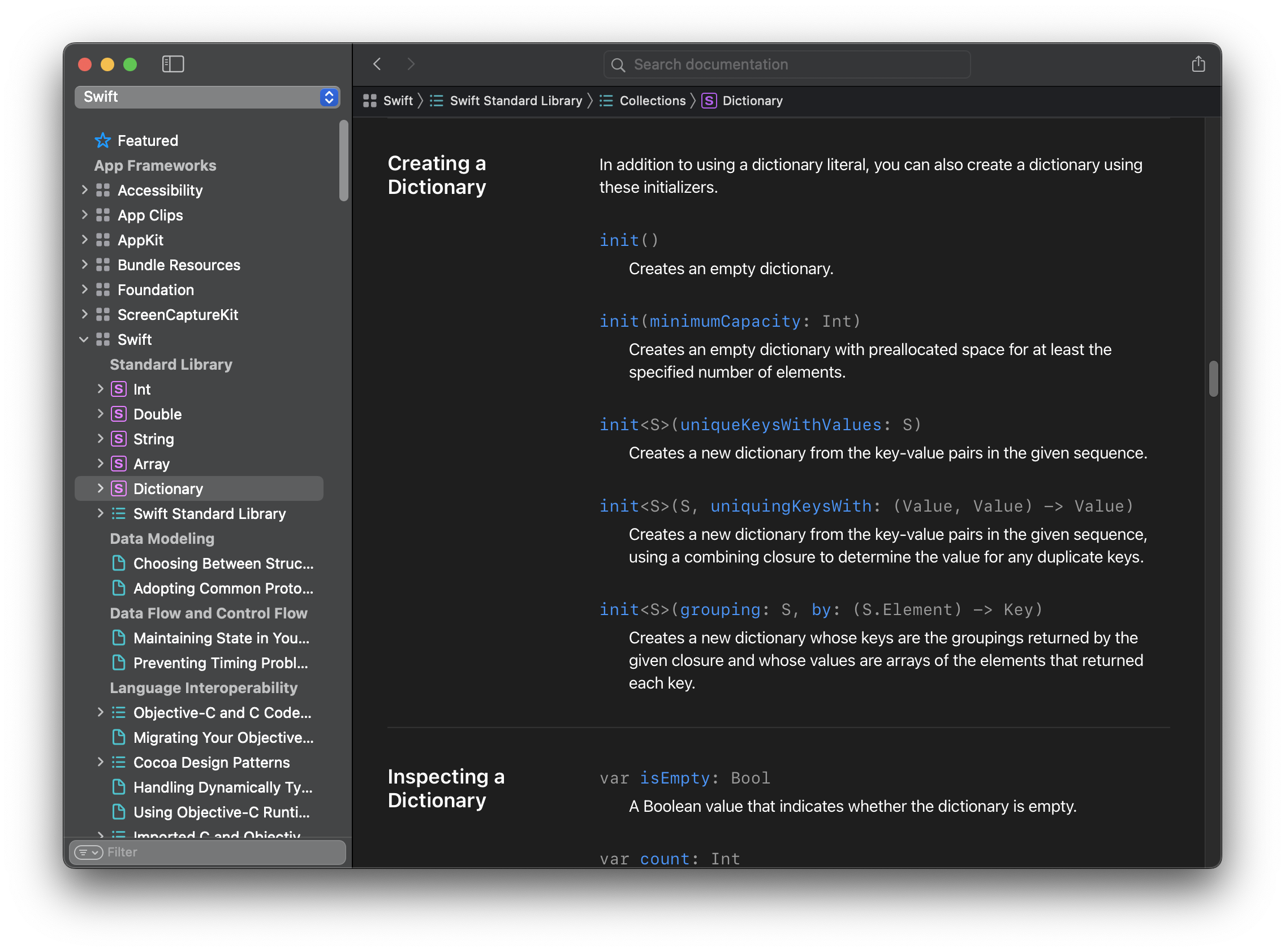
Being able to browse documentation of a project's symbols (including its dependencies) makes offline work a lot easier and is also more integrated with the IDE/editor than e.g. a web browser. This got me thinking whether it might be possible to extend LSP in a way that lets clients implement something similar. A few ideas that I had:
- LSP already offers the ability to attach documentation to completion items, hovers etc. Perhaps a more general request for querying documentation for a workspace symbol might be nice? Maybe something along the lines of
workspaceSymbol/documentationor just a new field (e.g.documentation?: MarkupContent) inWorkspaceSymbolthat could be provided inworkspaceSymbol/resolve? - It would be cool if documentation could contain links to other (documented) symbols.
- Perhaps completion items/hovers could (optionally) be associated with a workspace symbol, letting the client link to the corresponding page in a documentation browser?
The way I imagine such a browser could work is that a client requests a list of workspace symbols, e.g. for display in a sidebar-like manner, and then resolves documentation for the selected symbol, providing the main content in the UI. Users could then browse through different pages of documentation by following links or searching, leveraging the existing infrastructure for querying workspace symbols. Of course, clients would still have the freedom to choose some other UI for this, these are just some initial ideas.
Any thoughts? I would be very interested in hearing whether something like this would be in line with the general design of LSP or perhaps already possible with the current spec, or whether it would be out-of-scope.
Contributor guide
No contributing guide indexed for this repository
First steps
- Read the whole issue, then the project's contributing guide.
- Comment on the issue to say you are picking it up — it saves two people doing the same work.
- Fork the repository and make your change on a branch.
- Open a pull request that references the issue number.
Research direction
Review the existing workspaceSymbol, workspaceSymbol/resolve, completion-item, and hover capabilities described in the issue, along with how VSCode clients consume them. Determine whether documentation browsing fits the protocol's scope and which API shape is appropriate; done means a decided proposal or documented out-of-scope conclusion.
Written by the indexing model from the issue text.
Assessment
- Tech stack
- vscode
- Domain
- api, developer-experience, documentation
- Issue type
- Feature
- Difficulty
- 5/5
- Estimated time
- Over a week
- Activity status
- Stale
- Clarity
- Needs clarification
- Newbie friendliness
- 25/100