[RFC]: Landing Page Design
Nobody has claimed this yet.
Assessment
- Difficulty
- 5/5
- Estimated time
- Over a week
- Newbie friendliness
- 25/100
- Issue type
- Feature
- Clarity
- Mostly clear
- Activity status
- Stale
- Tech stack
- tailwindcss, typescript
Research direction
Start by locating the landing-page components and CSS entry point, then review the proposed TwoColumns, SideBySide, Header, Tweet, Features, Table, Testimonials, Footer, and Tools structure. Check tailwind.config.js and the CSS file for the custom palette and reusable styles; done means the landing page matches the supplied designs across desktop and mobile, with the listed sections represented.
Written by the indexing model from the issue text.
Description
Overview
To explain what Lage does, how Lage works, and to make Lage more marketable, Lage needs a new landing page design.
Goals & non-goals
Goals:
- Creating a slogan, one-liner, and a problem statement section to describe what Lage does.
- Displaying the tools Lage uses to give a brief idea about how Lage works.
- Coming up with a new color theme, reusable styles, and creating components to improve the design of the landing page.
- Adding testimonials, tweets, and a comparison table with Lage's competitors to make Lage more marketable.
Not-yet but soon-to-be goals: - Writing the text that will go into the landing page
- Implementing the Timer and TimeSaved components
- Designing and integrating the illustrations/animations that will go into the landing page
Altering dependencies
I was getting the "PostCSS plugin autoprefixer requires PostCSS 8. Update PostCSS or downgrade this plugin" error when I was building, so I ran the following commands:
npm i --save autoprefixer@^10.0.2
npm i --save postcss@8.1.7
npm i --save postcss-loader@4.0.4
Detailed Design
The components for the landing page design are as follows:
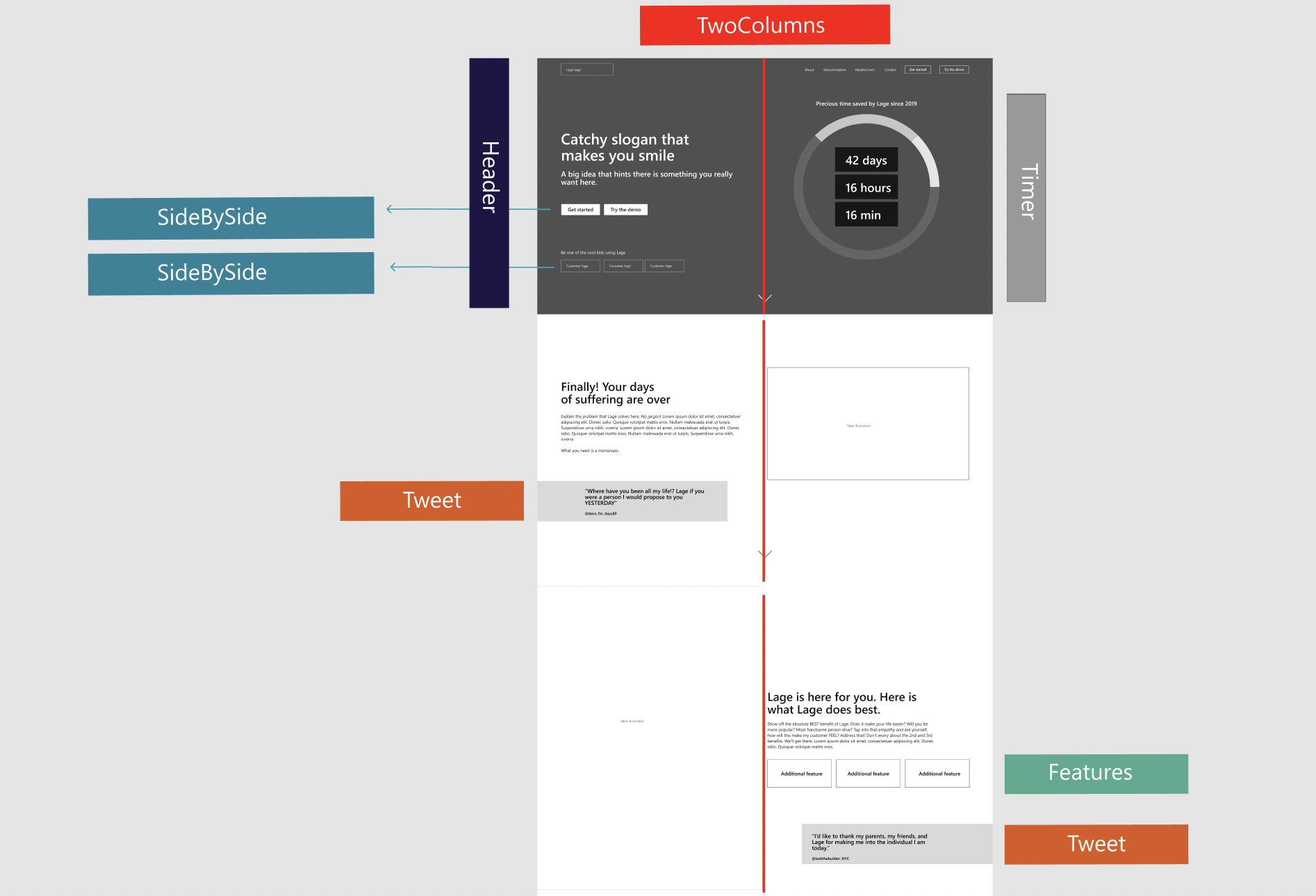
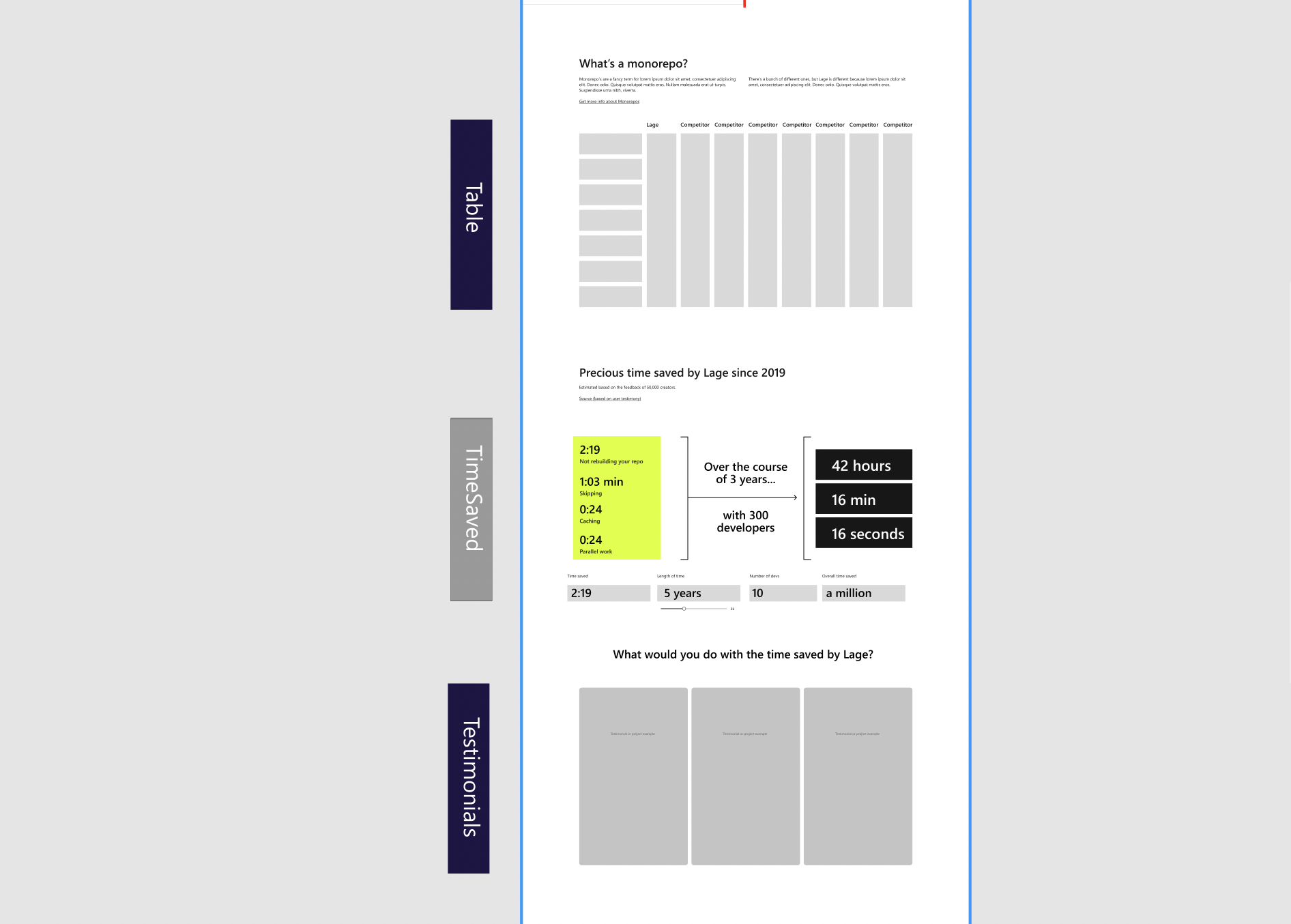
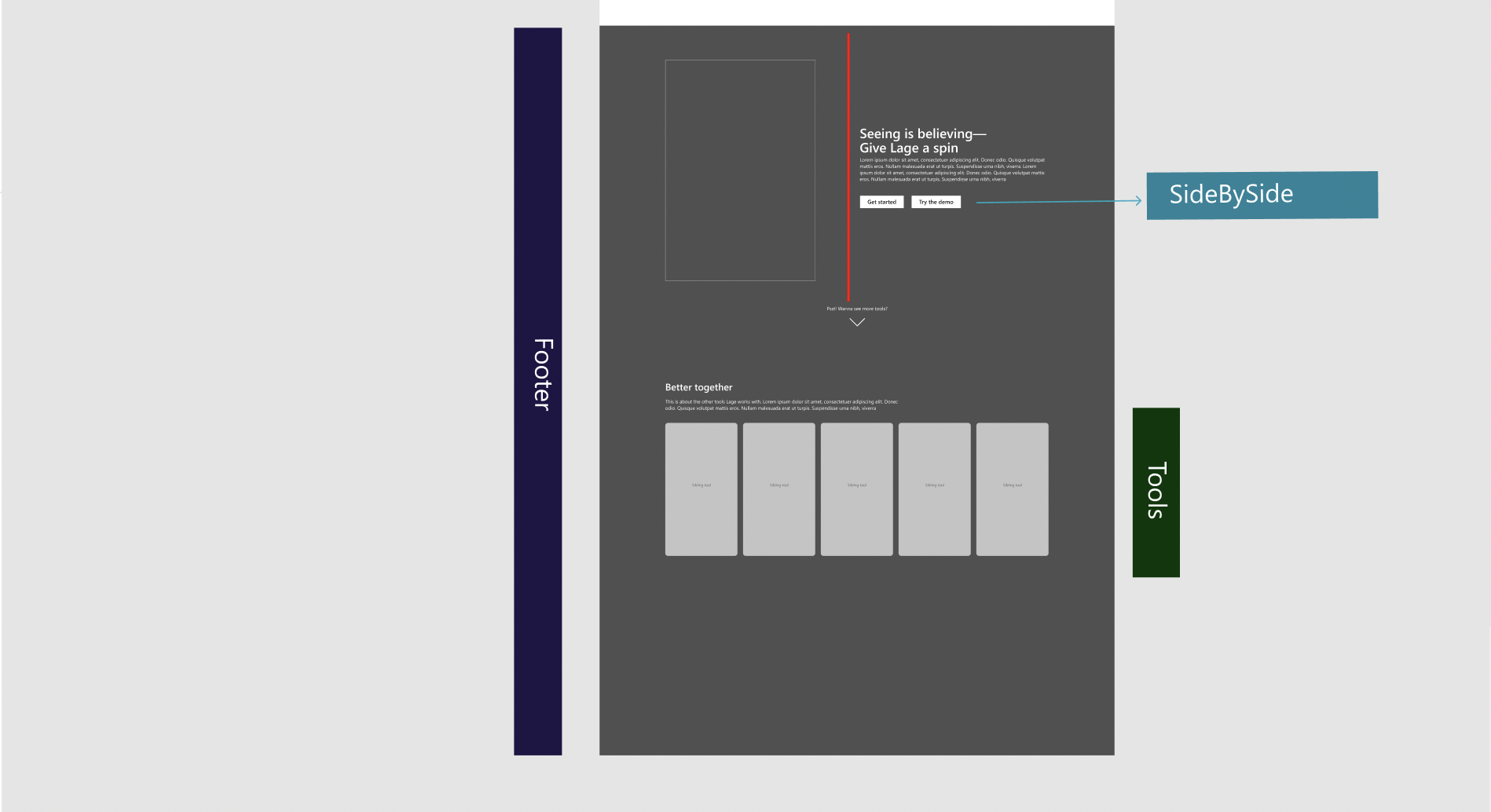
List of Components
- TwoColumns
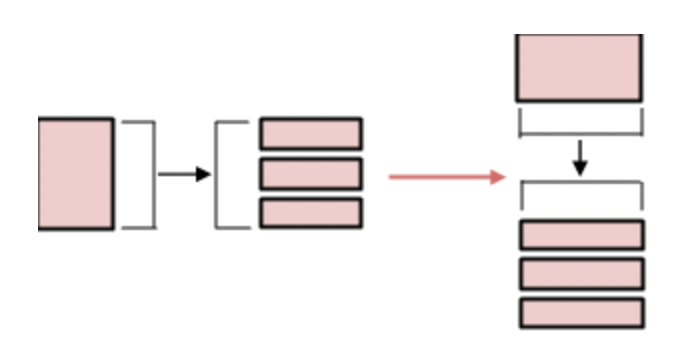
- Two columns are frequently used in the new design, mainly to show animations / illustrations next to some text. Having this wrapper lets us use only one component for the Problem Statement and Lage’s features sections, as they just have an altered order of columns. For the mobile design, this component will be making the following transformation:
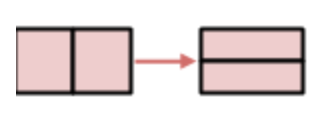
- SideBySide
- This component will be used to position the buttons or customer logos next to each other, with space in between.
- Timer
- The Timer component will consist of an animation that illustrates how Lage saves developers' time.
- TimeSaved
- The TimeSaved component will be adding details about how Lage saves time through making calculations based on collected data. For the mobile view, this component will be making the following transformation:
- Header
- Tweet
- Features
- Table
- Testimonials
- Footer
- Tools
Color Palette
The color palette set for the landing page design is currently as follows:
- Primary: Black (#000000)
- Secondary: White (#fffff)
- Tertiary: Zinc (#d4d4d8)
- Accent: Orange (#ea580c)
- Brand: Teal (#00897b)
These colors will be added to tailwind.config.js as custom colors, extending Tailwind's original colors.
Custom Styles
Aside from the components created, there are many parts of the design that should be styled in the same manner but would not necessarily need to have their own components.
As an example:
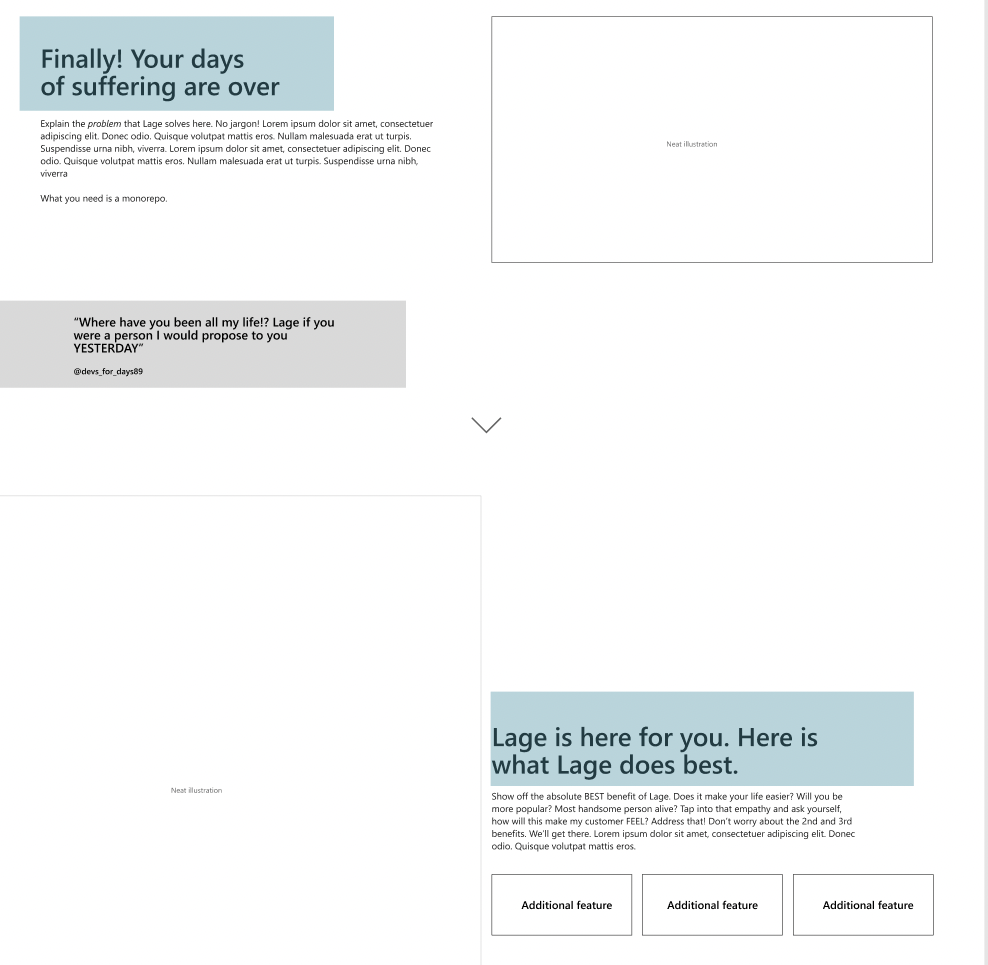
The text in blue here, let's call them "points", should both have the same styling. Rather than writing the long Tailwind style every time, we create a custom, reusable style within the CSS file after the Tailwind directives:
@layer components {
    .point {
        @apply font-bold text-secondary text-4xl pt-12 px-12;
    }
}
and just set the className to "point" whenever we want to use this style.
- Dominant language
- TypeScript
- Stars
- 816
- Forks
- 88
- PR merge metrics
- No merged PRs in 30d
Contributor guide
No contributing guide indexed for this repository
First steps
- Read the whole issue, then the project's contributing guide.
- Comment on the issue to say you are picking it up — it saves two people doing the same work.
- Fork the repository and make your change on a branch.
- Open a pull request that references the issue number.
More from microsoft/lage
-
Require Node 22 Openlage-v3
Difficulty 2/5 1-3 hours Newbie friendliness 65/100
-
Difficulty 3/5 1-2 days Newbie friendliness 55/100
-
lage-v3
Difficulty 4/5 3-5 days Newbie friendliness 42/100
-
lage-v3
-
lage-v3
Difficulty 3/5 1-2 days Newbie friendliness 48/100
Similar issues
-
clawsweeper:fix-shape-clear clawsweeper:queueable-fix clawsweeper:source-repro impact:ux-friction issue-rating: 🦞 diamond lobster no-stale P3
Difficulty 2/5 1-3 hours Newbie friendliness 78/100
-
community first-timers-only good first issue hacktoberfest help wanted low hanging fruit up-for-grabs
Difficulty 1/5 Under an hour Newbie friendliness 76/100
-
code-quality refactoring
Difficulty 2/5 1-3 hours Newbie friendliness 84/100
github/gh-aw-firewall#8816 ·
-
integration:quickjs org:external priority:backlog topic:code-interpreter topic:middleware type:feature
Difficulty 2/5 1-3 hours Newbie friendliness 74/100
langchain-ai/deepagents#6450 ·
-
Difficulty 1/5 Under an hour Newbie friendliness 88/100
vercel/react-tweet#225 ·