microsoft / microsoft/calculator
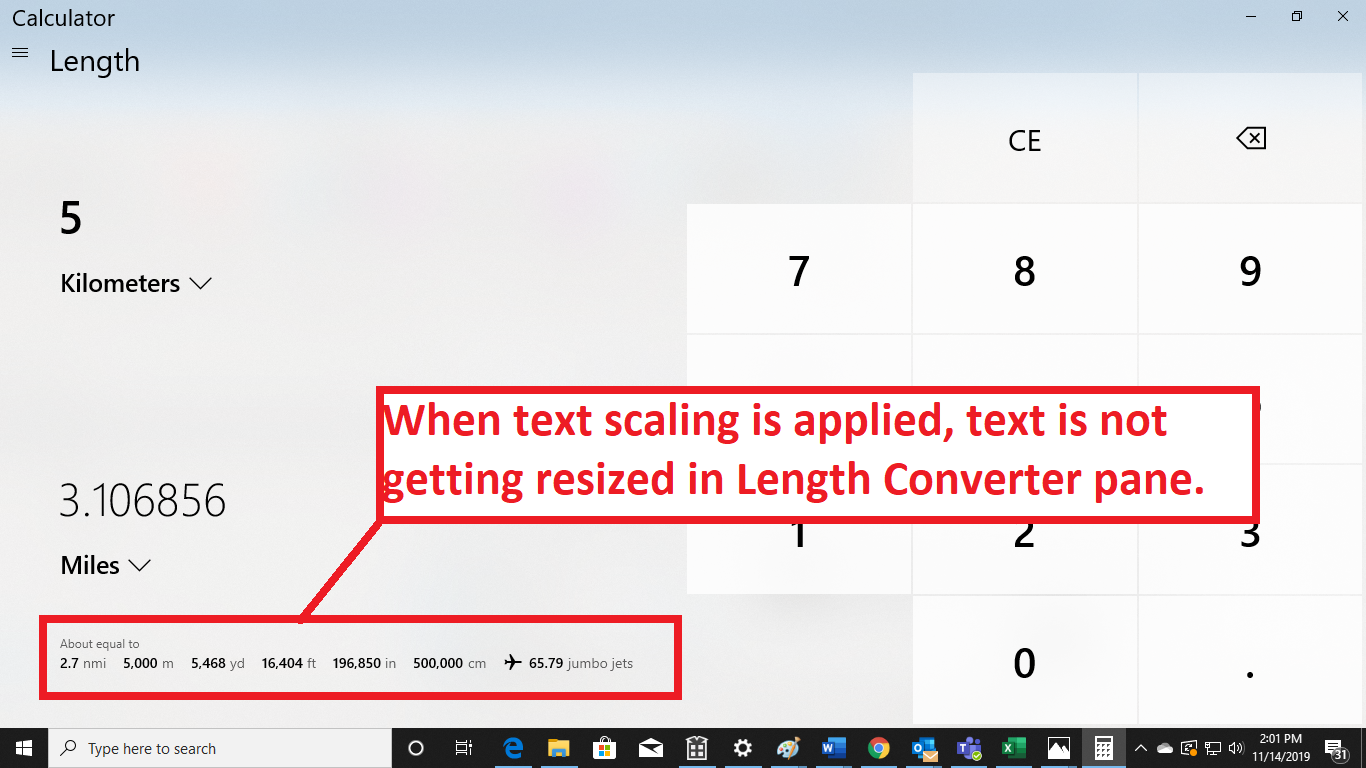
When text scaling is applied, text is not getting resized in Length Converter pane
Nobody has claimed this yet.
- Dominant language
- C#
- Stars
- 31.1k
- Forks
- 5.8k
- PR merge metrics
- No merged PRs in 30d
Description
When text scaling is applied, text is not getting resized in Length Converter pane
Repro steps:
1.Launch the calculator application from start menu.
2.Navigate to menu navigation button present in left corner if the app and invoke it.
3.Now select the length option under Converter pane and invoke it.
4.Length Converter page, select “kilometers” as the unit type in the input field and input “5” and navigate to the Output values now observe the "about equals to values" text size in Textscaling 200%. mode.
Actual Results
In Length converter pane "About equals text" and "Displayed value" text is not enlarged after applying 200 % textscaling.
Expected Results
Text size should be increased when Text scaling is applied
User Impact
Users with low vision will face difficulty if the text is not getting increased.
Contributor guide
First steps
- Read the whole issue, then the project's contributing guide.
- Comment on the issue to say you are picking it up — it saves two people doing the same work.
- Fork the repository and make your change on a branch.
- Open a pull request that references the issue number.
Research direction
Reproduce the issue in the Calculator app by opening the Length Converter pane, selecting kilometers, entering 5, and applying 200% text scaling. Compare the “about equals to values” and displayed value text with the expected enlarged sizing; done means both texts resize appropriately for low-vision users.
Written by the indexing model from the issue text.
Assessment
- Tech stack
- csharp
- Domain
- accessibility
- Issue type
- Bug
- Difficulty
- 3/5
- Estimated time
- 1-2 days
- Activity status
- Stale
- Clarity
- Mostly clear
- Newbie friendliness
- 45/100