microsoft / microsoft/calculator
AlwaysOnTop should use the same control than the normal mode to display calculation results.
Nobody has claimed this yet.
- Dominant language
- C#
- Stars
- 31.1k
- Forks
- 5.8k
- PR merge metrics
- No merged PRs in 30d
Description
Describe the issue
Instead of using the same control than in Normal mode to display the current value, AOT use a different control based on OverflowText.
This control wasn't made for this purpose, we should use the same control in both modes (cleaner, providing more features and easier to support).
Originally, the Calculator had 2 similar controls:
-
CalculationResult
- Purpose: Display a numeric value or an error message
- Usage: Display the result of a calculation or the current value entered
- Unique features: Support auto font resizing, made to host a textblock, support left/right keys to scroll, support error messages, including change the font to correctly display the message, support LtR for error messages, support context menu (copy/paste the value)
- The control scrolls automatically to the end when the value changed (to replicate this behavior,
OverflowTextmodified the VM and misuseTokenUpdated)
-
OverflowText
- Purpose: Display a ItemsControl
- Usage: Display the current operation (e.g.:
123 + 243 x 343) - Unique features: improve the accessibility of the containing ItemsControl.
It is very clear when we compare the 2 controls that the first one corresponds exactly to our needs unlike the second. The current implementation tries to adjust/tweak the style of OverflowText to look like CalculationResult, instead we should use it directly.
How will we improve the code quality and the UX?
Using the CalculationResult will effortlessly add the following features to AOT:
- better sizing of the text, the current implementation (via visual states in Calculator.xaml) only uses 2 font sizes, a large and a very small one (see screenshots)
- support of Left/Right keys
- better display of error messages (a comment from this repository mentions that we should improve this point in AOT mode, switching to CalculationResult will solve the problem)
- Support copy/paste via context menu.
- All future enhancements to the normal view will be added automatically in AOT mode.
- We will be able to improve the display of the operation without impacting AOT mode.
- slightly better performance, only 1 control instead of 2 will be used to display results
- remove huge template from Calculator.xaml, making the code easier to read.
- improve transition between the 2 mode, a text selected in one mode will still be selected in the other.
Screenshots
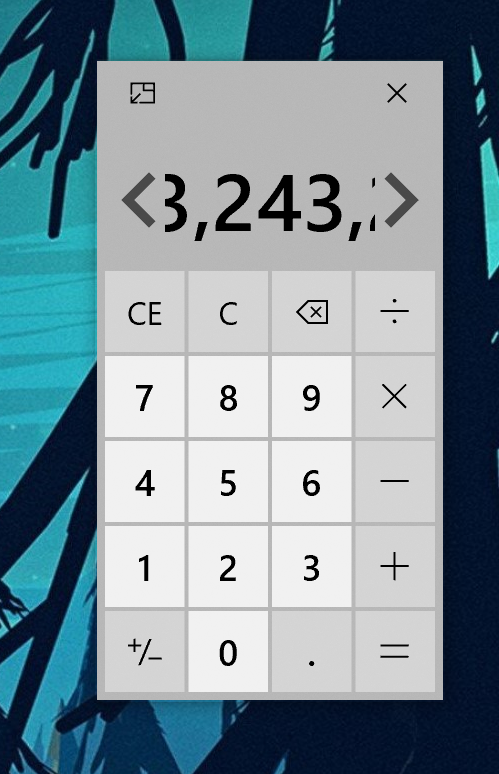 The current implementation supports only 2 font sizes, not adapted to all the sizes supported by AOT
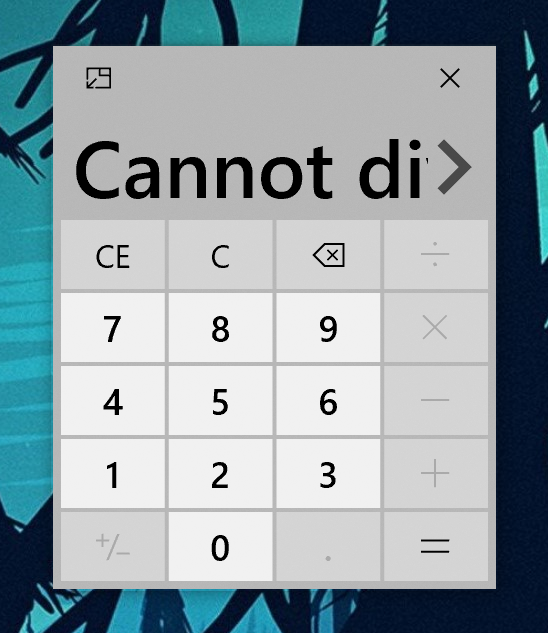 The display of error messages can be improved
What do we need to do?
- Add the
ScrollButtonsPlacement="Above"mode added by #647 in OverflowTextBlock to CalculationResult. (will it be necessary if the control auto-resizes the font?) - Remove
AlwaysOnTopStyleS,AlwaysOnTopStyleMandAlwaysOnTopResultsfromCalculator.xaml - in visual states associated to AOT, set the correct values for
Result.MinFontSize,Result.MaxFontSizeto perfectly fit the AOT UI.
Device and Application Information
- OS Build: 10.0.18875.0
- Architecture: X64
- Application Version: 10.1905.30.0
- Region: en-US
- Dev Version Installed: True
Requested Assignment
If possible, I would like to fix this.
Contributor guide
First steps
- Read the whole issue, then the project's contributing guide.
- Comment on the issue to say you are picking it up — it saves two people doing the same work.
- Fork the repository and make your change on a branch.
- Open a pull request that references the issue number.
Research direction
Start in Calculator.xaml and compare the AlwaysOnTop result styles with the normal CalculationResult control and the OverflowTextBlock changes from #647. Replace the AOT result presentation as described, remove the obsolete AOT styles and set the AOT font-size values. Done means AOT uses CalculationResult while retaining the requested sizing, scrolling, error display and context-menu behavior.
Written by the indexing model from the issue text.
Assessment
- Tech stack
- csharp
- Domain
- desktop, frontend
- Issue type
- Refactor
- Difficulty
- 3/5
- Estimated time
- 1-2 days
- Activity status
- Stale
- Clarity
- Clearly specified
- Newbie friendliness
- 45/100