microsoft / microsoft/calculator
Using the up-arrow to select items in the conversion list only works when down-arrow not used and list is scrolled
Nobody has claimed this yet.
- Dominant language
- C#
- Stars
- 31.1k
- Forks
- 5.8k
- PR merge metrics
- No merged PRs in 30d
Description
Describe the bug
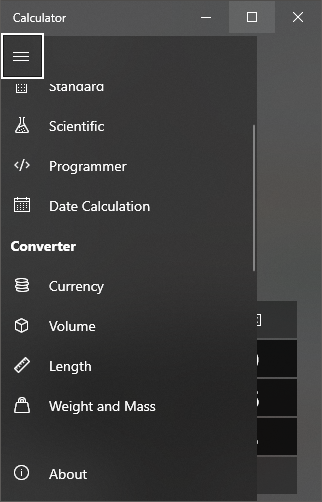
This is a complicated visual bug. When the Conversions hamburger menu is open, scrolling to the bottom and using the up arrow, the list will scroll but will not select items. When it gets to the stop, "Standard" will be cut off and the hamburger icon will be selected. Using the down arrow and up arrows will allow any item in the list to be selected. When closing the menu and going back into it, the items select as normal most of the time.
Steps To Reproduce
- Open Calculator
- Open the hamburger menu, don't click on any items, and scroll to the bottom
- Close the hamburger menu
- Re-open the hamburger menu
- Click on "Standard"
- Re-open the hamburger menu, scroll to the bottom
- Place your cursor over the last menu item (sometimes this works)
- Press the up arrow key many times. Sometimes, it will do nothing, sometimes it will scroll the list but will not select any items.
- I have attached a screenshot of what happens when you get to the top.
- When the hamburger item is selected, pressing the down arrow will select Standard. This appears to be the only way to select standard when in this state (Standard will not be automatically selected on first-try).
Expected behavior
The arrow keys always select an item, and will not scroll the list without selecting an item. Also, the "Standard" text at the top will not be clipped. The standard item will be selected rather than being clipped, as the hamburger menu is selected.
Screenshots
Device and Application Information (please complete the following information):
- OS Build: 10.0.17763.0
- Architecture: X64
- Application Version: 10.1902.42.0
Additional context
Hovering over the scroll bar while the hamburger menu item is selected, then hover over standard, then pressing down causes the about button to be selected. When pressing up, the hamburger menu item is selected, skipping the other items. It is not possible to select anything else until the mouse is moved.
However, when the last item is selected with the white box (Angle), hovering over the scroll bar and then over to angle, then using the arrow keys selects the next item. I'm not sure if this is intended or not.
Contributor guide
First steps
- Read the whole issue, then the project's contributing guide.
- Comment on the issue to say you are picking it up — it saves two people doing the same work.
- Fork the repository and make your change on a branch.
- Open a pull request that references the issue number.
Research direction
Start by reproducing the conversion hamburger-menu behavior in Calculator using the listed arrow-key and scrolling steps, including the clipped “Standard” item. Done means arrow keys consistently select each item, the list does not scroll without selection, and “Standard” is not clipped; no source file or test is named in the issue.
Written by the indexing model from the issue text.
Assessment
- Tech stack
- csharp
- Domain
- desktop, frontend
- Issue type
- Bug
- Difficulty
- 3/5
- Estimated time
- 1-2 days
- Activity status
- Stale
- Clarity
- Mostly clear
- Newbie friendliness
- 35/100