microsoft / microsoft/azure-tools-for-java
Deubug does not work in IDEA
Open
@Flanker32 is already working on this.
Since Oct 9, 2022.
Module: Azure Functions
Reason: external
State: Resolved
- Dominant language
- Java
- Stars
- 262
- Forks
- 185
- Avg merge
- 2d 21h
- Merged PRs (30d)
- 1
Description
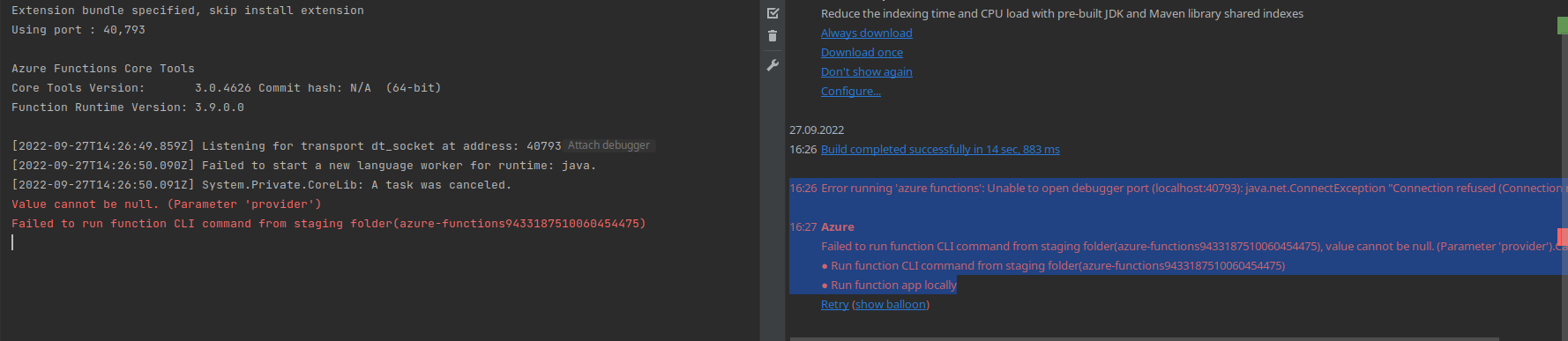
16:26	Error running 'azure functions': Unable to open debugger port (localhost:40793): java.net.ConnectException "Connection refused (Connection refused)"

16:27	Azure
			Failed to run function CLI command from staging folder(azure-functions9433187510060454475), value cannot be null. (Parameter 'provider').Call Stack:
			● Run function CLI command from staging folder(azure-functions9433187510060454475)
			● Run function app locally
Extension bundle specified, skip install extension
Using port : 40,793

Azure Functions Core Tools
Core Tools Version:       3.0.4626 Commit hash: N/A  (64-bit)
Function Runtime Version: 3.9.0.0

[2022-09-27T14:26:49.859Z] Listening for transport dt_socket at address: 40793
[2022-09-27T14:26:50.090Z] Failed to start a new language worker for runtime: java.
[2022-09-27T14:26:50.091Z] System.Private.CoreLib: A task was canceled.
Value cannot be null. (Parameter 'provider')
Failed to run function CLI command from staging folder(azure-functions9433187510060454475)
IDEA 2021.2.3
Ubuntu 20.04.4
Contributor guide
First steps
- Read the whole issue, then the project's contributing guide.
- Comment on the issue to say you are picking it up — it saves two people doing the same work.
- Fork the repository and make your change on a branch.
- Open a pull request that references the issue number.
Assessment
This issue has not been assessed yet.