microsoft / microsoft/agentsleague
Project: Reasoning Agents - Condor Console
Nobody has claimed this yet.
- Dominant language
- No language data
- Stars
- 286
- Forks
- 92
- Avg merge
- 12h 44m
- Merged PRs (30d)
- 1
Description
Track
Reasoning Agents (Azure AI Foundry)
Project Name
Condor Console
GitHub Username
@alanmaizon
Repository URL
https://github.com/alanmaizon/reasoning-agents
Project Description
Condor Console
Condor Console is a modular multi-agent reasoning system built to make complex AI workflows more reliable, auditable, and production-ready.
Instead of a single-pass prompt, Condor uses explicit role-based orchestration to improve transparency and control across multi-step tasks.
Architecture
- Planner Agent: Decomposes high-level goals into structured steps.
- Executor Agents: Perform scoped tasks independently.
- Critic / Verifier Agent: Checks logical consistency and constraint adherence.
- State & Memory Layer: Preserves intermediate reasoning for traceability.
Why It Matters
By separating planning, execution, and verification, Condor improves determinism and reduces hallucinated reasoning chains in complex workflows.
Key Features
- Explicit planner-executor-verifier orchestration
- Structured reasoning trace output
- Modular agent abstractions
- API-key based local execution
- Extensible architecture for new workflows
Technical Highlights
- Implemented a reusable planner-executor-critic reasoning loop
- Designed modular orchestration for extensibility
- Built traceable logs for debugging and evaluation
- Separated reasoning logic from execution logic
- Prioritized architectural reliability over prompt complexity
Demo Video or Screenshots
Live Site
The live site requires authentication. Please sign in with Google to test the full experience.
Demo Video
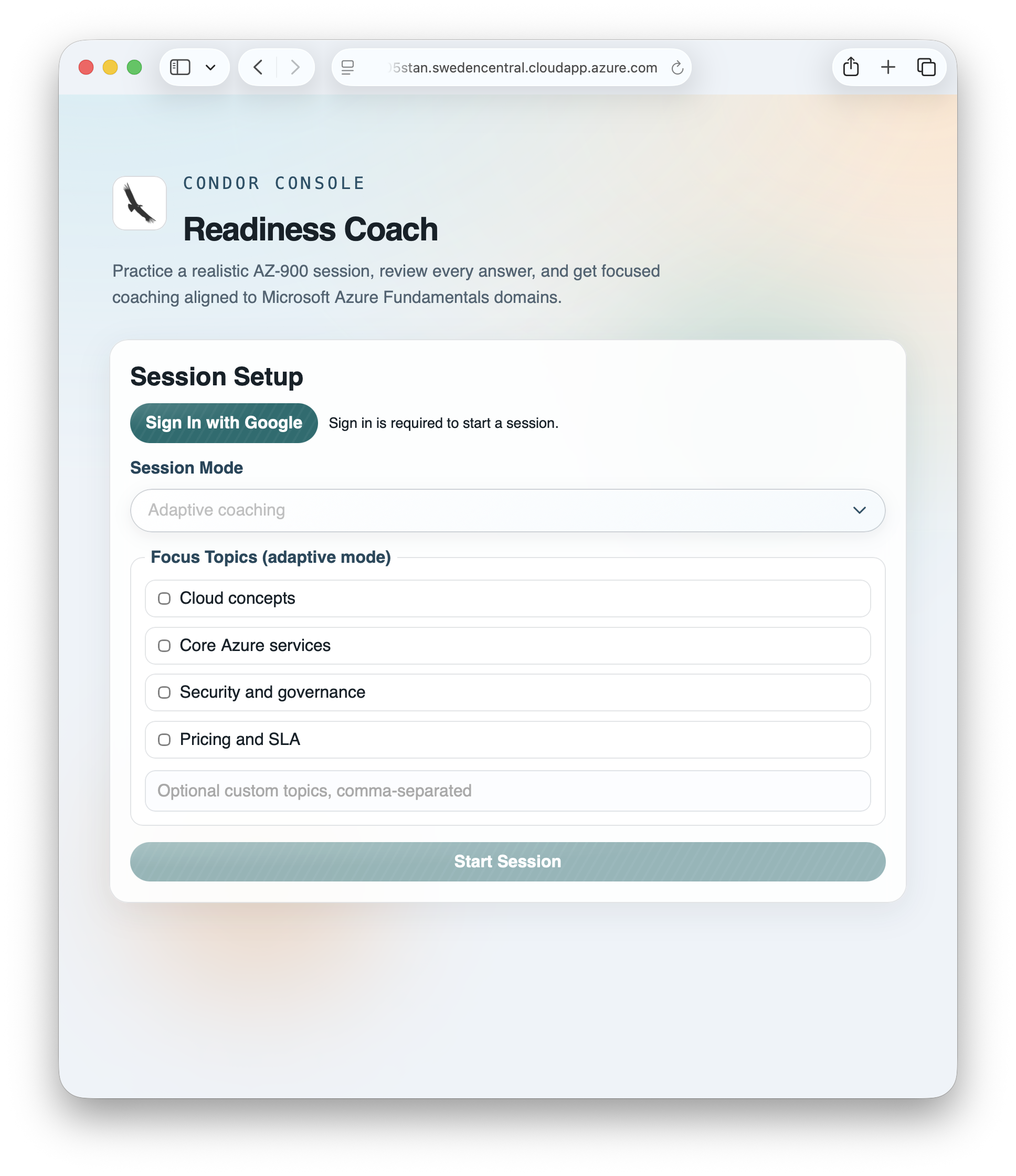
Primary Programming Language
Python
Key Technologies Used
- Backend: Python, FastAPI, Uvicorn
- Frontend: HTML5, CSS3, JavaScript (ES Modules)
- AI Orchestration: Multi-agent planner-executor-critic architecture
- LLM Integration: Azure AI Foundry / Azure OpenAI-compatible endpoints
- Identity & Access: Microsoft Entra External ID (CIAM), MSAL.js
- Cloud Platform: Microsoft Azure (VM/App hosting, networking, identity)
- DevOps: GitHub, GitHub Actions (CI/CD), SSH-based deployment workflows
- Configuration & Secrets: Environment variables (.env), GitHub Secrets
- Observability: Structured logs and reasoning trace outputs
Submission Type
Individual
Team Members
No response
Submission Requirements
- My project meets the track-specific challenge requirements
- My repository includes a comprehensive README.md with setup instructions
- My code does not contain hardcoded API keys or secrets
- I have included demo materials (video or screenshots)
- My project is my own work with proper attribution for any third-party code
- I agree to the Code of Conduct
- I have read and agree to the Disclaimer
- My submission does NOT contain any confidential, proprietary, or sensitive information
- I confirm I have the rights to submit this content and grant the necessary licenses
Quick Setup Summary
Quick setup is 3 steps: create a Python virtual environment and install dependencies, run either offline mode or local API mode, and open the built-in frontend.
-
Set up environment:
python -m venv .venv && source .venv/bin/activate && pip install -r requirements.txt -
Run the app:
python -m src.main --offlineoruvicorn src.api:app --reload --port 8000 -
Open frontend:
http://127.0.0.1:8000/
For online mode with Azure AI Foundry, copy .env.example to .env,
set AZURE_AI_PROJECT_ENDPOINT and AZURE_AI_MODEL_DEPLOYMENT_NAME,
then run again.
Note: if your shell maps commands differently, use python3 and pip3.
Technical Highlights
The strongest part of this implementation is the explicit multi-agent orchestration model: a Planner, Examiner, Misconception Diagnoser, Grounding Verifier, and Coach working as separate components with clear responsibilities.
- Role-separated reasoning architecture: We replaced single-pass prompting with planner-executor-verifier flow to improve consistency on multi-step tasks.
- Schema-first contracts: Agent inputs/outputs are validated with strict models, reducing brittle prompt coupling and making failures easier to detect and recover from.
- Grounding-before-explaining design: Coaching content is tied to Microsoft Learn evidence through MCP tooling, with explicit fallback behavior when evidence is insufficient.
- Dual-mode execution path: Adaptive mode provides diagnosis and coaching depth, while mock-test mode prioritizes exam-like speed and scoring realism.
- Production-oriented delivery: The same core runs locally and in cloud deployment with CI/CD, auth controls, and runtime configuration via secrets rather than hardcoded values.
- Traceability and observability: The system keeps structured state and intermediate reasoning artifacts to support debugging, evaluation, and iterative improvement.
Most importantly, I prioritized architectural reliability and debuggability over prompt complexity. That decision made the system easier to extend, test, and operate.
Challenges & Learnings
The biggest challenge was moving from a “single prompt” mindset to a reliable multi-agent system that behaves well in real deployment conditions.
-
Challenge: Inconsistent output quality across multi-step reasoning.
Learning: Explicit planner-executor-verifier separation plus schema validation gives much more stable behavior than prompt tuning alone. -
Challenge: Grounding quality varied when evidence retrieval was weak or unavailable.
Learning: A strict grounding policy with clear fallback (“insufficient evidence”) is better than forcing low-confidence explanations. -
Challenge: Authentication complexity with Entra External ID and federated sign-in flows.
Learning: Keep auth configuration minimal, issuer/audience rules explicit, and environment-specific values isolated in secrets. -
Challenge: Balancing exam realism with user experience and response time.
Learning: Splitting into adaptive and mock-test modes provided a clean tradeoff: depth when needed, speed when needed. -
Challenge: Frontend state complexity (session lifecycle, submit locking, question navigation).
Learning: Deterministic UI state transitions and explicit loading/disabled states prevent accidental resets and reduce user confusion. -
Challenge: Operating within cloud quota and cost constraints while iterating quickly.
Learning: Build local/offline paths first, then add cloud hosting and CI/CD with controlled runtime scaling.
Overall, the main takeaway was that reliability comes from system design decisions (contracts, orchestration, observability, and guardrails), not just stronger prompts.
Contact Information
Country/Region
Ireland
Contributor guide
First steps
- Read the whole issue, then the project's contributing guide.
- Comment on the issue to say you are picking it up — it saves two people doing the same work.
- Fork the repository and make your change on a branch.
- Open a pull request that references the issue number.
Research direction
This is a project submission rather than a scoped change request. The payload points to README.md, src.main, src.api, and requirements.txt for setup, but names no target file, failing test, requested change, or acceptance criteria, so a newcomer cannot identify a bounded task or definition of done.
Written by the indexing model from the issue text.
Assessment
- Tech stack
- azure, fastapi, github-actions, javascript, python
- Domain
- ai, authentication, backend, ci-cd, cloud, frontend
- Issue type
- Feature
- Difficulty
- 5/5
- Estimated time
- Over a week
- Activity status
- Quiet
- Clarity
- Needs clarification
- Newbie friendliness
- 15/100