microsoft / microsoft/TypeScript
Intellisense for generic parameterized string literal function arguments not working
Open
Nobody has claimed this yet.
Domain: LS: Completion Lists
Experience Enhancement
Suggestion
VS Code Tracked
- Dominant language
- Go
- Stars
- 111k
- Forks
- 14.3k
- Avg merge
- 2d 4h
- Merged PRs (30d)
- 132
Description
From @njgraf512 on July 31, 2018 22:5
- VSCode Version: 1.26.0-insider
- OS Version: MacOS 10.12.6
Steps to Reproduce:
- Enter the following into a TS file:
const myObj =  {
  foo: 'Foo',
  bar: 'Bar',
}

function myFunc<T>(obj: T, key: keyof T) {
  return obj[key];
}

myFunc(myObj, 'f')
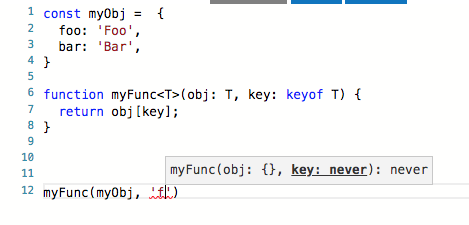
- Observe that once you begin typing the
fof string literalfoofor the function's second argument, the tooltip switches from suggesting"foo" | "bar"tonever:
Good:
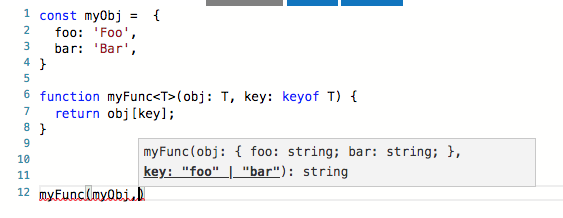
Bad:
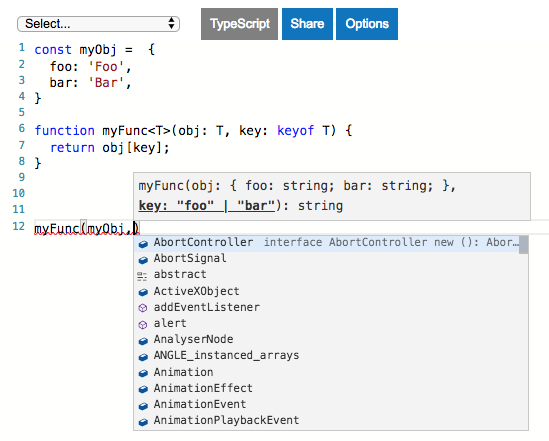
- Also, triggering intellisense with control+space does not suggest
fooorbar:
Does this issue occur when all extensions are disabled?: Yes/No
No
Copied from original issue: Microsoft/vscode#55530
Contributor guide
First steps
- Read the whole issue, then the project's contributing guide.
- Comment on the issue to say you are picking it up — it saves two people doing the same work.
- Fork the repository and make your change on a branch.
- Open a pull request that references the issue number.
Research direction
Start by reproducing the example in a TypeScript file using the reported VS Code and TypeScript context, then inspect the IntelliSense behavior for the second generic function argument. Done means the tooltip continues to show "foo" | "bar" while typing and manual IntelliSense invocation suggests both literals.
Written by the indexing model from the issue text.
Assessment
- Tech stack
- typescript
- Domain
- devtools
- Issue type
- Bug
- Difficulty
- 4/5
- Estimated time
- 3-5 days
- Activity status
- Stale
- Clarity
- Mostly clear
- Newbie friendliness
- 35/100