microsoft / microsoft/TypeScript-TmLanguage
Add ability to target keywords that take you out of the normal flow of execution
Nobody has claimed this yet.
- Dominant language
- TypeScript
- Stars
- 471
- Forks
- 149
- PR merge metrics
- No merged PRs in 30d
Description
TS and JS Grammar Extension version: 0.0.41 / latest
I'd like to be able to highlight keywords that take you out of the normal flow of execution. By this I mean keywords that cause code to jump somewhere else when running. For example return, throw, break, continue.
Because these keywords take you out of the normal flow of execution they are very important, and not something you'd want to miss when scanning code, so I think it would be great if we could target them separately to ensure they aren't missed.
I'd like the ability to highlight them as more important when compared to other keywords such as if, for, while, try, catch, etc.
Currently break and continue are in the same scope as for, while, do, etc (keyword.control.loop). And throw is in the same scope as try and catch (keyword.control.trycatch). Because of this it isn't possible to highlight them separately.
Example:
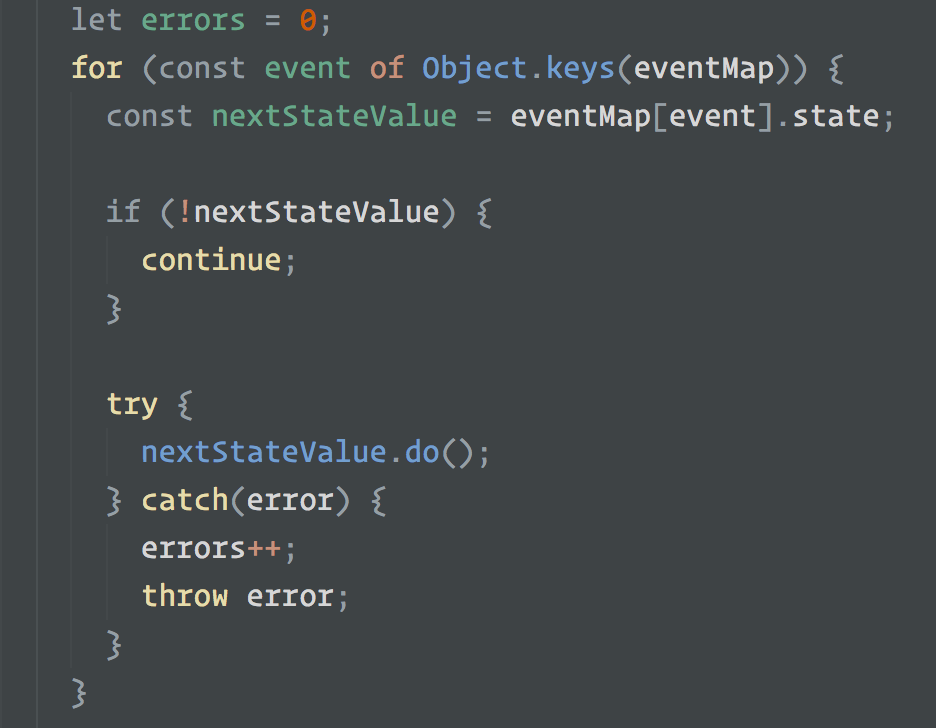
In the screenshot above I want to highlight continue and throw, but doing so also highlights for, try and catch whereas I'd like those to remain grey.
Contributor guide
No contributing guide indexed for this repository
First steps
- Read the whole issue, then the project's contributing guide.
- Comment on the issue to say you are picking it up — it saves two people doing the same work.
- Fork the repository and make your change on a branch.
- Open a pull request that references the issue number.
Research direction
Start with the TypeScript TextMate grammar files used by the VS Code, Sublime Text, and Atom grammars, and inspect the scopes assigned to return, throw, break, and continue versus the existing loop and try/catch keywords. Done means those exit-flow keywords have distinct scopes that can be highlighted independently without changing the scopes of for, try, or catch.
Written by the indexing model from the issue text.
Assessment
- Tech stack
- javascript, typescript
- Domain
- tooling
- Issue type
- Feature
- Difficulty
- 3/5
- Estimated time
- 1-2 days
- Activity status
- Stale
- Clarity
- Mostly clear
- Newbie friendliness
- 38/100