<codecvt>: Using codecvt_utf16 with wofstream results in malformed UTF16 output
Nobody has claimed this yet.
- Dominant language
- C++
- Stars
- 11.1k
- Forks
- 1.7k
- Avg merge
- 4d 15h
- Merged PRs (30d)
- 22
Description
Describe the bug
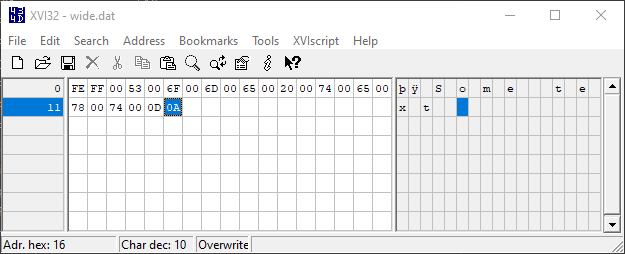
Newline translation that the CRT is doing on our behalf is transforming \n into \r\n, but this isn't being reflected to the codecvt facet.
Command-line test case
STL version (git commit or Visual Studio version): Visual Studio 2019 version 16.4
C:\Users\bion\Desktop>type test.cpp
#define _SILENCE_CXX17_CODECVT_HEADER_DEPRECATION_WARNING
#include <assert.h>
#include <codecvt>
#include <filesystem>
#include <fstream>
#include <iostream>
#include <sstream>
#include <string_view>

using namespace std::string_view_literals;

int main() {
  const auto target = std::filesystem::temp_directory_path() / "wide.dat"sv;
  std::cout << target << "\n" << std::flush;
  {
    std::wofstream wide(target);
    auto fac =
        new std::codecvt_utf16<wchar_t, 0x10ffff,
                               std::codecvt_mode(std::consume_header |
                                                 std::generate_header)>();
    std::locale uni16(wide.getloc(), fac);
    wide.imbue(uni16);
    wide << "Some text\n";
  }

  {
    std::string actual;
    {
      std::ifstream i(target, std::ios_base::in | std::ios_base::binary);
      std::stringstream s;
      s << i.rdbuf();
      actual = std::move(s).str();
    }
    assert(actual == "\xFE\xFF\0S\0o\0m\0e\0 \0t\0e\0x\0t\0\r\0\n"sv);
  }

  return 0;
}

C:\Users\bion\Desktop>cl /EHsc /W4 /WX /std:c++latest /nologo .\test.cpp
test.cpp

C:\Users\bion\Desktop>.\test.exe
"C:\\Users\\bion\\AppData\\Local\\Temp\\wide.dat"
Assertion failed: actual == "\xFE\xFF\0S\0o\0m\0e\0 \0t\0e\0x\0t\0\r\0\n"sv, file .\test.cpp, line 34

C:\Users\bion\Desktop>
Note the incorrect 0x0D 0x0A terminating the file:
This is a dual of Microsoft-internal VSO-208747 / AB#208747.
Contributor guide
First steps
- Read the whole issue, then the project's contributing guide.
- Comment on the issue to say you are picking it up — it saves two people doing the same work.
- Fork the repository and make your change on a branch.
- Open a pull request that references the issue number.
Research direction
Start by compiling and running the supplied Visual Studio 2019 reproducer using wofstream, codecvt_utf16, and the Windows CRT newline handling. Compare the generated wide.dat bytes with the assertion's expected UTF-16 sequence, then trace where newline translation occurs relative to the codecvt facet. Done means the reproducer passes without the extra or malformed carriage-return bytes.
Written by the indexing model from the issue text.
Assessment
- Tech stack
- cpp
- Domain
- operating-systems
- Issue type
- Bug
- Difficulty
- 4/5
- Estimated time
- 3-5 days
- Activity status
- Stale
- Clarity
- Clearly specified
- Newbie friendliness
- 38/100