microsoft / microsoft/BotFramework-WebChat
`webSocket` option passed to `createDirectLine` should be `boolean` instead of `WebSocket`
Nobody has claimed this yet.
- Dominant language
- HTML
- Stars
- 1.8k
- Forks
- 1.6k
- Avg merge
- 22h 58m
- Merged PRs (30d)
- 2
Description
Is it an issue related to Adaptive Cards?
- Yes, this is an Adaptive Card issue but it is specific to Web Chat.
Do you have any screenshots?
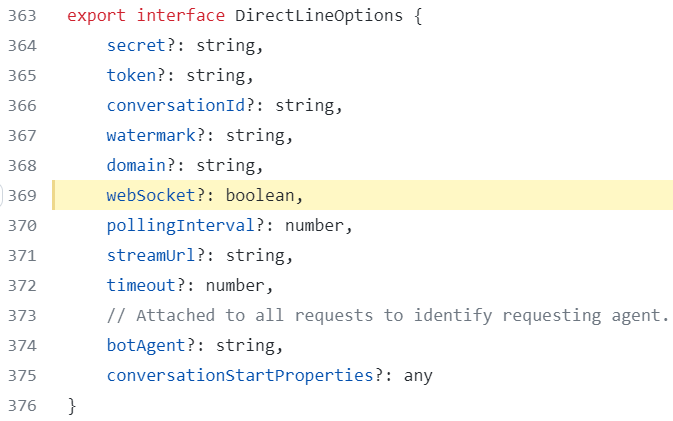
(From https://github.com/microsoft/BotFramework-DirectLineJS/blob/master/src/directLine.ts#L369)
What version of Web Chat are you using?
Latest production
Which distribution are you using Web Chat from?
Unrelated
Which hosting environment does this issue primarily affect?
Others or unrelated
Which browsers and platforms do the issue happened?
No response
Which area does this issue affect?
Protocol or service
Is this an accessibility issue?
- Yes, this is an accessibility issue.
Please describe the bug
The options passing to constructor of DirectLineJS is DirectLineOptions & Partial<Services>, which should produces:
type {
    secret?: string,
    token?: string,
    conversationId?: string,
    watermark?: string,
    domain?: string,
    webSocket?: boolean,
    pollingInterval?: number,
    streamUrl?: string,
    timeout?: number,
    botAgent?: string,
    conversationStartProperties?: any,

    scheduler: IScheduler;
    WebSocket: typeof WebSocket;
    ajax: AjaxCreationMethod;
    random: () => number;
}
However, when we type it out, we probably mistaken webSocket with WebSocket. Thus, our createDirectLine.ts should be boolean instead of WebSocket.
Do you see any errors in console log?
No response
How to reproduce the issue?
- Creates a TypeScript project
- Call
createDirectLine({ webSocket: true })
What is the expected and actual behavior?
Expected:
No TypeScript compile error should be produced.
Actual:
Compile errors on webSocket.
Adaptive Card JSON
No response
Additional context
No response
Contributor guide
First steps
- Read the whole issue, then the project's contributing guide.
- Comment on the issue to say you are picking it up — it saves two people doing the same work.
- Fork the repository and make your change on a branch.
- Open a pull request that references the issue number.
Research direction
Start with packages/bundle/src/createDirectLine.ts and compare its webSocket option type with DirectLineJS's DirectLineOptions in src/directLine.ts. Reproduce the issue in a TypeScript project with createDirectLine({ webSocket: true }). Done means the call compiles without a TypeScript error and the option matches the DirectLineJS type.
Written by the indexing model from the issue text.
Assessment
- Tech stack
- typescript
- Domain
- api
- Issue type
- Bug
- Difficulty
- 1/5
- Estimated time
- Under an hour
- Activity status
- Stale
- Clarity
- Clearly specified
- Newbie friendliness
- 55/100