microsoft / microsoft/BotFramework-WebChat
Accessibility Issue - Input fields and visual labels are not associated
@compulim is already working on this.
Since Oct 27, 2022.
- Dominant language
- HTML
- Stars
- 1.8k
- Forks
- 1.6k
- Avg merge
- 22h 58m
- Merged PRs (30d)
- 2
Description
Issue Description : -
If a relationship between elements is expressed with visual cues, it also needs to be programmatically determined. This enables assistive technology to communicate the relationship to users. Content may otherwise seem unstructured or disorganised.
There are form fields that are not associated with their visual labels. The purpose of the form fields may be unclear to users.
Success Criteria : -
Any relationship presented through visual cues must also use the appropriate semantics. Make sure that form fields are associated with their visual labels. In this case, wrap the visual label such as “Please give us some more…”, “First name”, “Last name” and “Email address” within the element. For example:
<label for="i1"...>
<span ...>Please give us some more details to help us respond
<span...>Required
Avoid using multiple labelling techniques on the same form field. For example, using and aria-label together will cause the aria-label to overwrite the . As well, using aria-labelledby will overwrite any other labelling techniques.
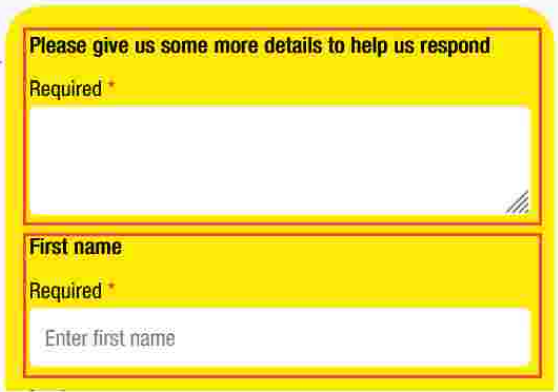

Steps to reproduce
- Observe the visual labels for the form fields.
- Inspect the form fields and review the DOM.
- Observe that the visual labels are not associated with the form fields.
- Observe that there is not an alternative labelling method that serves the same purpose
Webchat Version :- 4.13.0
Contributor guide
First steps
- Read the whole issue, then the project's contributing guide.
- Comment on the issue to say you are picking it up — it saves two people doing the same work.
- Fork the repository and make your change on a branch.
- Open a pull request that references the issue number.
Assessment
This issue has not been assessed yet.