microsoft / microsoft/BotFramework-WebChat
Markdown: External link icon did not show up in Adaptive Cards
Nobody has claimed this yet.
- Dominant language
- HTML
- Stars
- 1.8k
- Forks
- 1.6k
- Avg merge
- 22h 58m
- Merged PRs (30d)
- 2
Description
Screenshots
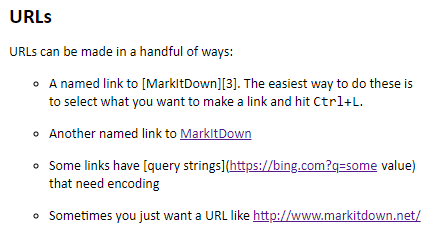
When typing markdown, the external link icon shows up.
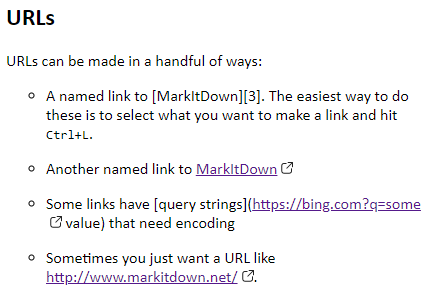
When typing card markdown, the external link icon did not show up.
Version
4.13.0
Describe the bug
The new "external link icon" only works with the command markdown, but not the card markdown command.
Steps to reproduce
- Go to https://compulim.github.io/webchat-loader/
- Type
card markdown
Expected behavior
The links in the Adaptive Cards should show an external link icon.
Additional context
This is because the CSS class name was not applied to the content of Adaptive Cards, but only the TextContent.js.
Action items
- Update the
Styles/StyleSet/AdaptiveCardRenderer.tsand use the external link icon, as like inStyles/StyleSet/TextContent.ts - Make sure our existing test cover the external link icon, otherwise, add new tests
[Bug]
Contributor guide
First steps
- Read the whole issue, then the project's contributing guide.
- Comment on the issue to say you are picking it up — it saves two people doing the same work.
- Fork the repository and make your change on a branch.
- Open a pull request that references the issue number.
Research direction
Start with Styles/StyleSet/AdaptiveCardRenderer.ts and compare its link handling with Styles/StyleSet/TextContent.ts, where the external link icon already works. Run the existing tests covering Adaptive Cards and the external link icon; add coverage if they do not verify card markdown links. Done means links rendered by the card markdown command show the external link icon.
Written by the indexing model from the issue text.
Assessment
- Tech stack
- typescript
- Domain
- frontend
- Issue type
- Bug
- Difficulty
- 2/5
- Estimated time
- 1-3 hours
- Activity status
- Stale
- Clarity
- Clearly specified
- Newbie friendliness
- 58/100