microsoft / microsoft/AzureTRE
Add ability to pin resources/services to workspace dashboard on per-user basis
Nobody has claimed this yet.
- Dominant language
- Python
- Stars
- 235
- Forks
- 192
- Avg merge
- 1d 23h
- Merged PRs (30d)
- 13
Description
Is your feature request related to a problem? Please describe.
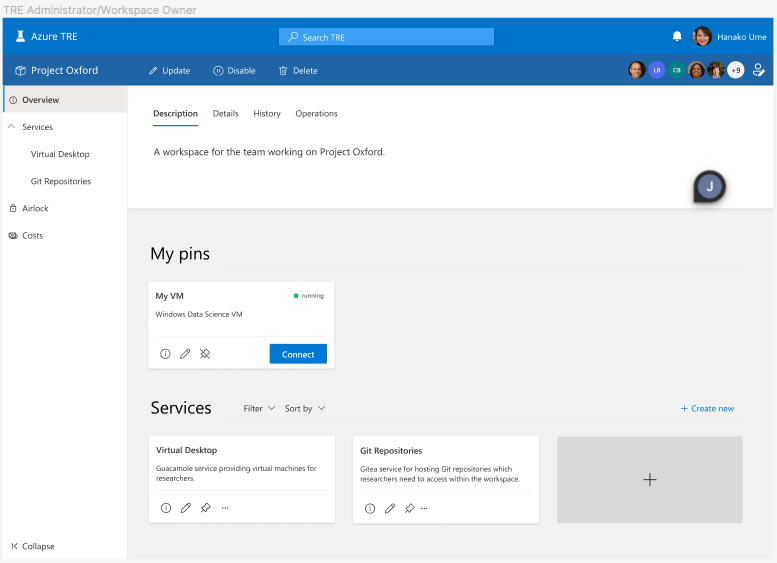
As both a researcher and other type of TRE User, it would be highly useful if I could pin a service or user resource to my workspace dashboard for quick and easy access to things I use frequently. This should look something like the following:
Describe the solution you'd like
As shown above, we should have a section in the UI for user-pinned resources and services. On each resource/service card, we can add an additional pin icon which will allow users to pin or unpin.
Thoughts on implementation
We will need to add an additional cosmos collection for storing user preferences, which could be called userSettings or something similar. This would then need to store a simple document that looks something like this:
{
    "id": "<USER_OBJECT_ID>",
    "pins": [
        {
            "resourceId": "xyz123",
            "workspaceId": "456abc"
        }
    ]
}
This can then be used by the UI to show pins relevant to that workspace by filtering the pins array by workspace id, but also means if/when we add the overall dashboard feature (designs here) we can list all pins regardless of workspace under the pinned resources header.
Alongside the new Cosmos collection, we will need new API methods to facilitate getting and updating of the user preferences. We could scope down the methods to storing and retrieving pins, but there might be use-cases in future for additional fields of the user preferences document to inform the UI, so probably more future-proof to set and retrieve the whole document and reduce having to write additional API boilerplate.
The Ui can then make a single GET when loading to retrieve the preferences, show pins as per the document, and then send POSTs to update the pins whenever changed.
Contributor guide
First steps
- Read the whole issue, then the project's contributing guide.
- Comment on the issue to say you are picking it up — it saves two people doing the same work.
- Fork the repository and make your change on a branch.
- Open a pull request that references the issue number.
Research direction
Start by reviewing the existing workspace dashboard and resource/service card UI, then trace the API patterns used for user-specific data and Cosmos collections. Define the user-preferences document and pin update flow described in the issue, with completion shown by per-user pins being retrievable, scoped to a workspace, and reflected in the dashboard UI.
Written by the indexing model from the issue text.
Assessment
- Tech stack
- azure, python
- Domain
- cloud, database, full-stack
- Issue type
- Feature
- Difficulty
- 5/5
- Estimated time
- Over a week
- Activity status
- Stale
- Clarity
- Mostly clear
- Newbie friendliness
- 35/100