microsoft / microsoft/AzureStorageExplorer
Add a validation on Blob Properties dialog when inputting invalid properties for ADLS Gen 2 accounts
Open
Nobody has claimed this yet.
:gear: adls gen2
:test_tube: testing
- Dominant language
- No language data
- Stars
- 452
- Forks
- 92
- Avg merge
- 15h 20m
- Merged PRs (30d)
- 3
Description
Storage Explorer Version: 1.5.0
Platform/OS Version: Windows 10/ MacOS High Sierra/ Linux Ubuntu 16.04
Architecture: ia32
Build Number: 20181127.2
Commit: 71a17300
Regression From: Previous release 1.5.0
Steps to Reproduce:
- Expand one ADLS Gen2 account -> Blob Containers.
- Open one blob container which contains one blob at least.
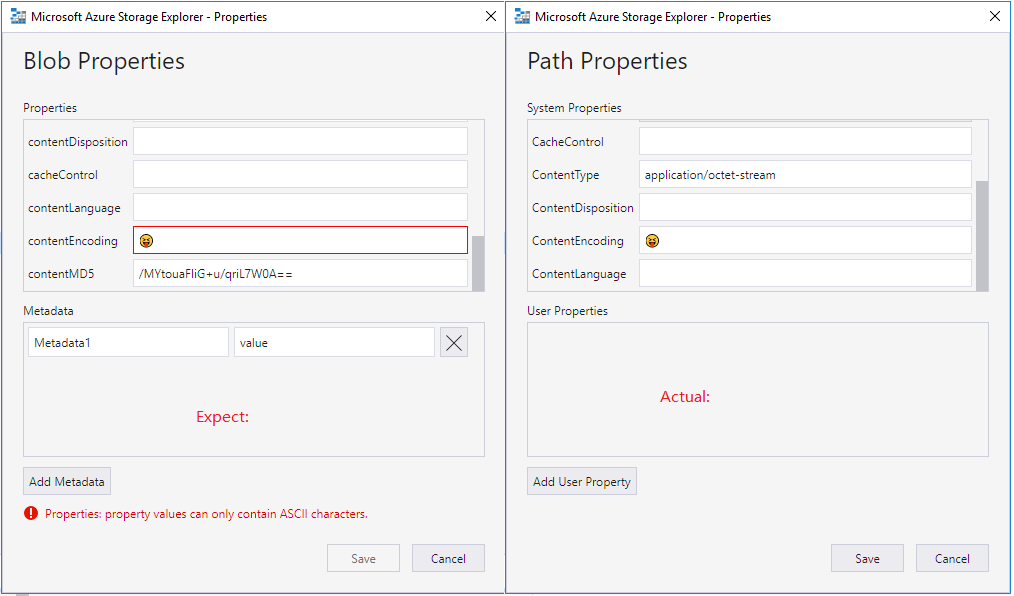
- Right click one blob then select 'Properties...' -> Input an invalid system properties.
Expected Experience:
- There prompts an error message on the bottom.
- 'Save' button is disabled.
Actual Experience:
- No error occurs.
- 'Save' button is enabled.
Contributor guide
No contributing guide indexed for this repository
First steps
- Read the whole issue, then the project's contributing guide.
- Comment on the issue to say you are picking it up — it saves two people doing the same work.
- Fork the repository and make your change on a branch.
- Open a pull request that references the issue number.
Research direction
Start by reproducing the issue in the Blob Properties dialog for an ADLS Gen2 account using the listed steps and an invalid system property. The work is done when an error appears at the bottom of the dialog and Save is disabled for invalid input.
Written by the indexing model from the issue text.
Assessment
- Tech stack
- azure
- Domain
- cloud, frontend
- Issue type
- Bug
- Difficulty
- 3/5
- Estimated time
- 1-2 days
- Activity status
- Stale
- Clarity
- Mostly clear
- Newbie friendliness
- 45/100