microsoft / microsoft/AzureStorageExplorer
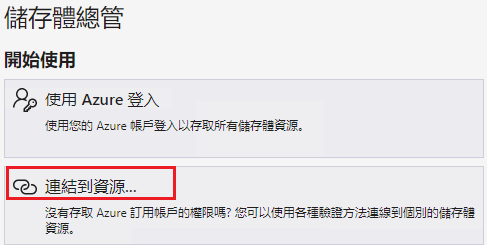
There is '...' next to the localized string 'Attach to a resource' on the Get Started panel
Open
@cristianosuzuki77 is already working on this.
Since Jul 26, 2022.
:globe_with_meridians: localization
:grey_question: investigate
:test_tube: testing
- Dominant language
- No language data
- Stars
- 452
- Forks
- 92
- Avg merge
- 15h 20m
- Merged PRs (30d)
- 3
Description
Storage Explorer Version: 1.25.0-dev
Build Number: 20220725.3
Branch: main
Platform/OS: Windows 10/Linux Ubuntu 22.04/MacOS Monterey 12.4 (Apple M1 Pro)
Reproduce Languages: Chinese (zh-TW)
Architecture: ia32/x64
How Found: From running test cases
Regression From: Not a regression
Steps to Reproduce
- Launch Storage Explorer -> Open 'Settings' -> 'Application -> Regional Settings'.
- Select '繁體中文' -> Restart Storage Explorer.
- Click the localized 'Help -> Get Started'.
- Observe the 'Get Started' part.
- Check there is no '...' next to the localized string 'Attach to a resource'.
Expected Experience
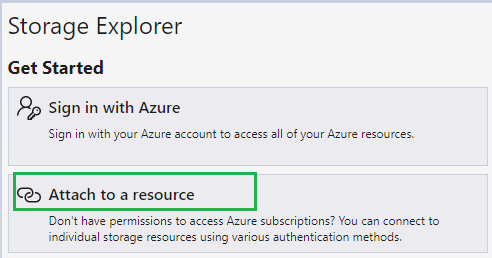
There is no '...' next to the localized string 'Attach to a resource'.
The screenshot in ENU:
Actual Experience
There is '...' next to the localized string 'Attach to a resource'.
Additional Context
This issue only reproduces on Chinese (zh-TW).
Contributor guide
No contributing guide indexed for this repository
First steps
- Read the whole issue, then the project's contributing guide.
- Comment on the issue to say you are picking it up — it saves two people doing the same work.
- Fork the repository and make your change on a branch.
- Open a pull request that references the issue number.
Assessment
This issue has not been assessed yet.