microsoft / microsoft/AzureStorageExplorer
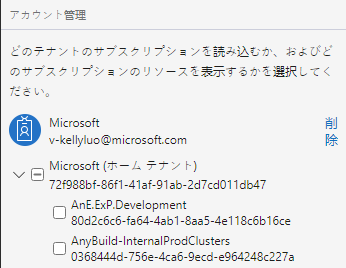
The localized string 'Remove' shows in two lines in Account Management panel
Nobody has claimed this yet.
- Dominant language
- No language data
- Stars
- 452
- Forks
- 92
- Avg merge
- 15h 20m
- Merged PRs (30d)
- 3
Description
Storage Explorer Version: 1.23.0-dev
Build Number: 20211220.7
Branch: main
Platform/OS: Windows 10/Linux Ubuntu 18.04/MacOS Big Sur 11.6.1
Architecture: ia32/x64
Language: Japanese/Korean/Swedish/zh-CN/zh-TW
How Found: From running test cases
Regression From: Not a regression
Steps to Reproduce
- Launch Storage Explorer.
- Open 'Settings' -> Application (Regional Settings) -> Select '日本語' -> Restart Storage Explorer.
- Switch to 'ACCOUNT MANAGEMENT' panel -> Make sure there is an account logged in.
- Check whether the localized string 'Remove' shows correctly.
Expected Experience
The localized string 'Remove' shows correctly.
Actual Experience
The localized string 'Remove' shows in two lines.
Contributor guide
No contributing guide indexed for this repository
First steps
- Read the whole issue, then the project's contributing guide.
- Comment on the issue to say you are picking it up — it saves two people doing the same work.
- Fork the repository and make your change on a branch.
- Open a pull request that references the issue number.
Research direction
Reproduce the issue in the Account Management panel after selecting Japanese, then check the localized “Remove” label across the listed languages and platforms. Done means the label displays correctly on one line rather than wrapping in the affected locales.
Written by the indexing model from the issue text.
Assessment
- Domain
- frontend, localization
- Issue type
- Bug
- Difficulty
- 3/5
- Estimated time
- 1-2 days
- Activity status
- Stale
- Clarity
- Mostly clear
- Newbie friendliness
- 35/100