microsoft / microsoft/AzureStorageExplorer
The dialog which is opened by dragging and dropping a toolbar button cannot be closed
Open
@craxal is already working on this.
Since Jun 28, 2021.
:computer: linux
:grey_question: investigate
:test_tube: testing
- Dominant language
- No language data
- Stars
- 452
- Forks
- 92
- Avg merge
- 15h 20m
- Merged PRs (30d)
- 3
Description
Storage Explorer Version: 1.20.0-dev
Build Number: 202100618.7
Branch: rel/1.20.0
Platform/OS: Linux Ubuntu 16.04/Linux Ubuntu 20.04
Architecture: x64
How Found: Exploratory testing
Regression From: Not a regression
Bug Description
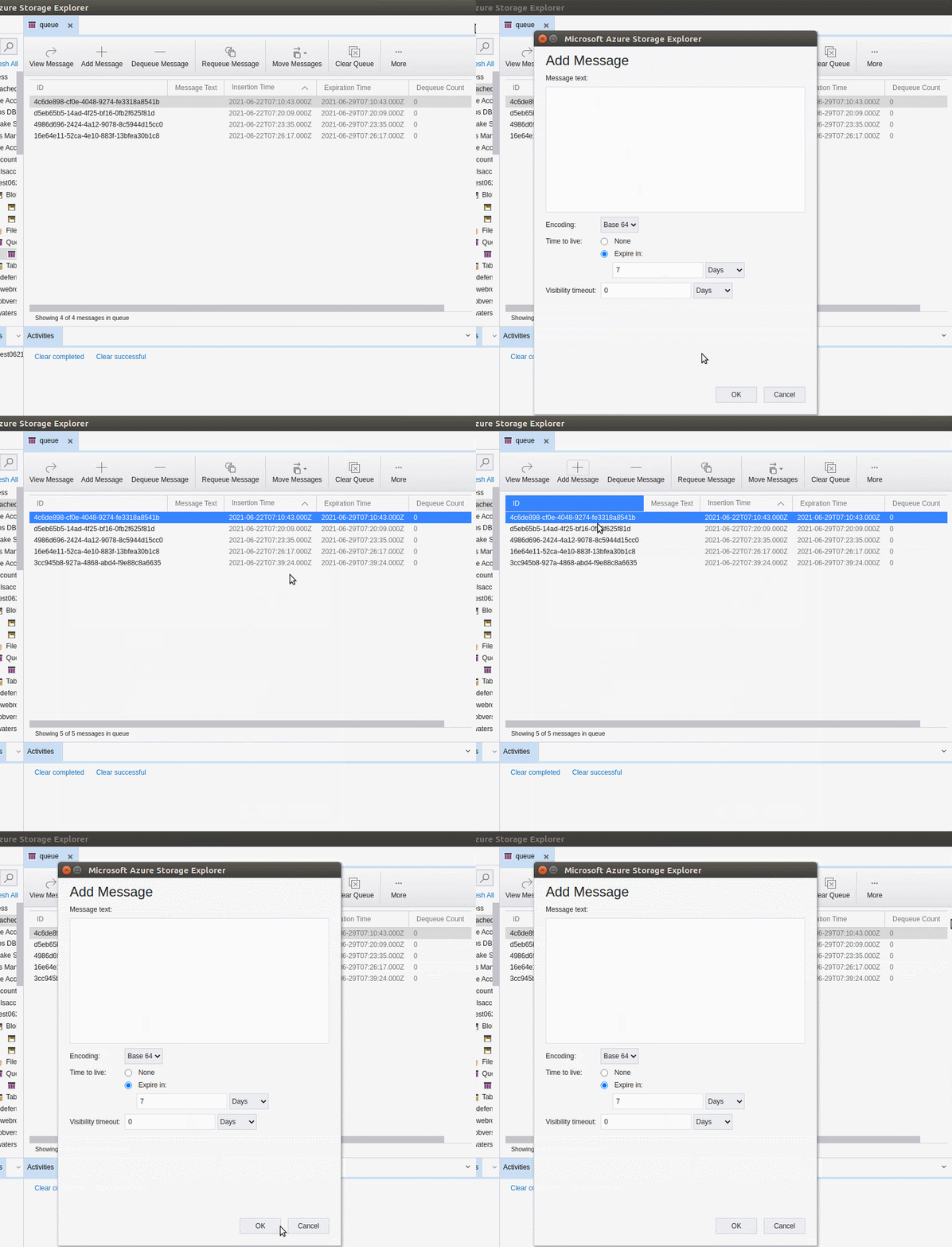
The dialog which is opened by dragging and dropping a toolbar button cannot be closed.(Like 'New Folder' toolbar button for blob container/file share, 'Add' toolbar button for one table)
Steps to Reproduce
- Expand one storage account -> Queues.
- Select one queue -> Open it.
- Drag and drop the toolbar button 'Add Message' to the editor.
- Try to close the 'Add Message' dialog.
- Check whether the dialog can be closed.
Expected Experience
The dialog can be closed.
Actual Experience
The dialog cannot be closed.
Additional Context
This issue doesn't reproduce on Windows & MacOS.
Contributor guide
No contributing guide indexed for this repository
First steps
- Read the whole issue, then the project's contributing guide.
- Comment on the issue to say you are picking it up — it saves two people doing the same work.
- Fork the repository and make your change on a branch.
- Open a pull request that references the issue number.
Assessment
This issue has not been assessed yet.