microsoft / microsoft/AzureStorageExplorer
Auto detect HNS enabled when attaching with Azure AD
Open
Nobody has claimed this yet.
:gear: adls gen2
:gear: attach
:grey_question: external
:test_tube: testing
- Dominant language
- No language data
- Stars
- 452
- Forks
- 92
- Avg merge
- 15h 20m
- Merged PRs (30d)
- 3
Description
Storage Explorer Version: 1.16.0
Build Number: 20201202.1
Branch: main
Platform/OS: Windows 10/ CentOS 7.6.1810 (Core) / MacOS Catalina
Architecture: ia32/x64
Regression From: Not a regression
Steps to Reproduce
- Give one RBAC role to the ADLS Gen2 blob container to a user like 'Storage Blob Data Contributor'.
- Copy the URL of the blob container -> Open the connect dialog -> Select 'Add a resource via Azure Active Directory (Azure AD)' -> Click 'Next' -> Select one account -> Click 'Next'.
- Keep the default 'Resource type' (Blob Container) -> Paste the URL -> Click 'Next' -> Click 'Connect'.
- Check whether there is an error.
Expected Experience
There is an error.
Actual Experience
- Succeed to connect.
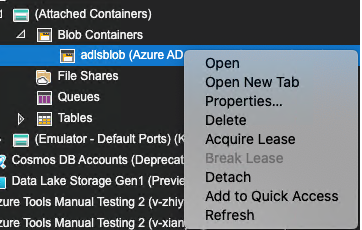
- Display a regular Azure AD attached blob container after connecting the ADLS Gen2 blob container in this way.
Contributor guide
No contributing guide indexed for this repository
First steps
- Read the whole issue, then the project's contributing guide.
- Comment on the issue to say you are picking it up — it saves two people doing the same work.
- Fork the repository and make your change on a branch.
- Open a pull request that references the issue number.
Assessment
This issue has not been assessed yet.