microsoft / microsoft/AzureStorageExplorer
Storage Explorer doesn't work with certs generated from dotnet dev-certs
Nobody has claimed this yet.
- Dominant language
- No language data
- Stars
- 452
- Forks
- 92
- Avg merge
- 15h 20m
- Merged PRs (30d)
- 3
Description
We want to be able to use the certs generated by dotnet dev-certs to help create a seamless dev exp across Azurite, ASP.NET, Storage Explorer, and the SDKs. This issue is blocking that exp.
- Generate a cert
- Install dotnet SDK
dotnet dev-certs https --trust -ep cert.pfx -p azurite
-
Start Azurite with that cert
npm install azurite
azurite --oauth basic --cert cert.pfx --pwd azurite --blobHost localhost --queueHost localhost -
Create connection to Azurite using this connection string
DefaultEndpointsProtocol=https;AccountName=devstoreaccount1;AccountKey=Eby8vdM02xNOcqFlqUwJPLlmEtlCDXJ1OUzFT50uSRZ6IFsuFq2UVErCz4I6tq/K1SZFPTOtr/KBHBeksoGMGw==;BlobEndpoint=https://localhost:10000/devstoreaccount1;QueueEndpoint=https://localhost:10001/devstoreaccount1; -
Add cert to Storage explorer
Edit -> SSL Certificates -> Import Certificates
Import the cert.pfx file you created in first step
-
Reload Storage Explorer
-
Try to access Azurite node and you get this:
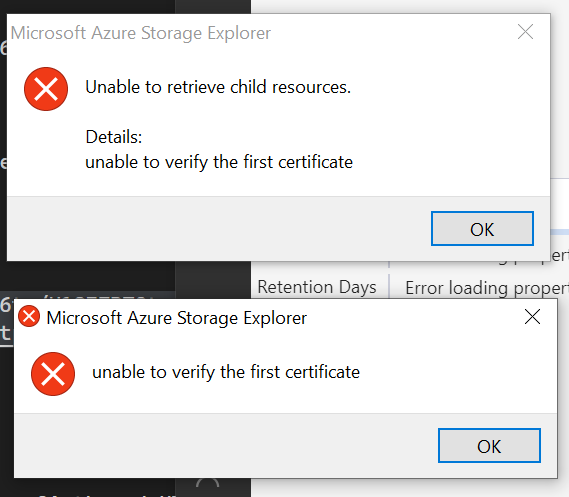
I tried importing the cert into the Root Certificate store, but still got the same issue. Here's the command I tried:
certutil -f -user -enterprise -p azurite -importpfx root cert.pfx
This same cert works with the Azure SDKs, so I think there's something about Storage Explorer that doesn't support this cert. The source for how this cert is generated is here:
https://github.com/dotnet/aspnetcore/blob/master/src/Tools/dotnet-dev-certs/src/Program.cs
Contributor guide
No contributing guide indexed for this repository
First steps
- Read the whole issue, then the project's contributing guide.
- Comment on the issue to say you are picking it up — it saves two people doing the same work.
- Fork the repository and make your change on a branch.
- Open a pull request that references the issue number.
Research direction
Reproduce the issue by running the shown dotnet dev-certs and Azurite commands, then importing cert.pfx through Storage Explorer's SSL Certificates settings. Compare this certificate path with the Azure SDK behavior and the dotnet-dev-certs Program.cs source mentioned in the report. Done means the generated certificate can be imported and used to access the Azurite node without the reported error.
Written by the indexing model from the issue text.
Assessment
- Tech stack
- azure
- Domain
- security
- Issue type
- Bug
- Difficulty
- 4/5
- Estimated time
- 3-5 days
- Activity status
- Stale
- Clarity
- Mostly clear
- Newbie friendliness
- 35/100