microsoft / microsoft/AzureStorageExplorer
Allow column resizing in Metadata view of Blob Properties
Nobody has claimed this yet.
- Dominant language
- No language data
- Stars
- 452
- Forks
- 92
- Avg merge
- 15h 20m
- Merged PRs (30d)
- 3
Description
Is your feature request related to a problem? Please describe.
When connected to a Blob storage account,
Navigate to a blob, right click on it and select "Properties..."
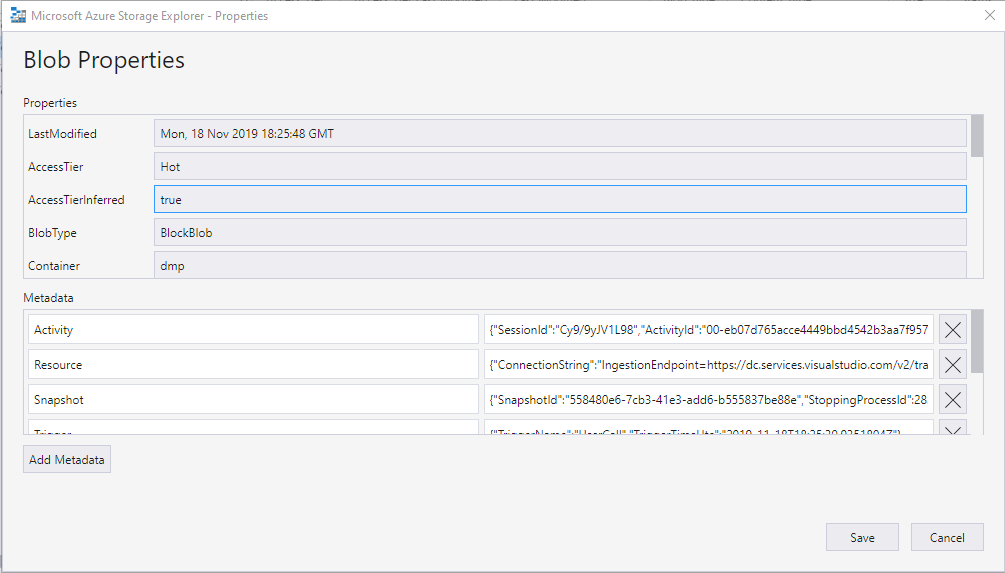
When the Blob Properties window appears, resize it by dragging the right edge.
Observe the "Metadata" grid or key-value pairs. The columns are fixed size and seem to be taking about half the available width each.
Describe the solution you'd like
I'd like to resize the columns using the mouse so that I can give more room to the "value" and less to the "key".
Describe alternatives you've considered
A 30/70 or 20/80 split instead of 50/50
Additional context
Contributor guide
No contributing guide indexed for this repository
First steps
- Read the whole issue, then the project's contributing guide.
- Comment on the issue to say you are picking it up — it saves two people doing the same work.
- Fork the repository and make your change on a branch.
- Open a pull request that references the issue number.
Research direction
Reproduce the issue by opening a blob's Properties window and navigating to the Metadata view. Inspect the Metadata grid or key-value pairs used there; done means the key and value columns can be resized with the mouse while the window is open.
Written by the indexing model from the issue text.
Assessment
- Domain
- desktop
- Issue type
- Feature
- Difficulty
- 3/5
- Estimated time
- 1-2 days
- Activity status
- Stale
- Clarity
- Mostly clear
- Newbie friendliness
- 38/100