microsoft / microsoft/AzureStorageExplorer
Error message should be more clear when drive is not big enough to download a disk
Nobody has claimed this yet.
- Dominant language
- No language data
- Stars
- 452
- Forks
- 92
- Avg merge
- 15h 20m
- Merged PRs (30d)
- 3
Description
Storage Explorer Version: 1.10.0
Build: 20190910.8
Branch: master
Platform/OS: Windows 10/ Linux Ubuntu 19.04/macOS High Sierra
Architecture: ia32/x64
Regression From: Not a regression
Steps to reproduce:
- Create a disk with size (1024GB) in portal.
- Open the disk in Storage Explorer -> Try to download it.
- Check the result.
Expect Experience:
The disk is downloaded successfully.
Actual Experience:
Fail to download the disk.

More Info:
Error details:
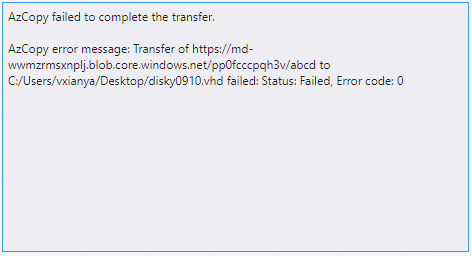
Contributor guide
No contributing guide indexed for this repository
First steps
- Read the whole issue, then the project's contributing guide.
- Comment on the issue to say you are picking it up — it saves two people doing the same work.
- Fork the repository and make your change on a branch.
- Open a pull request that references the issue number.
Research direction
The issue does not name any files, tests, or entry points. Start by reproducing the disk download failure on a supported platform and inspect the reported error details; done means the failure explains clearly that the drive lacks enough space to download the disk.
Written by the indexing model from the issue text.
Assessment
- Tech stack
- azure
- Domain
- cloud, desktop
- Issue type
- Bug
- Difficulty
- 3/5
- Estimated time
- 1-2 days
- Activity status
- Stale
- Clarity
- Needs clarification
- Newbie friendliness
- 25/100