microsoft / microsoft/AzureStorageExplorer
Verify connections in the connect dialog before "Finishing"
Open
Nobody has claimed this yet.
:test_tube: testing
- Dominant language
- No language data
- Stars
- 452
- Forks
- 92
- Avg merge
- 15h 20m
- Merged PRs (30d)
- 3
Description
Storage Explorer Version: 1.1.0 RC
Platform: Windows/Mac/Linux
Architecture: x64
Build Number: 20180502.5
Commit: 48f8a5a0
Regression From: Not a regression
Steps to Reproduce:
- Launch Storage Explorer and expand storage accounts.
- Right click one blob container and select 'Get Shared Access Signature...' -> 'Create'.
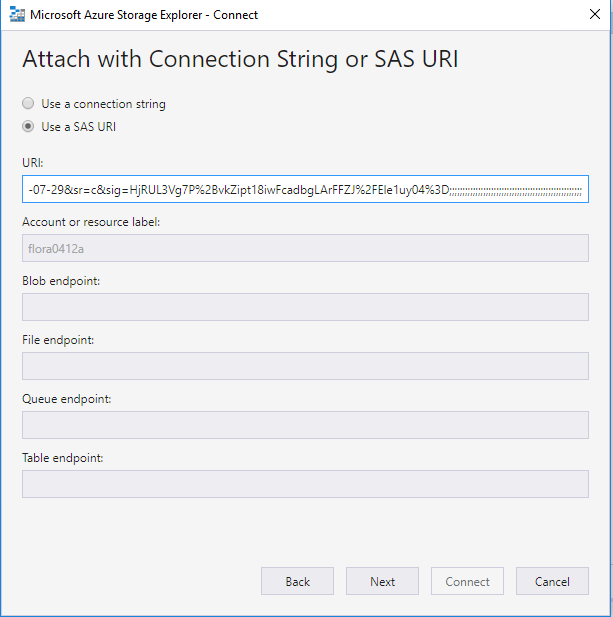
- Open the 'Connect to Azure Storage' dialog -> Paste the created SAS URI and add semicolons behind of the URI.
Expected Experience:
An error occurs.

Actual Experience:
No error occurs.
Contributor guide
No contributing guide indexed for this repository
First steps
- Read the whole issue, then the project's contributing guide.
- Comment on the issue to say you are picking it up — it saves two people doing the same work.
- Fork the repository and make your change on a branch.
- Open a pull request that references the issue number.
Research direction
Reproduce the issue in the Connect to Azure Storage dialog using a SAS URI with trailing semicolons, following the listed steps. Start at the dialog's connection verification and finishing flow; done means the malformed connection is rejected with an error before finishing.
Written by the indexing model from the issue text.
Assessment
- Tech stack
- azure
- Domain
- cloud
- Issue type
- Bug
- Difficulty
- 3/5
- Estimated time
- 1-2 days
- Activity status
- Stale
- Clarity
- Mostly clear
- Newbie friendliness
- 35/100