microsoft / microsoft/AzureStorageExplorer
The Files/Queues/Tables services are enabled for premium accounts on SAS dialog
Nobody has claimed this yet.
- Dominant language
- No language data
- Stars
- 452
- Forks
- 92
- Avg merge
- 15h 20m
- Merged PRs (30d)
- 3
Description
Storage Explorer Version: 1.7.0_20190318.3
Platform/OS: Linux Ubuntu/macOS High Sierra/Windows 10
Architecture: ia32/x64
Regression From: Previous release 1.6.2
Steps to Reproduce:
- Right click one Premium account -> Select 'Get Shared Access Signature...'.
- Check the services on the opened SAS dialog.
Expected Experience:
Files/Queues/Tables services are disabled.
Actual Experience:
Files/Queues/Tables services are enabled.
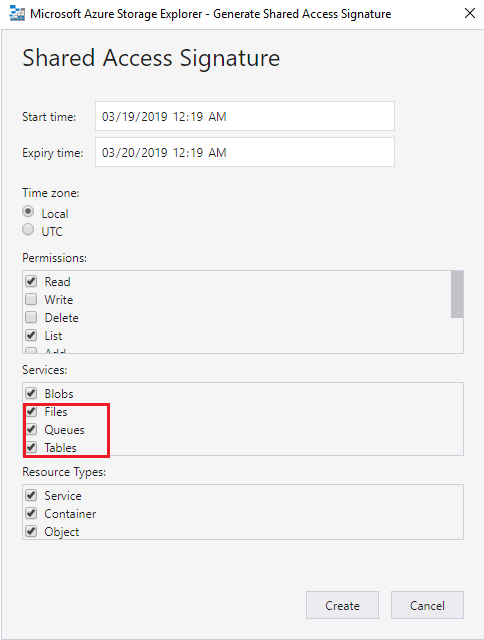
More info:
This issue also reproduces on release 1.7.0
Contributor guide
No contributing guide indexed for this repository
First steps
- Read the whole issue, then the project's contributing guide.
- Comment on the issue to say you are picking it up — it saves two people doing the same work.
- Fork the repository and make your change on a branch.
- Open a pull request that references the issue number.
Research direction
Reproduce the issue in the SAS dialog for a Premium account on a supported platform and verify which services are enabled. Trace the dialog's service-selection logic and compare it with the expected behavior from release 1.6.2; done means Files, Queues, and Tables are disabled for Premium accounts while applicable services remain available.
Written by the indexing model from the issue text.
Assessment
- Tech stack
- azure
- Domain
- cloud
- Issue type
- Bug
- Difficulty
- 3/5
- Estimated time
- 1-2 days
- Activity status
- Stale
- Clarity
- Mostly clear
- Newbie friendliness
- 35/100