microsoft / microsoft/AdaptiveCards
On Teams, Images not being displayed under accordion in adaptive card
Nobody has claimed this yet.
- Dominant language
- C#
- Stars
- 2k
- Forks
- 595
- Avg merge
- 1d 19h
- Merged PRs (30d)
- 1
Description
Target Platforms
Other
SDK Version
1.5
Application Name
Microsoft Teams
Problem Description
I have Power Virtual Agent bot running on Teams. Images are not being displayed(rather displayed as hyperlinks) under accordion in adaptive card. Same content displays images if it is rendered through simple message.
Screenshots
Content containing image rendered through accordion,
Content containing images rendered through simple message,
Card JSON
{
"type": "AdaptiveCard",
"body": [
{
"type": "Container",
"items": [
{
"type": "ColumnSet",
"columns": [
{
"type": "Column",
"items": [
{
"type": "TextBlock",
"text": "Headline 1",
"wrap": true,
"size": "Medium"
}
],
"width": "stretch"
},
{
"type": "Column",
"id": "chevronDown1",
"spacing": "Small",
"verticalContentAlignment": "Center",
"items": [
{
"type": "Image",
"url": "https://adaptivecards.io/content/down.png",
"width": "20px",
"altText": "collapsed"
}
],
"width": "auto",
"isVisible": false
},
{
"type": "Column",
"id": "chevronUp1",
"spacing": "Small",
"verticalContentAlignment": "Center",
"items": [
{
"type": "Image",
"url": "https://adaptivecards.io/content/up.png",
"width": "20px",
"altText": "expanded"
}
],
"width": "auto"
}
],
"selectAction": {
"type": "Action.ToggleVisibility",
"targetElements": [
"cardContent1",
"chevronUp1",
"chevronDown1"
]
}
},
{
"type": "Container",
"id": "cardContent1",
"items": [
{
"type": "Container",
"items": [
{
"type": "TextBlock",
"text": "Content for headline 1 [View Article](https://kdusdemo2.service-now.com/kb_view.do?sys_kb_id=576e28a387f83c10c71db3c2debb3516) \n\n### Introduction\n\nA pivot table is a table of grouped values that aggregates the individual items of a more extensive table within one or more discrete categories.\n\n### Instructions\n\n## How to create a PivotTable in Excel for Windows\n\n1. Select the cells you want to create a PivotTable from.\n\n 1. **Note:** Your data shouldn't have any empty rows or columns. It must have only a single-row heading.\n2. Select **Insert** > **PivotTable**.\n3. 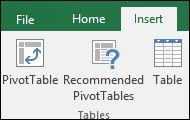\n4. Under **Choose the data that you want to analyze**, select **Select a table or range**. \n5. 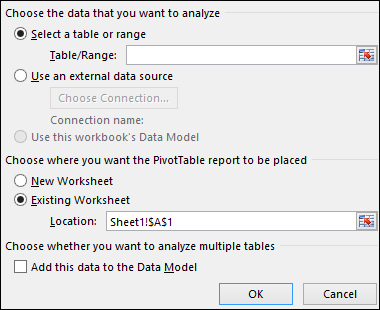\n6. In **Table/Range**, verify the cell range.\n7. Under **Choose where you want the PivotTable report to be placed**, select **New worksheet** to place the PivotTable in a new worksheet or **Existing worksheet** and then select the location you want the PivotTable to appear.\n8. Select **OK**.",
"isSubtle": true,
"wrap": true
}
]
}
]
}
],
"separator": true,
"spacing": "Medium"
},
{
"type": "Container",
"items": [
{
"type": "ColumnSet",
"columns": [
{
"type": "Column",
"items": [
{
"type": "TextBlock",
"text": "Headline 2",
"wrap": true,
"size": "Medium"
}
],
"width": "stretch"
},
{
"type": "Column",
"id": "chevronDown2",
"spacing": "Small",
"verticalContentAlignment": "Center",
"items": [
{
"type": "Image",
"url": "https://adaptivecards.io/content/down.png",
"width": "20px",
"altText": "collapsed"
}
],
"width": "auto"
},
{
"type": "Column",
"id": "chevronUp2",
"isVisible": false,
"spacing": "Small",
"verticalContentAlignment": "Center",
"items": [
{
"type": "Image",
"url": "https://adaptivecards.io/content/up.png",
"width": "20px",
"altText": "expanded"
}
],
"width": "auto"
}
],
"selectAction": {
"type": "Action.ToggleVisibility",
"targetElements": [
"cardContent2",
"chevronUp2",
"chevronDown2"
]
}
},
{
"type": "Container",
"id": "cardContent2",
"isVisible": false,
"items": [
{
"type": "Container",
"items": [
{
"type": "TextBlock",
"text": "Content for headline 2",
"isSubtle": true,
"wrap": true
}
]
}
]
}
],
"separator": true,
"spacing": "Medium"
},
{
"type": "Container",
"items": [
{
"type": "ColumnSet",
"columns": [
{
"type": "Column",
"items": [
{
"type": "TextBlock",
"text": "Headline 3",
"wrap": true,
"size": "Medium"
}
],
"width": "stretch"
},
{
"type": "Column",
"id": "chevronDown3",
"spacing": "Small",
"verticalContentAlignment": "Center",
"items": [
{
"type": "Image",
"url": "https://adaptivecards.io/content/down.png",
"width": "20px",
"altText": "collapsed"
}
],
"width": "auto"
},
{
"type": "Column",
"id": "chevronUp3",
"isVisible": false,
"spacing": "Small",
"verticalContentAlignment": "Center",
"items": [
{
"type": "Image",
"url": "https://adaptivecards.io/content/up.png",
"width": "20px",
"altText": "expanded"
}
],
"width": "auto"
}
],
"selectAction": {
"type": "Action.ToggleVisibility",
"targetElements": [
"cardContent3",
"chevronUp3",
"chevronDown3"
]
}
},
{
"type": "Container",
"id": "cardContent3",
"isVisible": false,
"items": [
{
"type": "Container",
"items": [
{
"type": "TextBlock",
"text": "Content for headline 3",
"isSubtle": true,
"wrap": true
}
]
}
]
}
],
"separator": true,
"spacing": "Medium"
}
],
"$schema": "http://adaptivecards.io/schemas/adaptive-card.json",
"version": "1.5",
"fallbackText": "This card requires Adaptive Cards v1.2 support to be rendered properly."
}
Sample Code Language
No response
Sample Code
No response
Contributor guide
First steps
- Read the whole issue, then the project's contributing guide.
- Comment on the issue to say you are picking it up — it saves two people doing the same work.
- Fork the repository and make your change on a branch.
- Open a pull request that references the issue number.
Research direction
Start with the supplied Adaptive Card JSON and compare how its markdown image links render in Microsoft Teams inside the accordion versus a simple message. Done means the images display inline under the accordion rather than appearing only as hyperlinks.
Written by the indexing model from the issue text.
Assessment
- Domain
- frontend
- Issue type
- Bug
- Difficulty
- 4/5
- Estimated time
- 3-5 days
- Activity status
- Stale
- Clarity
- Needs clarification
- Newbie friendliness
- 25/100