microsoft / microsoft/AdaptiveCards
[Rendering] Problem when expanding the adaptive card by the insert fields from several objects.
Nobody has claimed this yet.
- Dominant language
- C#
- Stars
- 2k
- Forks
- 595
- Avg merge
- 1d 19h
- Merged PRs (30d)
- 1
Description
Target Platforms
UWP
SDK Version
AdaptiveCards.Templating, Version=2.6.0.0
Application Name
Microsoft Teams
Problem Description
Hello!
I faced a problem when expanding the adaptive card by the insert fields from several objects - the collection insert field is breaking when the data source is in the second object.
For example, let firstProp insert field value will be in the Model1, and properties insert field value will be in the Model2:
public class Model1
{
     public string FirstProp { get; set; }
}

public class Model2
{
     public ICollection<KeyValuePair<string, string>> Properties { get; set; }
}
And then I extend this card by these models something like this:
var template = new AdaptiveCardTemplate(jsonTemplate);
var card = template.Expand(new Model1 { FirstProp = "FirstPropValue" });
template = new AdaptiveCardTemplate(card);
card = template.Expand(new Model2
{
    Properties = new[]
    {
        new KeyValuePair<string, string>("key1", "value1"),
        new KeyValuePair<string, string>("key2", "value2")
    }
});
Then I get Failed result.
But if I expand at first Model2 and then Model1 I get Success result.
And it's working incorrectly not only with collection but with several embedded functions in adaptive cards, like joining of collection of strings.
Right now I'm workaround it by merging all insert fields source objects in JObject, kind of this:
public string BuildCard(string jsonTemplate, params object[] properties)
{
	var mergedProperties = JObject.FromObject(properties.First());
	foreach (var property in properties.Skip(1).ToList())
	{
		mergedProperties.Merge(property);
	}

	var template = new AdaptiveCardTemplate(jsonTemplate);

	return template.Expand(mergedProperties);
}
But still, it looks like a bug.
Thank you.
Best regards.
Screenshots
Failed result

Success result
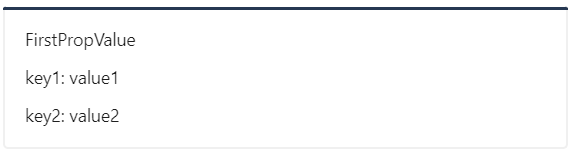
Card JSON
{
    "type": "AdaptiveCard",
    "$schema": "http://adaptivecards.io/schemas/adaptive-card.json",
    "version": "1.4",
    "body": [
        {
            "type": "TextBlock",
            "text": "${firstProp}",
            "wrap": true
        },
        {
            "$data": "${properties}",
            "type": "TextBlock",
            "text": "${key}: ${value}",
            "wrap": true
        }
    ]
}
Sample Code Language
No response
Sample Code
No response
Contributor guide
First steps
- Read the whole issue, then the project's contributing guide.
- Comment on the issue to say you are picking it up — it saves two people doing the same work.
- Fork the repository and make your change on a branch.
- Open a pull request that references the issue number.
Research direction
Start with the AdaptiveCardTemplate Expand entry point and reproduce the sequential expansion using Model1 followed by Model2 from the issue. Trace how collection insertion and embedded functions resolve data across expansions; done means the Model1-then-Model2 order succeeds, including the properties collection and joined string collections.
Written by the indexing model from the issue text.
Assessment
- Tech stack
- csharp
- Domain
- desktop, frontend
- Issue type
- Bug
- Difficulty
- 4/5
- Estimated time
- 3-5 days
- Activity status
- Stale
- Clarity
- Mostly clear
- Newbie friendliness
- 35/100