microsoft / microsoft/AdaptiveCards
[Rendering] action.ToggleVisibility Yields Error in Teams Channel
Nobody has claimed this yet.
- Dominant language
- C#
- Stars
- 2k
- Forks
- 595
- Avg merge
- 1d 19h
- Merged PRs (30d)
- 1
Description
Target Platforms
Other
SDK Version
1.3
Application Name
Microsoft Teams
Problem Description
In the Adaptive Card Designer, the
"type":"action.ToggleVisibility"
is highlighted as "Value not Accepted" in intellisense.
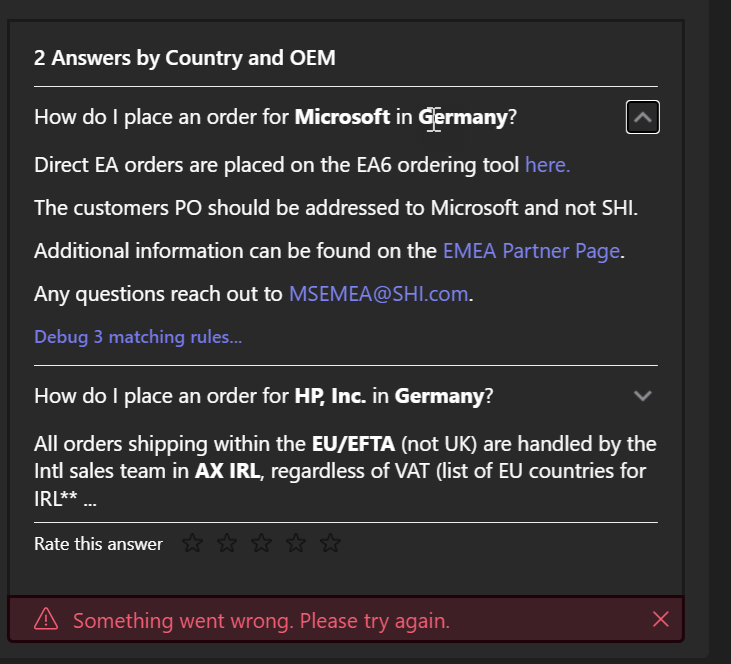
However, the Action works as expected in the adaptive card in Bot Framework Emulator. In Microsoft Teams, it works except for that upon expanding the item, the teams channel shows a red notification at the bottom of the card:
"Something went wrong. Please try again." X
My understanding is that ToggleVisibility is supported in v1.3 and should also be supported by MS Teams channel.
Here is the adaptive card that fails:
{
  "type": "AdaptiveCard",
  "body": [
    {
      "$data": "${Rules}",
      "type": "Container",
      "items": [
        {
          "type": "ColumnSet",
          "width": "Stretch",
          "columns": [
            {
              "type": "Column",
              "width": "stretch",
              "items": [
                {
                  "type": "TextBlock",
                  "text": "${Question}",
                  "wrap": true,
                  "width": "Stretch"
                }
              ]
            },
            {
              "type": "Column",
              "spacing": "Small",
              "selectAction": {
                "type": "Action.ToggleVisibility",
                "title": "expand",
                "targetElements": [
                  "cardContent${$index}",
                  "chevronDown${$index}",
                  "chevronUp${$index}"
                ]
              },
              "verticalContentAlignment": "Top",
              "items": [
                {
                  "type": "Image",
                  "id": "chevronDown${$index}",
                  "url": "https://adaptivecards.io/content/down.png",
                  "width": "20px",
                  "isVisible": true,
                  "altText": "Details collapsed"
                },
                {
                  "type": "Image",
                  "id": "chevronUp${$index}",
                  "url": "https://adaptivecards.io/content/up.png",
                  "width": "20px",
                  "altText": "Details expanded",
                  "isVisible": false
                }
              ],
              "width": "auto"
            }
          ]
        },
        {
          "type": "Container",
          "id": "cardContent${$index}",
          "isVisible": false,
          "items": [
            {
              "type": "TextBlock",
              "text": "${Answer}",
              "wrap": true
            }
          ]
        }
      ],
      "separator": true
    }
  ],
  "$schema": "http://adaptivecards.io/schemas/adaptive-card.json",
  "version": "1.3"
}
Here is the data JSON:
{
    "Rules": [
        {
            "Countries": [
                "Germany"
            ],
            "OEMs": [
                "HP, Inc."
            ],
            "BU": "Commercial",
            "Task": "sell",
            "Question": "\r\nCan we sell **HP, Inc.** in **Germany**?\r\n",
            "TruncatedAnswer": "Please check CRM to see if you have a rep already assigned. If you do not have a local team already supporting your customer then please see your ...",
            "Country": "**Germany**",
            "OEM": "**HP, Inc.**",
            "Answer": "\r\nPlease check CRM to see if you have a rep already assigned. If you do not have a local team already supporting your customer then please see your options below for supporting this.\r\n\r\n*If ANY of the following apply customer has over 50 users in the region, will have on-going requests, if configs are required and/or if this is/will be part of larger opportunities, you must utilize **option 1***  \r\n\r\n*If this customer has less than 50 users locally, please use **option 2***  \r\n**Option 1**Outside of supporting our Global customers, there are local teams who are focused on developing and growing the local business opportunities. All teams must leverage these local resources if they have any regional business opportunities as international business is complex and should be handled by the local sales teams.\r\n\r\n*Sourcing:* We will engage a local rep to support the customer and you would be asked to make introductions. Please submit more details about the account including the local end user counts (by country) [here](https://shiandms.sharepoint.com/sites/international/Lists/InternationalEngagement/Item/newifs.aspx).  \r\n\r\n*If you have locations in France and would like a local French account team to be assigned, please select France ONLY under country/region.  You will still need to submit another Europe request for any other European location(s)Quoting & Order Placement: The FoundaSHIon team will manage the local relationship in Europe and be responsible for local deal registrations, quoting, order entry, etc.  \r\n**Option 2**If your account is less than 50 users, you and your team are responsible for working through our Unassigned portal to source and quote the customer.  \r\n*Sourcing:* You will need to source locally however you will need to leverage our international FoundaSHIon team to source the products for you via the Unassigned Europe portal (you will not be able to source yourself).  The portal is located [here](https://shiandms.sharepoint.com/sites/ops/International).  The FoundaSHIon team is responsible for supplying SHI costs and local vendors.  It takes a minimum of 3 full business days for pricing to be returned.*\r\n\r\n*Quoting & Order Placement:* Full instructions for customer quoting and ordering will be returned with your completed request. After receiving pricing from the portal, you are responsible for creating the quote in SC, creating the customer in CRM for the appropriate AX required and placing the order.  \r\n\r\n**There is a 1% Order Value charge that will go against GM for ALL orders placed in* *AX UKLT/AX IRL*\r\n",
            "MatchingRules": []
        }
    ],
    "GroupByLabel": "Country and OEM"
}
Screenshots
Card JSON
{
  "type": "AdaptiveCard",
  "body": [
    {
      "$data": "${Rules}",
      "type": "Container",
      "items": [
        {
          "type": "ColumnSet",
          "width": "Stretch",
          "columns": [
            {
              "type": "Column",
              "width": "stretch",
              "items": [
                {
                  "type": "TextBlock",
                  "text": "${Question}",
                  "wrap": true,
                  "width": "Stretch"
                }
              ]
            },
            {
              "type": "Column",
              "spacing": "Small",
              "selectAction": {
                "type": "Action.ToggleVisibility",
                "title": "expand",
                "targetElements": [
                  "cardContent${$index}",
                  "chevronDown${$index}",
                  "chevronUp${$index}"
                ]
              },
              "verticalContentAlignment": "Top",
              "items": [
                {
                  "type": "Image",
                  "id": "chevronDown${$index}",
                  "url": "https://adaptivecards.io/content/down.png",
                  "width": "20px",
                  "isVisible": true,
                  "altText": "Details collapsed"
                },
                {
                  "type": "Image",
                  "id": "chevronUp${$index}",
                  "url": "https://adaptivecards.io/content/up.png",
                  "width": "20px",
                  "altText": "Details expanded",
                  "isVisible": false
                }
              ],
              "width": "auto"
            }
          ]
        },
        {
          "type": "Container",
          "id": "cardContent${$index}",
          "isVisible": false,
          "items": [
            {
              "type": "TextBlock",
              "text": "${Answer}",
              "wrap": true
            }
          ]
        }
      ],
      "separator": true
    }
  ],
  "$schema": "http://adaptivecards.io/schemas/adaptive-card.json",
  "version": "1.3"
}
Sample Code Language
No response
Sample Code
No response
Contributor guide
First steps
- Read the whole issue, then the project's contributing guide.
- Comment on the issue to say you are picking it up — it saves two people doing the same work.
- Fork the repository and make your change on a branch.
- Open a pull request that references the issue number.
Research direction
Start by reproducing the supplied card and data JSON in the Adaptive Card Designer, Bot Framework Emulator, and Microsoft Teams, focusing on the Action.ToggleVisibility expansion error. No source files or tests are named; done means identifying whether the Teams rendering failure is reproducible and documenting the affected behavior or a verified resolution.
Written by the indexing model from the issue text.
Assessment
- Domain
- frontend
- Issue type
- Bug
- Difficulty
- 4/5
- Estimated time
- 3-5 days
- Activity status
- Stale
- Clarity
- Needs clarification
- Newbie friendliness
- 25/100