microsoft / microsoft/AdaptiveCards
[iOS][Teams] SelectAction role is announced as "Link", expected to be "Button"
Open
Nobody has claimed this yet.
- Dominant language
- C#
- Stars
- 2k
- Forks
- 595
- Avg merge
- 1d 19h
- Merged PRs (30d)
- 1
Description
Platform
What platform is your issue or question related to? (Delete other platforms).
- iOS
Author or host
Host: Teams
Version of SDK
latest main
Issue
Although the selectAction is for "OpenUrl", but the UI looks like a button. So our tester thinks it is better to be announced as a button.
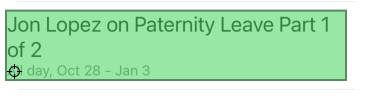
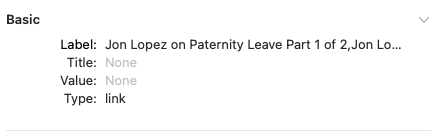
Card payload:
{
    "type": "AdaptiveCard",
    "version": "1.4",
    "speak": "Calendar",
    "body": [
        {
            "type": "Container",
            "items": [
                {
                    "type": "ColumnSet",
                    "columns": [
                        {
                            "type": "Column",
                            "width": "stretch",
                            "items": [
                                {
                                    "type": "TextBlock",
                                    "size": "Large",
                                    "text": "Jon Lopez on Paternity Leave Part 1 of 2",
                                    "wrap": true,
                                    "maxLines": 2,
                                    "spacing": "Medium"
                                },
                                {
                                    "type": "TextBlock",
                                    "isSubtle": true,
                                    "text": "All day, Oct 28 - Jan 3",
                                    "spacing": "None"
                                }
                            ]
                        }
                    ]
                }
            ],
            "selectAction": {
                "type": "Action.OpenUrl",
                "url": "https://teams.microsoft.com/l/meeting/details?eventId=AAMkADBmYWM1ZGZmLWQ3MjctNGRkNy1iMDQyLTVlNGE4ODM5NzI2ZQBGAAAAAACo8LiXtx9SToMm8pILtou4BwAjYdTg0jsAR5QJS8P2OBmOAAAAEaWfAAD5IiZZqzuqQqiWPN43S9KgAAR2u_feAAA=",
                "title": "Jon Lopez on Paternity Leave Part 1 of 2"
            },
            "spacing": "ExtraLarge",
            "separator": true
        }
    ],
    "$schema": "http://adaptivecards.io/schemas/adaptive-card.json"
}
Contributor guide
First steps
- Read the whole issue, then the project's contributing guide.
- Comment on the issue to say you are picking it up — it saves two people doing the same work.
- Fork the repository and make your change on a branch.
- Open a pull request that references the issue number.
Research direction
Start with the iOS handling of the Container selectAction shown in the card payload and trace how its OpenUrl action is exposed to accessibility services. Reproduce the announcement in Teams, then verify that the same UI is announced as a button rather than a link.
Written by the indexing model from the issue text.
Assessment
- Tech stack
- ios
- Domain
- accessibility, mobile
- Issue type
- Bug
- Difficulty
- 3/5
- Estimated time
- 1-2 days
- Activity status
- Stale
- Clarity
- Needs clarification
- Newbie friendliness
- 35/100