microsoft / microsoft/AdaptiveCards
[Rendering] relative column widths don't always line up
Nobody has claimed this yet.
- Dominant language
- C#
- Stars
- 2k
- Forks
- 595
- Avg merge
- 1d 19h
- Merged PRs (30d)
- 1
Description
Target Platforms
NodeJS
SDK Version
N/A
Application Name
Microsoft Teams
Problem Description
Looking at the attached screenshot you can see that I have several column sets attempting to lay content out in a grid using relative widths. The relative widths for every row always adds up to 12 but you can see how the column edges don't always line up for a given span. I've tried several grid sizes, 10, 12, 15, 100, etc. and it's always the same issue.
The issue has actually been here for years (I noticed it 2 - 3 years ago) and reproduces in the web renderer for sure. I tested it several years ago on mobile and I believe it reproduced there as well but can't remember to be honest.
It would be great if this could be fixed at some point in the near future. My Adapt JS has a really nice gird layout system but currently you need to be aware of this alignment issue when laying out cards which kind of sucks...
Screenshots
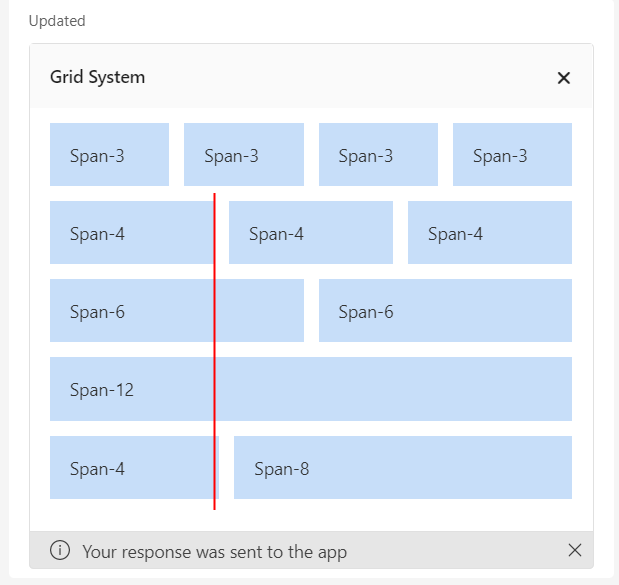
Card JSON
{"type":"AdaptiveCard","body":[{"type":"Container","items":[{"type":"ColumnSet","columns":[{"type":"Column","items":[{"type":"TextBlock","text":"Grid System","size":"medium","weight":"bolder"}],"width":"auto"},{"type":"Column","items":[],"width":"stretch"},{"type":"Column","items":[{"type":"TextBlock","text":"🗙"}],"selectAction":{"type":"Action.Execute","data":{},"verb":"C:\\source\\adapt-js\\samples\\TeamsCardBot\\lib\\components.js#closeCard"},"width":"auto"}]}],"style":"emphasis","bleed":true},{"type":"Container","items":[{"type":"ColumnSet","columns":[{"type":"Column","width":3,"items":[{"type":"TextBlock","text":"Span-3"}],"style":"accent"},{"type":"Column","width":3,"items":[{"type":"TextBlock","text":"Span-3"}],"style":"accent"},{"type":"Column","width":3,"items":[{"type":"TextBlock","text":"Span-3"}],"style":"accent"},{"type":"Column","width":3,"items":[{"type":"TextBlock","text":"Span-3"}],"style":"accent"}]},{"type":"ColumnSet","columns":[{"type":"Column","width":4,"items":[{"type":"TextBlock","text":"Span-4"}],"style":"accent"},{"type":"Column","width":4,"items":[{"type":"TextBlock","text":"Span-4"}],"style":"accent"},{"type":"Column","width":4,"items":[{"type":"TextBlock","text":"Span-4"}],"style":"accent"}]},{"type":"ColumnSet","columns":[{"type":"Column","width":6,"items":[{"type":"TextBlock","text":"Span-6"}],"style":"accent"},{"type":"Column","width":6,"items":[{"type":"TextBlock","text":"Span-6"}],"style":"accent"}]},{"type":"ColumnSet","columns":[{"type":"Column","width":12,"items":[{"type":"TextBlock","text":"Span-12"}],"style":"accent"}]},{"type":"ColumnSet","columns":[{"type":"Column","width":4,"items":[{"type":"TextBlock","text":"Span-4"}],"style":"accent"},{"type":"Column","width":8,"items":[{"type":"TextBlock","text":"Span-8"}],"style":"accent"}]}],"bleed":true}],"version":"1.5"}
Sample Code Language
No response
Sample Code
No response
Contributor guide
First steps
- Read the whole issue, then the project's contributing guide.
- Comment on the issue to say you are picking it up — it saves two people doing the same work.
- Fork the repository and make your change on a branch.
- Open a pull request that references the issue number.
Research direction
Start by reproducing the layout in the web renderer with the Card JSON and screenshot described in the issue. Compare the column edges across the 3/3/3/3, 4/4/4, 6/6, 12, and 4/8 ColumnSets; done means relative-width columns align consistently across rows.
Written by the indexing model from the issue text.
Assessment
- Tech stack
- javascript, nodejs
- Domain
- frontend, web-dev
- Issue type
- Bug
- Difficulty
- 4/5
- Estimated time
- 3-5 days
- Activity status
- Stale
- Clarity
- Mostly clear
- Newbie friendliness
- 35/100