microsoft / microsoft/AdaptiveCards
[Designer Accessibility] Bind designer peer button should be keyboard accessible
Open
Nobody has claimed this yet.
Area-Accessibility
Area-Designer
- Dominant language
- C#
- Stars
- 2k
- Forks
- 595
- Avg merge
- 1d 19h
- Merged PRs (30d)
- 1
Description
Keyboard accessibility needs to be enabled for the bind button on designer peers. We also need to add the new keyboard shortcuts to the help dialog.
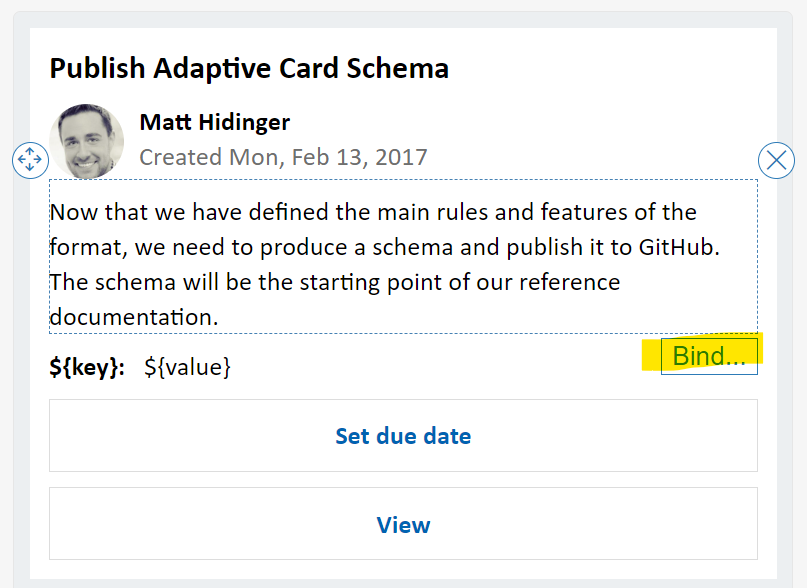
See #7159
Contributor guide
First steps
- Read the whole issue, then the project's contributing guide.
- Comment on the issue to say you are picking it up — it saves two people doing the same work.
- Fork the repository and make your change on a branch.
- Open a pull request that references the issue number.
Research direction
Start by reviewing the designer peer bind button and the help dialog described in the issue, then read the related discussion in #7159. Done means the bind button supports keyboard interaction and the corresponding shortcuts appear in the help dialog.
Written by the indexing model from the issue text.
Assessment
- Domain
- accessibility
- Issue type
- Feature
- Difficulty
- 3/5
- Estimated time
- 1-2 days
- Activity status
- Stale
- Clarity
- Mostly clear
- Newbie friendliness
- 35/100