microsoft / microsoft/AdaptiveCards
[Designer] Carousel control will not display arrows on non Windows 11 devices
Nobody has claimed this yet.
- Dominant language
- C#
- Stars
- 2k
- Forks
- 595
- Avg merge
- 1d 19h
- Merged PRs (30d)
- 1
Description
Problem Description
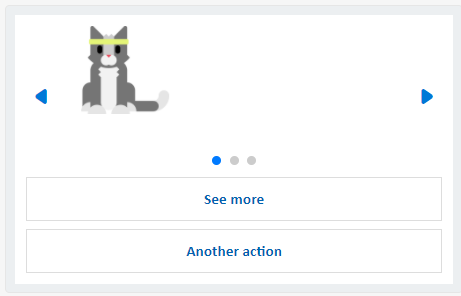
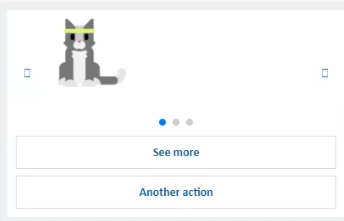
The Carousel control for 1.6 preview card in the Designer will only show the previous and next arrow controls on Windows 11 devices. If these are rendered in Windows 10 or Mac devices, they will see empty squares.
This is because the arrows are using fluent icons that are only included on Windows 11.
https://docs.microsoft.com/en-us/windows/apps/design/style/segoe-fluent-icons-font
Link to CI site
https://adaptivecardsci.z5.web.core.windows.net/designer
Card JSON
{
	"$schema": "http://adaptivecards.io/schemas/adaptive-card.json",
	"type": "AdaptiveCard",
	"version": "1.6",
	"body": {
		"type": "Carousel",
		"timer": 5000,
		"pages": [
			{
				"type": "CarouselPage",
				"id": "firstCarouselPage",
				"selectAction": {
					"type": "Action.OpenUrl",
					"title": "Click for more information about the first carousel page!",
					"url": "https://adaptivecards.io/"
				},
				"items": [
					{
						"type": "Image",
						"url": "https://adaptivecards.io/content/cats/1.png",
						"size": "medium"
					}
				]
			},
			{
				"type": "CarouselPage",
				"id": "theSecondCarouselPage",
				"items": [
					{
						"type": "Image",
						"url": "https://adaptivecards.io/content/cats/2.png",
						"size": "medium"
					}
				]
			},
			{
				"type": "CarouselPage",
				"id": "last-carousel-page",
				"items": [
					{
						"type": "Image",
						"url": "https://adaptivecards.io/content/cats/3.png",
						"altText": "That's a cool cat!",
						"size": "medium"
					}
				]
			}
		]
	},
	"actions": [
		{
			"type": "Action.OpenUrl",
			"title": "See more",
			"url": "https://adaptivecards.io"
		},
		{
			"type": "Action.OpenUrl",
			"title": "Another action",
			"url": "https://adaptivecards.io"
		}
	]
}
Screenshot
Windows 11:
Windows 10:
Contributor guide
First steps
- Read the whole issue, then the project's contributing guide.
- Comment on the issue to say you are picking it up — it saves two people doing the same work.
- Fork the repository and make your change on a branch.
- Open a pull request that references the issue number.
Research direction
Open the Designer using the supplied Carousel card JSON and compare the arrow controls on Windows 11, Windows 10, and macOS. Inspect the Carousel control's arrow or icon entry point and the linked CI Designer; done means previous and next arrows render on all listed devices without empty squares.
Written by the indexing model from the issue text.
Assessment
- Domain
- frontend
- Issue type
- Bug
- Difficulty
- 3/5
- Estimated time
- 1-2 days
- Activity status
- Stale
- Clarity
- Mostly clear
- Newbie friendliness
- 45/100