microsoft / microsoft/AdaptiveCards
[Rendering] ImageSets don't respect spacing, size and vertical spacing
Open
Nobody has claimed this yet.
Area-Renderers
Request
- Dominant language
- C#
- Stars
- 2k
- Forks
- 595
- Avg merge
- 1d 19h
- Merged PRs (30d)
- 1
Description
Target Platforms
NodeJS
SDK Version
1.3
Application Name
Viva Connections
Problem Description
Multiple issues with Image Sets
- No vertical spacing between images, only horizontal spacing
- Spacing property values aren't respected, they all look the same
- Size property values aren't respected, they all look the same
Screenshots
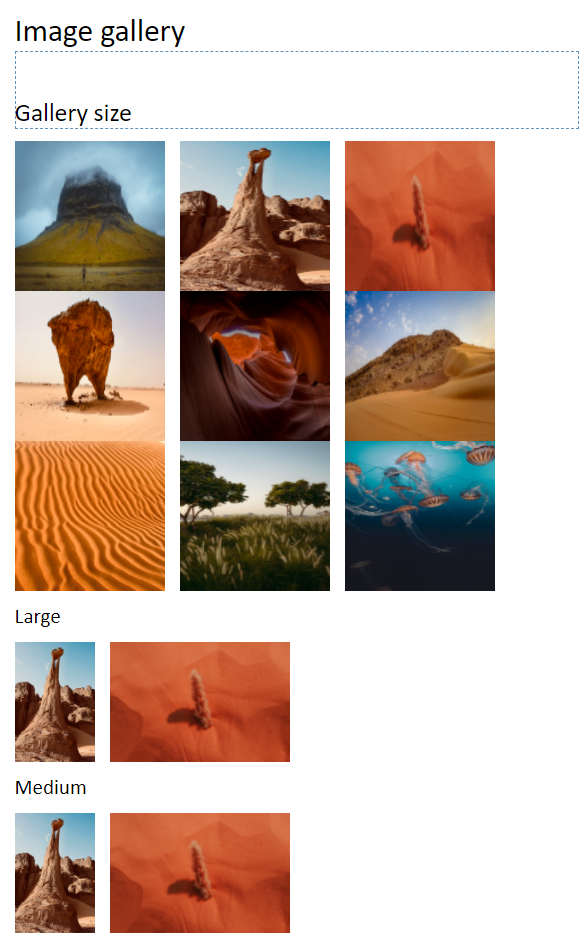
Card JSON
{
    "$schema": "http://adaptivecards.io/schemas/adaptive-card.json",
    "type": "AdaptiveCard",
    "version": "1.3",
    "body": [
        {
            "type": "TextBlock",
            "text": "Image gallery",
            "size": "Large",
            "wrap": true
        },
        {
            "type": "TextBlock",
            "text": "Gallery size",
            "size": "Medium",
            "wrap": true,
            "fontType": "Default",
            "spacing": "Large"
        },
        {
            "type": "ImageSet",
            "images": [
                {
                    "type": "Image",
                    "url": "https://images.unsplash.com/photo-1626515405452-9728f8d67d39",
                    "size": "Large",
                    "width": "100px",
                    "height": "100px",
                    "spacing": "Padding"
                },
                {
                    "type": "Image",
                    "url": "https://images.unsplash.com/photo-1632032042135-1f4c11f53141",
                    "size": "Small",
                    "width": "100px",
                    "height": "100px",
                    "spacing": "Padding"
                },
                {
                    "type": "Image",
                    "url": "https://images.unsplash.com/photo-1632163559943-4980593a2383",
                    "size": "Small",
                    "width": "100px",
                    "height": "100px",
                    "spacing": "Padding"
                },
                {
                    "type": "Image",
                    "url": "https://images.unsplash.com/photo-1631995390084-cb82295cd2c0",
                    "size": "Small",
                    "width": "100px",
                    "height": "100px",
                    "spacing": "Large"
                },
                {
                    "type": "Image",
                    "url": "https://images.unsplash.com/photo-1444076784383-69ff7bae1b0a",
                    "size": "Small",
                    "width": "100px",
                    "height": "100px",
                    "spacing": "Large"
                },
                {
                    "type": "Image",
                    "url": "https://images.unsplash.com/photo-1581337377333-904020186445",
                    "size": "Small",
                    "width": "100px",
                    "height": "100px",
                    "spacing": "Large"
                },
                {
                    "type": "Image",
                    "url": "https://images.unsplash.com/photo-1614075547089-1ef13fb5ad0d",
                    "size": "Small",
                    "width": "100px",
                    "height": "100px",
                    "spacing": "None"
                },
                {
                    "type": "Image",
                    "url": "https://images.unsplash.com/photo-1630872134430-6837e967804c",
                    "size": "Small",
                    "width": "100px",
                    "height": "100px",
                    "spacing": "None"
                },
                {
                    "type": "Image",
                    "url": "https://images.unsplash.com/photo-1626288937220-3b1a0cdbbfe7",
                    "size": "Small",
                    "width": "100px",
                    "height": "100px",
                    "spacing": "None"
                }
            ],
            "imageSize": "Small"
        },
                {
            "type": "TextBlock",
            "text": "Large",
            "wrap": true
        },
        {
            "type": "ImageSet",
            "images": [
                {
                    "type": "Image",
                    "url": "https://images.unsplash.com/photo-1632032042135-1f4c11f53141",
                    "size": "Large"
                },
                {
                    "type": "Image",
                    "url": "https://images.unsplash.com/photo-1632163559943-4980593a2383",
                    "size": "Large"
                }
            ]
        },
        {
            "type": "TextBlock",
            "text": "Medium",
            "wrap": true
        },
        {
            "type": "ImageSet",
            "images": [
                {
                    "type": "Image",
                    "url": "https://images.unsplash.com/photo-1632032042135-1f4c11f53141",
                    "size": "Medium"
                },
                {
                    "type": "Image",
                    "url": "https://images.unsplash.com/photo-1632163559943-4980593a2383",
                    "size": "Medium"
                }
            ]
        }
    ]
}
Sample Code Language
No response
Sample Code
No response
Contributor guide
First steps
- Read the whole issue, then the project's contributing guide.
- Comment on the issue to say you are picking it up — it saves two people doing the same work.
- Fork the repository and make your change on a branch.
- Open a pull request that references the issue number.
Research direction
Reproduce the ImageSet rendering from the supplied Adaptive Card JSON on the NodeJS target, checking image size and spacing in both horizontal and vertical layouts. Trace the ImageSet entry point and compare the rendered result with the requested None, Padding, and Large spacing and Small, Medium, and Large sizes; done means each value produces the expected visual effect.
Written by the indexing model from the issue text.
Assessment
- Tech stack
- node.js
- Domain
- frontend
- Issue type
- Bug
- Difficulty
- 3/5
- Estimated time
- 1-2 days
- Activity status
- Stale
- Clarity
- Mostly clear
- Newbie friendliness
- 35/100