microsoft / microsoft/AdaptiveCards
[Rendering] Text block in a container with background image is not accessible
Open
Nobody has claimed this yet.
Area-Accessibility
Area-Renderers
Request
- Dominant language
- C#
- Stars
- 2k
- Forks
- 595
- Avg merge
- 1d 19h
- Merged PRs (30d)
- 1
Description
Target Platforms
NodeJS
SDK Version
1.3
Application Name
Viva Connections
Problem Description
Adding a text block in a container with background image is not accessible. Switching to a light color doesn't help either. Should there be a support for opacity?
Screenshots
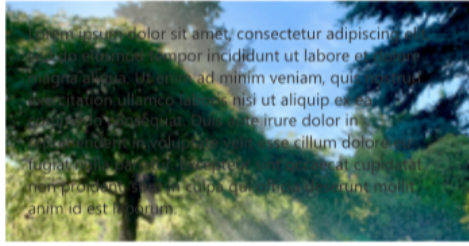
Card JSON
{
    "type": "AdaptiveCard",
    "$schema": "http://adaptivecards.io/schemas/adaptive-card.json",
    "version": "1.3",
    "body": [
        {
            "type": "Container",
            "backgroundImage": {
                "url": "https://microsoft.sharepoint-df.com/teams/MEEDemo/SiteAssets/Dashboard/tree-small.jpeg"
            },
            "items": [
                {
                    "type": "TextBlock",
                    "text": "Lorem ipsum dolor sit amet, consectetur adipiscing elit, sed do eiusmod tempor incididunt ut labore et dolore magna aliqua. Ut enim ad minim veniam, quis nostrud exercitation ullamco laboris nisi ut aliquip ex ea commodo consequat. Duis aute irure dolor in reprehenderit in voluptate velit esse cillum dolore eu fugiat nulla pariatur. Excepteur sint occaecat cupidatat non proident, sunt in culpa qui officia deserunt mollit anim id est laborum.",
                    "wrap": true
                }
            ],
            "bleed": true
        }
    ],
    "backgroundImage": {
        "horizontalAlignment": "Center"
    },
    "minHeight": "0px"
}
Sample Code Language
No response
Sample Code
No response
Contributor guide
First steps
- Read the whole issue, then the project's contributing guide.
- Comment on the issue to say you are picking it up — it saves two people doing the same work.
- Fork the repository and make your change on a branch.
- Open a pull request that references the issue number.
Research direction
Start by reproducing the supplied Card JSON on NodeJS with SDK version 1.3, focusing on the TextBlock inside the background-image Container. Define the expected accessible contrast behavior and whether opacity support is required; done means the text remains accessible in this scenario and the behavior is covered by an appropriate validation.
Written by the indexing model from the issue text.
Assessment
- Tech stack
- node.js
- Domain
- accessibility
- Issue type
- Bug
- Difficulty
- 5/5
- Estimated time
- Over a week
- Activity status
- Stale
- Clarity
- Needs clarification
- Newbie friendliness
- 25/100