microsoft / microsoft/AdaptiveCards
[Rendering] Input config for the JS host config has several rendering bugs.
Open
Nobody has claimed this yet.
Area-Renderers
Bug
- Dominant language
- C#
- Stars
- 2k
- Forks
- 595
- Avg merge
- 1d 19h
- Merged PRs (30d)
- 1
Description
Target Platforms
NodeJS
SDK Version
1.3
Application Name
Viva Connections
Problem Description
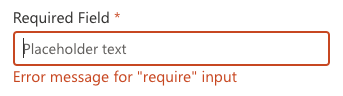
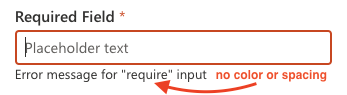
- If ANY inputConfig is customized, the errorMessage loses its color.
- Error message spacing does not work
- Feature request: allow customization of errorMessage color.
Screenshots
With no custom json:
With this custom json:
inputs: {
      label: {
        requiredInputs: {
          weight: 'bolder'
        },
        optionalInputs: {
          weight: 'bolder'
        }
      },
      errorMessage: {
        spacing: 'large',
        size: 'small'
      }
    }
Card JSON
{
    "type": "AdaptiveCard",
    "$schema": "http://adaptivecards.io/schemas/adaptive-card.json",
    "version": "1.3",
    "body": [
        {
            "type": "Container",
            "items": [
                {
                    "type": "TextBlock",
                    "text": "Basic Input functionality",
                    "wrap": true
                },
                {
                    "type": "Input.Text",
                    "placeholder": "Placeholder text",
                    "id": "requiredInput",
                    "isRequired": true,
                    "errorMessage": "Error message for \"require\" input",
                    "label": "Required Field"
                },
                {
                    "type": "Input.Text",
                    "placeholder": "Placeholder text",
                    "label": "Validation Match ",
                    "id": "validation1",
                    "errorMessage": "This must say \"Viva\"",
                    "regex": "(Viva)|(viva)"
                },
                {
                    "type": "Input.Text",
                    "placeholder": "Placeholder text",
                    "label": "Multi-Line",
                    "isMultiline": true,
                    "id": "multiLine",
                    "errorMessage": "Multiline should say \"Viva\"",
                    "regex": "(Viva)|(viva)"
                }
            ]
        },
        {
            "type": "Container",
            "items": [
                {
                    "type": "TextBlock",
                    "wrap": true,
                    "text": "Different Input formats:",
                    "height": "stretch",
                    "separator": true,
                    "spacing": "Large"
                },
                {
                    "type": "Input.Text",
                    "placeholder": "Type a telephone number",
                    "id": "telephoneFormat",
                    "label": "Telephone Format",
                    "style": "Tel",
                    "maxLength": 12,
                    "errorMessage": "Must match 111-111-1111",
                    "regex": "^[0-9]{3}-[0-9]{3}-[0-9+]{4}$"
                },
                {
                    "type": "Input.Text",
                    "placeholder": "Type a URL",
                    "id": "urlFormat",
                    "style": "Url",
                    "label": "URL Format",
                    "regex": "^http:\\/\\/[a-zA-Z0-9_\\-]+\\.[a-zA-Z0-9_\\-]+\\.[a-zA-Z0-9_\\-]+$",
                    "errorMessage": "Must be in a url format http://*******.***"
                },
                {
                    "type": "Input.Text",
                    "placeholder": "Type your email",
                    "id": "emailFormat",
                    "label": "Email Format",
                    "regex": "^\\S+@\\S+\\.\\S+$",
                    "errorMessage": "Must be a valid email format"
                }
            ]
        }
    ],
    "actions": [
        {
            "type": "Action.Submit",
            "title": "Validate Form",
            "id": "submit",
            "style": "positive",
            "associatedInputs": "auto"
        }
    ]
}
Sample Code Language
No response
Sample Code
No response
Contributor guide
First steps
- Read the whole issue, then the project's contributing guide.
- Comment on the issue to say you are picking it up — it saves two people doing the same work.
- Fork the repository and make your change on a branch.
- Open a pull request that references the issue number.
Research direction
Start with the JS host config rendering path and reproduce the supplied Adaptive Card using the custom inputs JSON. Check the reported error-message color and spacing behavior, then verify that errorMessage color customization is supported and that the rendered output matches the requested styling.
Written by the indexing model from the issue text.
Assessment
- Tech stack
- javascript
- Domain
- frontend
- Issue type
- Bug
- Difficulty
- 4/5
- Estimated time
- 3-5 days
- Activity status
- Stale
- Clarity
- Mostly clear
- Newbie friendliness
- 35/100