microsoft / microsoft/AdaptiveCards
[Rendering] Accessibility: Screen reader cannot read "alternate text" from image with selection action (`Action.OpenUrl`)
Nobody has claimed this yet.
- Dominant language
- C#
- Stars
- 2k
- Forks
- 595
- Avg merge
- 1d 19h
- Merged PRs (30d)
- 1
Description
Target Platforms
NodeJS
SDK Version
2.9.0
Application Name
Web Chat
Problem Description
When adding an image element with selection action of type Action.OpenUrl, the "alternate text" from the image element cannot be read by the screen reader.
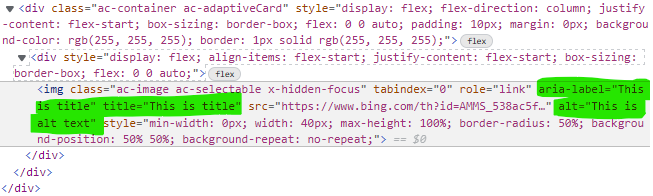
Rendering the attached card through AC 2.9.0, the DOM tree will be the following. Note the convoluted <img> with role="link".
<div style="display: flex; align-items: flex-start; justify-content: flex-start; box-sizing: border-box; flex: 0 0 auto;">
  <img class="ac-image ac-selectable x-hidden-focus" tabindex="0" role="link" aria-label="This is title" title="This is title" src="https://www.bing.com/th?id=AMMS_538ac5fe8754dd7df7589f49378971dc" alt="This is alt text" style="min-width: 0px; width: 40px; max-height: 100%; border-radius: 50%; background-position: 50% 50%; background-repeat: no-repeat;">
</div>
When reading using a screen reader (Windows Narrator + Edge), it will say: "link this is title". And it will not read the alt text "this is alt text". Even when we press CAPS + DOWN to dig into the content of the link, the alt text will not be narrated.
In comparison, when implementing an image link in HTML with the following DOM tree:
<a aria-label="This is title" href="https://bing.com/">
  <img alt="This is alt text" src="https://www.bing.com/th?id=AMMS_538ac5fe8754dd7df7589f49378971dc" />
</a>
The screen reader will narrate:
- "Link image this is title"
- Then, press CAPS + DOWN to dig into the content of the link
- "This is alt text"
(Related to https://github.com/microsoft/BotFramework-WebChat/issues/4025)
Screenshots
The card is rendered as follow.
Card JSON
{
    "type": "AdaptiveCard",
    "body": [
        {
            "type": "Image",
            "style": "Person",
            "size": "Small",
            "url": "https://www.bing.com/th?id=AMMS_538ac5fe8754dd7df7589f49378971dc",
            "altText": "This is alt text",
            "selectAction": {
                "type": "Action.OpenUrl",
                "title": "This is title",
                "url": "https://github.com/"
            }
        }
    ],
    "$schema": "http://adaptivecards.io/schemas/adaptive-card.json",
    "version": "1.3"
}
Sample Code Language
No response
Sample Code
No response
Contributor guide
First steps
- Read the whole issue, then the project's contributing guide.
- Comment on the issue to say you are picking it up — it saves two people doing the same work.
- Fork the repository and make your change on a branch.
- Open a pull request that references the issue number.
Research direction
No source file or test is named. Start in the NodeJS rendering path for an Image with an Action.OpenUrl select action and inspect how the image's altText and link label become DOM attributes. Done means the rendered structure lets a screen reader announce the alternate text as shown in the comparison, with coverage for this card configuration.
Written by the indexing model from the issue text.
Assessment
- Tech stack
- nodejs
- Domain
- accessibility, frontend
- Issue type
- Bug
- Difficulty
- 4/5
- Estimated time
- 3-5 days
- Activity status
- Stale
- Clarity
- Mostly clear
- Newbie friendliness
- 35/100