microsoft / microsoft/AdaptiveCards
[Shared][Parsing] [Image Height Property & BaseCard element's Height property]
Nobody has claimed this yet.
- Dominant language
- C#
- Stars
- 2k
- Forks
- 595
- Avg merge
- 1d 19h
- Merged PRs (30d)
- 1
Description
Platform
What platform is your issue or question related to? (Delete other platforms).
- UWP
- iOS
- .NET
Details
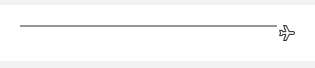
{
    "type": "AdaptiveCard",
    "body": [
        {
            "type": "ColumnSet",
            "columns": [
                {
                    "type": "Column",
                    "verticalContentAlignment": "Center",
                    "items": [
                        {
                            "type": "Image",
                            "url": "https://messagecardplayground.azurewebsites.net/assets/graydot2x2.png",
                            "width": "10000px",
                            "height": "2px"
                        }
                    ],
                    "width": "stretch"
                },
                {
                    "type": "Column",
                    "spacing": "Small",
                    "verticalContentAlignment": "Center",
                    "items": [
                        {
                            "type": "Image",
                            "url": "https://messagecardplayground.azurewebsites.net/assets/smallairplane.png",
                            "height": "16px"
                        }
                    ],
                    "width": "auto"
                }
            ]
        }
    ],
    "$schema": "http://adaptivecards.io/schemas/adaptive-card.json",
    "version": "1.3"
}

    DEFINE_ADAPTIVECARD_ENUM_DEFAULT(HeightType, HeightType::Stretch, {
            {HeightType::Auto, "Auto"},
            {HeightType::Stretch, "Stretch"}
When the image's pixel height is set as shown in the example above, BaseCardElement's height property is set to Stretch because the parser attempts to parse the height property and sees the value that's not one of the enum values, and default to Stretch.
The negative consequence is that an Image element can't set both BaseCardElement's height and pixel height at the same time. This results in the grey bar pushed up in UWP. In the example given, Auto is a better value as the BaseCardElement's height since we want to honor the explicit pixel value given.
Pixel height should be used if Pixel height is set, and BaseCardElement's height should be ignored.
Contributor guide
First steps
- Read the whole issue, then the project's contributing guide.
- Comment on the issue to say you are picking it up — it saves two people doing the same work.
- Fork the repository and make your change on a branch.
- Open a pull request that references the issue number.
Research direction
Start by locating the shared parser code containing DEFINE_ADAPTIVECARD_ENUM_DEFAULT(HeightType, HeightType::Stretch) and trace how the Image height value is handled. Reproduce the supplied Adaptive Card and verify that an explicit pixel height takes precedence over BaseCardElement's height, with the resulting layout matching the intended behavior.
Written by the indexing model from the issue text.
Assessment
- Tech stack
- cpp
- Domain
- frontend
- Issue type
- Bug
- Difficulty
- 3/5
- Estimated time
- 1-2 days
- Activity status
- Stale
- Clarity
- Mostly clear
- Newbie friendliness
- 35/100