microsoft / microsoft/AdaptiveCards
[UWP][Accessibility] Text in a select action should display as button text in high contrast mode
Nobody has claimed this yet.
- Dominant language
- C#
- Stars
- 2k
- Forks
- 595
- Avg merge
- 1d 19h
- Merged PRs (30d)
- 1
Description
Platform
What platform is your issue or question related to? (Delete other platforms).
- UWP
Details
The expected behavior is that text in a select action would display as if it were in a button in high contrast mode (overriding colors set by the card author). The current behavior in high contrast mode is that all text is displayed using the text colors.
Using the below card and the following high contrast settings:
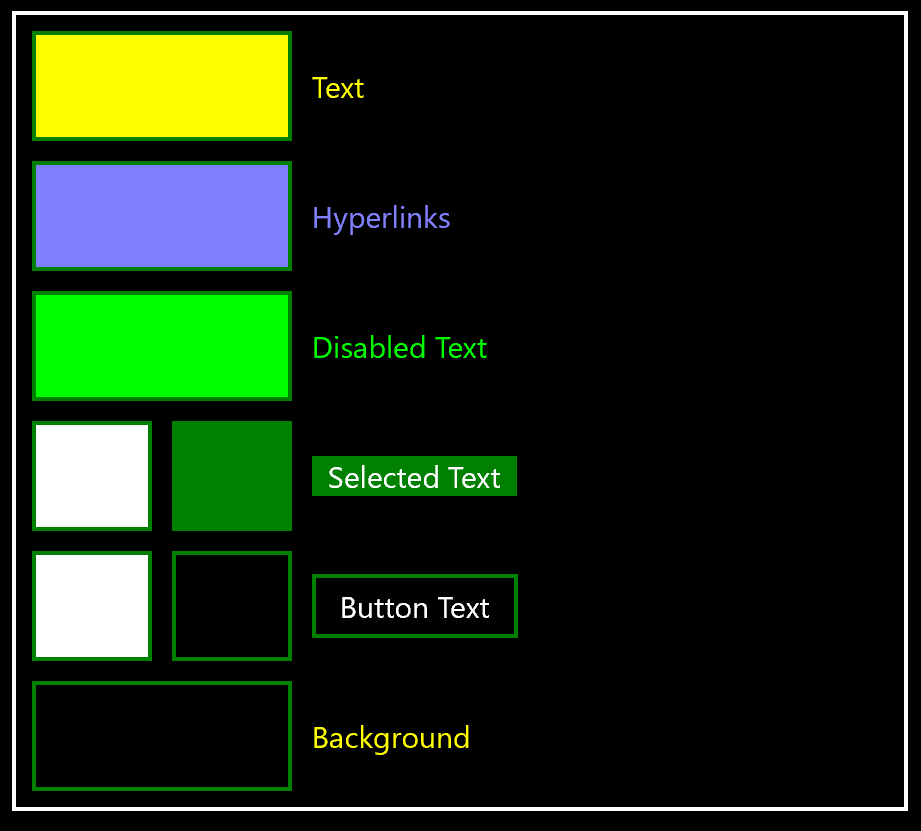
The current result is as follows:
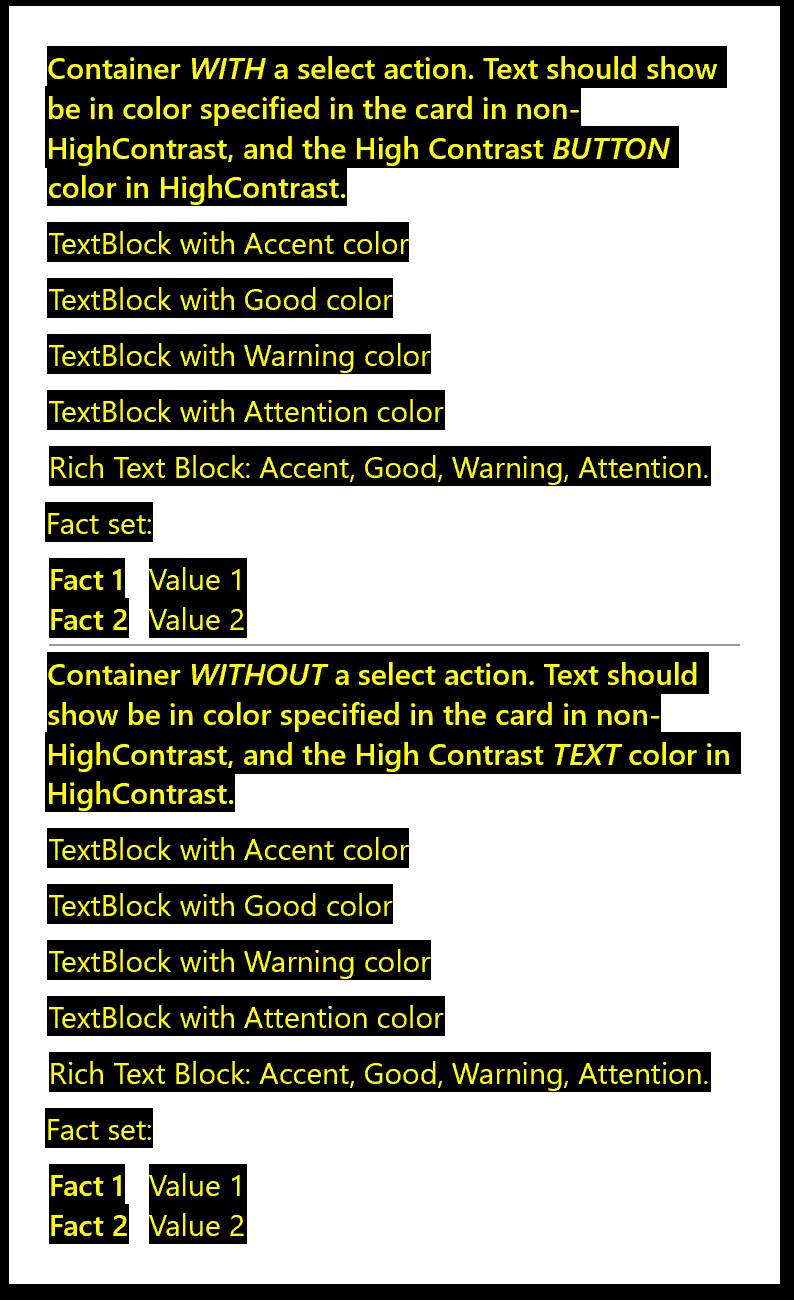
The text in the upper container should display in white rather than yellow, because white is the button text color.
Json:
{
	"type": "AdaptiveCard",
	"version": "1.0",
	"body": [
		{
			"type": "TextBlock",
			"text": "Container _WITH_ a select action. Text should show be in color specified in the card in non-HighContrast, and the High Contrast _BUTTON_ color in HighContrast.",
			"wrap": true,
			"weight": "Bolder"
		},
		{
			"type": "Container",
			"items": [
				{
					"type": "TextBlock",
					"text": "TextBlock with Accent color",
					"color": "Accent"
				},
				{
					"type": "TextBlock",
					"text": "TextBlock with Good color",
					"color": "Good"
				},
				{
					"type": "TextBlock",
					"text": "TextBlock with Warning color",
					"color": "Warning"
				},
				{
					"type": "TextBlock",
					"text": "TextBlock with Attention color",
					"color": "Attention"
				},
				{
					"type": "RichTextBlock",
					"inlines": [
						{
							"type": "TextRun",
							"text": "Rich Text Block: "
						},
						{
							"type": "TextRun",
							"text": "Accent, ",
							"color": "Accent"
						},
						{
							"type": "TextRun",
							"text": "Good, ",
							"color": "Good"
						},
						{
							"type": "TextRun",
							"text": "Warning, ",
							"color": "Warning"
						},
						{
							"type": "TextRun",
							"text": "Attention.",
							"color": "Attention"
						}
					]
				},
				{
					"type": "TextBlock",
					"text": "Fact set:"
				},
				{
					"type": "FactSet",
					"facts": [
						{
							"title": "Fact 1",
							"value": "Value 1"
						},
						{
							"title": "Fact 2",
							"value": "Value 2"
						}
					]
				}
			],
			"selectAction": {
				"type": "Action.Submit",
				"title": "ContainerSelect"
			}
		},
		{
			"type": "TextBlock",
			"text": "Container _WITHOUT_ a select action. Text should show be in color specified in the card in non-HighContrast, and the High Contrast _TEXT_ color in HighContrast.",
			"wrap": true,
			"weight": "Bolder",
			"separator": true
		},
		{
			"type": "Container",
			"items": [
				{
					"type": "TextBlock",
					"text": "TextBlock with Accent color",
					"color": "Accent"
				},
				{
					"type": "TextBlock",
					"text": "TextBlock with Good color",
					"color": "Good"
				},
				{
					"type": "TextBlock",
					"text": "TextBlock with Warning color",
					"color": "Warning"
				},
				{
					"type": "TextBlock",
					"text": "TextBlock with Attention color",
					"color": "Attention"
				},
				{
					"type": "RichTextBlock",
					"inlines": [
						{
							"type": "TextRun",
							"text": "Rich Text Block: "
						},
						{
							"type": "TextRun",
							"text": "Accent, ",
							"color": "Accent"
						},
						{
							"type": "TextRun",
							"text": "Good, ",
							"color": "Good"
						},
						{
							"type": "TextRun",
							"text": "Warning, ",
							"color": "Warning"
						},
						{
							"type": "TextRun",
							"text": "Attention.",
							"color": "Attention"
						}
					]
				},
				{
					"type": "TextBlock",
					"text": "Fact set:"
				},
				{
					"type": "FactSet",
					"facts": [
						{
							"title": "Fact 1",
							"value": "Value 1"
						},
						{
							"title": "Fact 2",
							"value": "Value 2"
						}
					]
				}
			]
		}
	],
	"$schema": "http://adaptivecards.io/schemas/adaptive-card.json"
}
Contributor guide
First steps
- Read the whole issue, then the project's contributing guide.
- Comment on the issue to say you are picking it up — it saves two people doing the same work.
- Fork the repository and make your change on a branch.
- Open a pull request that references the issue number.
Research direction
Start by reproducing the supplied Adaptive Card JSON in UWP with the shown high-contrast settings. Compare text inside a container with a selectAction against text in a container without one; done means select-action text uses the high-contrast button text color while ordinary text uses the high-contrast text color.
Written by the indexing model from the issue text.
Assessment
- Tech stack
- csharp
- Domain
- accessibility, frontend
- Issue type
- Bug
- Difficulty
- 3/5
- Estimated time
- 1-2 days
- Activity status
- Stale
- Clarity
- Mostly clear
- Newbie friendliness
- 35/100