Intellisense autocomplete suggestion for `case`/`end;` doesn't work and is missing semicolon
Nobody has claimed this yet.
- Dominant language
- PowerShell
- Stars
- 881
- Forks
- 285
- Avg merge
- 3d 36m
- Merged PRs (30d)
- 1
Description
The bug with case/end; not being known as related by VS Code was fixed, here:
https://github.com/microsoft/AL/issues/5815
...but... there seems to be a bug in the fix!
For begin/end;, on typing begin, we get an Intellisense suggestion...
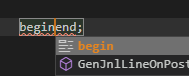
...that if accepted with the Enter key (twice) creates the delimiters correctly and puts the cursor within them:
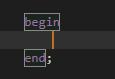
It seems this was attempted for case/end; too, but it doesn't work: we get the same kind of suggestion:
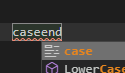
...but as you can see, (a) it lacks the semicolon after end, and (b) it doesn't seem to actually work when accepted, just doing nothing:
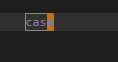
This is after pressing the Enter key just once, unlike above; the end disappears and we are just left with the originally typed case
AL extension version 6.1.397164
Contributor guide
First steps
- Read the whole issue, then the project's contributing guide.
- Comment on the issue to say you are picking it up — it saves two people doing the same work.
- Fork the repository and make your change on a branch.
- Open a pull request that references the issue number.
Research direction
Start with the AL language extension's autocomplete handling for the case/end; suggestion, comparing it with the working begin/end; behavior described in the issue. Verify that accepting the suggestion inserts end;, preserves the semicolon, and places the cursor inside the delimiters.
Written by the indexing model from the issue text.
Assessment
- Tech stack
- vscode
- Domain
- developer-experience
- Issue type
- Bug
- Difficulty
- 3/5
- Estimated time
- 1-2 days
- Activity status
- Stale
- Clarity
- Mostly clear
- Newbie friendliness
- 45/100