Spurious syntax errors when adding conditions to FlowField CalcFormula expression: "'FIELD', 'CONST' or 'FILTER' keyword is expected."
Nobody has claimed this yet.
- Dominant language
- PowerShell
- Stars
- 881
- Forks
- 285
- Avg merge
- 3d 36m
- Merged PRs (30d)
- 1
Description
Describe the bug
Prepending a new condition to a FlowField's CalcFormula results in a false syntax error, and I have to then go and re-type a different part of the pre-existing code to dismiss that.
To Reproduce
- Have a
FlowFieldwith aCalcFormulacontaining 1 (or more) condition(2) - Go to just after the
where(, type a space, then go before that, and add a new condition (having the space after means Intellisense works, etc.) - Observe the spurious errors reported:
'FIELD', 'CONST' or 'FILTER' keyword is expected. AL(AL0292) [17, 78]
Syntax error, ')' expected AL(AL0104) [17, 83]
Syntax error, ')' expected AL(AL0104) [17, 83]
minimal sample:
table 50100 Foo
{
    fields
    {
        field(1; "Entry No."; Integer)
        {
        }

        field(2; "Customer No."; Code[20])
        {
        }

        field(3; "No. of Customers"; Integer)
        {
            FieldClass = FlowField;
            Editable = false;
            CalcFormula = count(Customer where("No." = field("Customer No.")));
            // Edit the above to add the following and observe: Blocked = const(" "),
            // CalcFormula = count(Customer where(Blocked = const(" "), "No." = field("Customer No.")));
        }
    }

    keys
    {
        key(PK; "Entry No.")
        {
            Clustered = true;
        }
    }
}
Expected behavior
This is yet another waste of developers' time, where the background/realtime code analysis fires errors that aren't really errors, and we have to re-enter/cut/paste/whatever the same code just to get rid of those wrongly reported errors.
See also e.g. #6225, #6232, #6276
Screenshots
This is the exact scenario where I first noticed this bug.
Original code before adding condition:

after adding condition, reporting spurious error:

after fixing said error by deleting and retyping the 'offending' field keyword...

This is the same false error with the minimal code given above:

after retyping field:
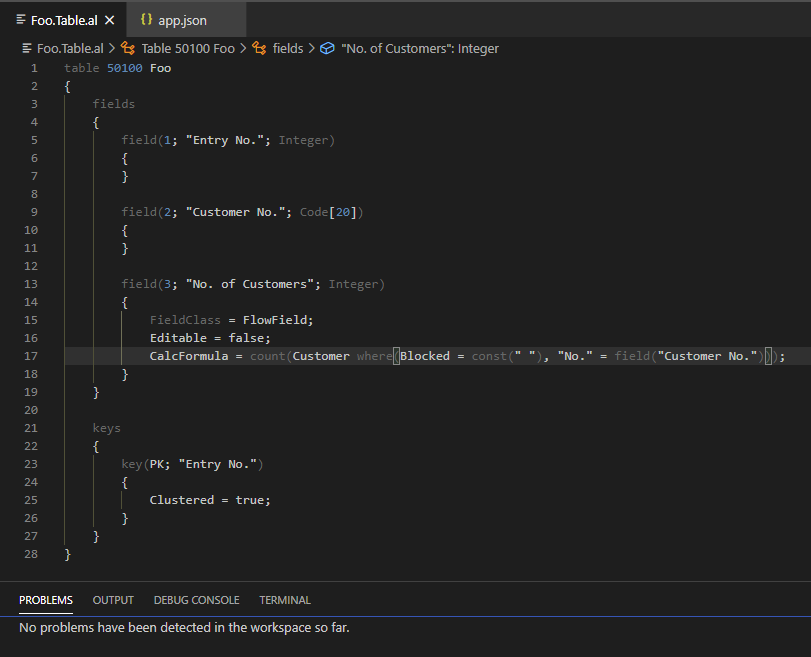
5. Versions:
- AL Language: 6.1.362735
- Business Central: n/a
Contributor guide
First steps
- Read the whole issue, then the project's contributing guide.
- Comment on the issue to say you are picking it up — it saves two people doing the same work.
- Fork the repository and make your change on a branch.
- Open a pull request that references the issue number.
Research direction
Reproduce the issue in the minimal AL table sample using the AL Language extension version 6.1.362735. Start by inspecting the diagnostics produced while inserting a condition at the beginning of the FlowField CalcFormula where clause. Done means adding the condition no longer produces spurious AL0292 or AL0104 errors, while valid syntax errors remain reported.
Written by the indexing model from the issue text.
Assessment
- Tech stack
- vscode
- Domain
- compilers, devtools
- Issue type
- Bug
- Difficulty
- 4/5
- Estimated time
- 3-5 days
- Activity status
- Stale
- Clarity
- Mostly clear
- Newbie friendliness
- 45/100