microg app drawer icon doesn't display correct image
Nobody has claimed this yet.
- Dominant language
- Java
- Stars
- 14.6k
- Forks
- 3.2k
- Avg merge
- 12d 11h
- Merged PRs (30d)
- 4
Description
Hello
I'm running an Mi A1 Stock Oreo. I used the Terminal Debloater and removed as much of Google as I understand...
Apps Installed
Xposed - version 90-beta 3
FakeGapps - 2.0
Magisk 16.0
Services Core - com.google.android.gms-9258259.apk
Services Framework Proxy - com.google.android.gsf-8.apk
Store (FakeStore release) - com.android.vending-16.apk
DroidGuard Helper - org.microg.gms.droidguard-4.apk
While playing to get micrgo installed on Stock Oreo, originally I couldn't get it to install because I still had some Google installed that it didn't like, and I flashed the NanoDroid Microg zip in TWRP, and I was also messing with it in F-droid. I can't remember which, between NanoDroid install or F-Droid the icon did appear correctly.
I've also flashed microg using this same manual method in custom roms, and it always works.
So why won't it show up properly when I manually install microg in Stock Oreo, how can I fix this?
I'm attaching a screen shot showing the app drawer displaying a Gear with the letter C in it, instead of the correct icon.
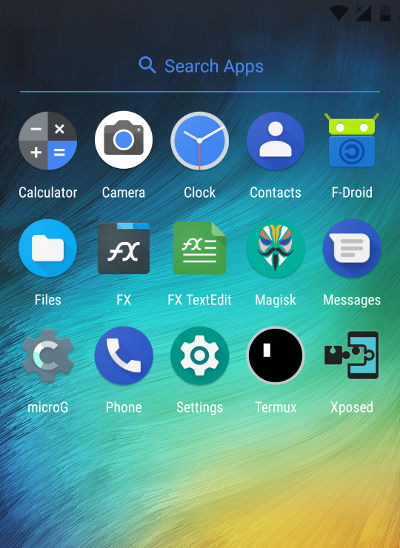
Thanks
Contributor guide
No contributing guide indexed for this repository
First steps
- Read the whole issue, then the project's contributing guide.
- Comment on the issue to say you are picking it up — it saves two people doing the same work.
- Fork the repository and make your change on a branch.
- Open a pull request that references the issue number.
Research direction
Reproduce the incorrect app-drawer icon using the listed microG components on Mi A1 Stock Oreo after manual installation. No source file or test is identified in the issue, so first locate the Android application/icon resources and compare manual installation with the NanoDroid or F-Droid installation; done means the correct icon appears in the app drawer.
Written by the indexing model from the issue text.
Assessment
- Tech stack
- android
- Domain
- mobile
- Issue type
- Bug
- Difficulty
- 4/5
- Estimated time
- 3-5 days
- Activity status
- Stale
- Clarity
- Needs clarification
- Newbie friendliness
- 25/100