Applicaton - Checking License - Not Valid
Nobody has claimed this yet.
- Dominant language
- Java
- Stars
- 14.6k
- Forks
- 3.2k
- Avg merge
- 12d 11h
- Merged PRs (30d)
- 4
Description
Hello,
Hopefully I can just keep this brief without a lot of system detail(s).
On the download section, I downloaded all these latest stable versions;
Services Core
Services Framework Proxy
Store (FakeStore release)
DroidGuard Helper
UnifiedNlp
Xposed Installer 3.1.5 - Framework version 90-beta3
FakeGapps 2.0
Yalp Store 0.42
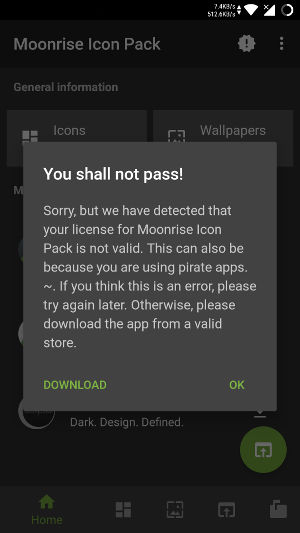
I installed the H2O Icon Pack for Oreo, and when I click it's icon in the apps drawer, it opens, then gives me a popup; checking license, not sure how to get around this? I've been reading quite a bit online in regards to this license checking, but I thought with all of the apps I have installed above, it would solve this issue? This is also a free app...
This is license check from H20;

Also a popup from Moonrise Icon Pack, about license not valid;
Contributor guide
No contributing guide indexed for this repository
First steps
- Read the whole issue, then the project's contributing guide.
- Comment on the issue to say you are picking it up — it saves two people doing the same work.
- Fork the repository and make your change on a branch.
- Open a pull request that references the issue number.
Research direction
Start with the issue's reproduction details: the listed microG components and the H2O and Moonrise icon packs, both showing license-validation errors. Reproduce the popups on the reported setup and determine whether the license checks can be satisfied; the issue provides no source files or tests to target, so a completed fix would need a confirmed cause and verification for both apps.
Written by the indexing model from the issue text.
Assessment
- Tech stack
- java
- Domain
- mobile
- Issue type
- Bug
- Difficulty
- 4/5
- Estimated time
- 3-5 days
- Activity status
- Stale
- Clarity
- Needs clarification
- Newbie friendliness
- 25/100