gms.vision.Barcode getBoundingBox() returns incorrect coordinates
Nobody has claimed this yet.
- Dominant language
- Java
- Stars
- 14.6k
- Forks
- 3.2k
- Avg merge
- 12d 11h
- Merged PRs (30d)
- 4
Description
Describe the bug
The gms.vision.Barcode class getBoundingBox() function returns incorrect coordinates for the bounding box of a detected QR Code or other 2D barcode.
To Reproduce
It's easiest to reproduce using the "barcode-reader" demo app from the Google android-vision samples repo. The Google repo is no longer maintained so I used this fork which is already updated for recent Android SDK versions.
Steps to reproduce the behavior:
- Launch barcode-reader sample app under MicroG and view a QR code in the camera.
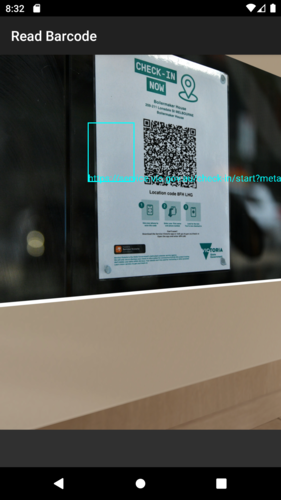
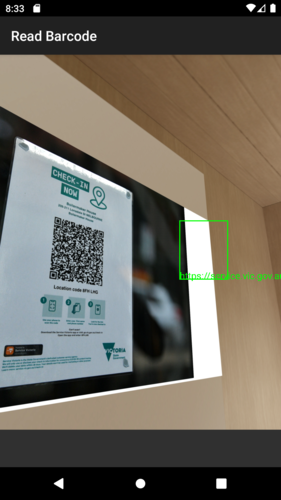
- Note the bounding box overlaid on the camera view is in the wrong place relative to the QR code position.
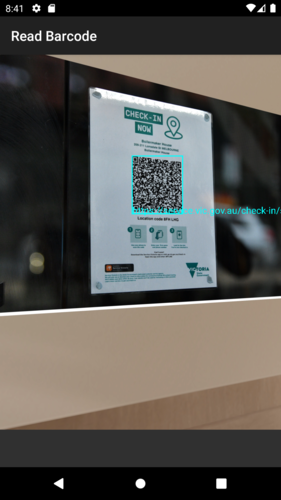
- If necessary, launch the same app with GSF and verify the bounding box is drawn in the correct place.
Screenshots
Running barcode-reader under AVD with MicroG:
Same QR code scanned under AVD with GSF:
System
- Tested with AVD image "Pixel 2 API 29 (MicroG)" with Android 10
Additional context
The bounding box coordinates seem to be mirrored in both axes when the phone is in the default orientation. I think this is to do with the rotation property of the image passed into the BarcodeDetector API, it looks like the bounding box coordinates are expected to have the rotation applied to them. However I haven't dug into this very much.
The impact of the bug is pretty low. There are some apps (like the Service Victoria COVID checkin app) that display a region on the live camera overlay and require the scanned QR code to be inside this region. However if the region is in the centre of the screen then it's possible to zoom out a little and the bounding box will still be in roughly the right place, as a workaround.
Contributor guide
No contributing guide indexed for this repository
First steps
- Read the whole issue, then the project's contributing guide.
- Comment on the issue to say you are picking it up — it saves two people doing the same work.
- Fork the repository and make your change on a branch.
- Open a pull request that references the issue number.
Research direction
Start by reproducing the issue with the barcode-reader sample and compare the MicroG and GSF results for Barcode.getBoundingBox(). Trace how the BarcodeDetector API receives image rotation and how the returned coordinates are consumed by the camera overlay. Done means the bounding box aligns with the detected QR code in the stated orientations without regressing the sample behavior.
Written by the indexing model from the issue text.
Assessment
- Tech stack
- android, java
- Domain
- mobile-dev
- Issue type
- Bug
- Difficulty
- 4/5
- Estimated time
- 3-5 days
- Activity status
- Stale
- Clarity
- Mostly clear
- Newbie friendliness
- 35/100