Opening Folder on local network
Nobody has claimed this yet.
- Dominant language
- Python
- Stars
- 275
- Forks
- 16
- PR merge metrics
- No merged PRs in 30d
Description
I have a PC on the network and i want to access some files on that PC.
Windows explorer:
if i type in "\\192.168.2.62" i will get
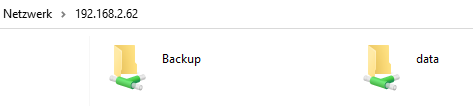
if i do the same thing in fman, nothing happens. Fman is behaving like when i type in a wrong folder.
But if i type in "\\192.168.2.62\Backup" i will get access:
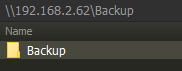
If i press Backslash key i will get where i want, but i was not be able to access it directly.
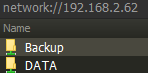
what i did as a workaround, i created an additional folder called "root" and i always access "\\192.168.2.62\root" first and then press backslash to get to the real root, so i can navigate to the folder i want.
Contributor guide
No contributing guide indexed for this repository
First steps
- Read the whole issue, then the project's contributing guide.
- Comment on the issue to say you are picking it up — it saves two people doing the same work.
- Fork the repository and make your change on a branch.
- Open a pull request that references the issue number.
Research direction
Reproduce the issue on Windows by entering the UNC host path shown in the report, then inspect the file-manager navigation handling for network roots. Done means opening the host root directly works while paths to named shares, such as Backup, continue to work.
Written by the indexing model from the issue text.
Assessment
- Tech stack
- python
- Domain
- desktop, networking
- Issue type
- Bug
- Difficulty
- 3/5
- Estimated time
- 1-2 days
- Activity status
- Stale
- Clarity
- Mostly clear
- Newbie friendliness
- 45/100