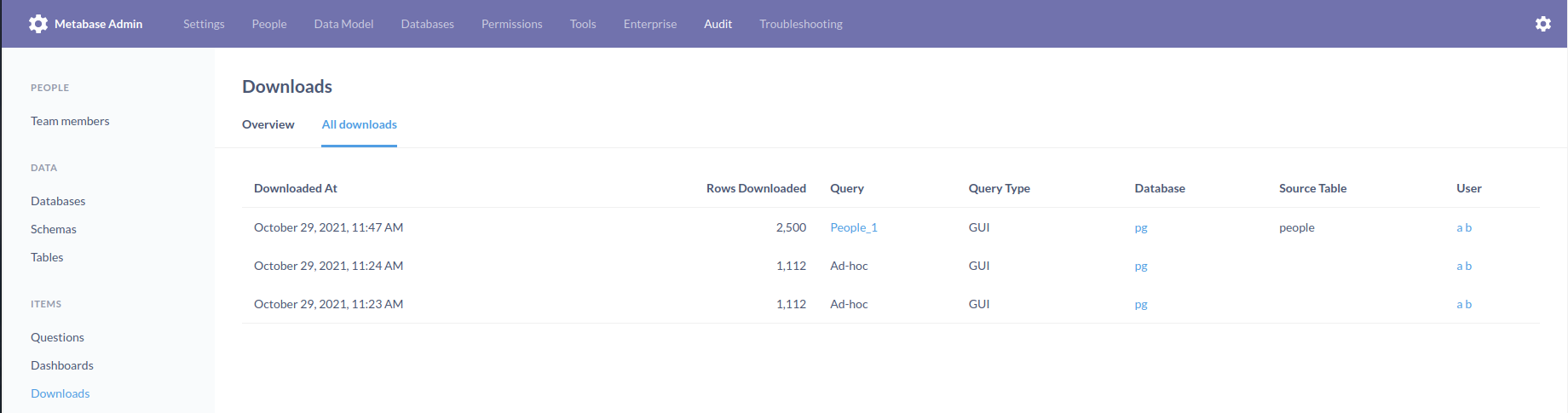
Audit->Downloads does not simply show what's being downloaded unless it's a saved question
- Dominant language
- Clojure
- Stars
- 49.3k
- Forks
- 6.8k
- Avg merge
- 1d 13h
- Merged PRs (30d)
- 653
Description
**Describe the bug**
In the case of an ad-hoc question, when you want to know the actual question that's being downloaded in Audit, you don't get the actual question by clicking on the row but rather an "ad-hoc" text. You have to match the question that's been run on the Team members-> audit log section by looking at the question that was run in the exact hh:mm (which makes the feature pretty difficult to use)
**To Reproduce**
1) Using Metabase Enterprise, just go to any table and click on download
2) then go to Admin->settings->audit->downloads and see something that was downloaded, but you don't have a way of knowing what was that, you have to guess by going to Team members -> audit log
**Expected behavior**
Link the ad-hoc execution in the download section to the actual question that run, so admins can see what was downloaded
**Screenshots**
**Information about your Metabase Installation:**
- Your browser and the version: Brave latest
- Your operating system: Ubuntu 21.10
- Your databases: Postgres
- Metabase version: 41.1
- Metabase hosting environment: Docker
- Metabase internal database: Postgres
**Severity**
Makes the download audit functionality pretty cumbersome to use
**Additional context**
Reported by a lead
Contributor guide
Research direction
Start in Admin → Settings → Audit → Downloads and compare the ad-hoc rows with the related entries in Team members → Audit log. Trace how an ad-hoc download is represented and identify the existing question link or detail entry. Done means an administrator can determine the actual question downloaded directly from the Downloads audit view, without matching timestamps.
Written by the indexing model from the issue text.
Assessment
- Tech stack
- clojure
- Domain
- analytics, frontend
- Issue type
- Bug
- Difficulty
- 4/5
- Estimated time
- 3-5 days
- Activity status
- Stale
- Clarity
- Mostly clear
- Newbie friendliness
- 35/100