meliorence / meliorence/react-native-snap-carousel
[Android] Issue with last item in the vertical carousel related to the height occupation of Status Bar
Nobody has claimed this yet.
- Dominant language
- JavaScript
- Stars
- 10.5k
- Forks
- 2.3k
- PR merge metrics
- No merged PRs in 30d
Description
Is this a bug report, a feature request, or a question?
This is a bug report
Have you followed the required steps before opening a bug report?
(Check the step you've followed - put an x character between the square brackets ([]).)
- I have read the guidelines regarding bug report.
- I have reviewed the documentation in its entirety, including the dedicated documentations 📚.
- I have searched for existing issues and made sure that the problem hasn't already been reported.
- I am using the latest plugin version.
- I am following the issue template closely in order to produce a useful bug report.
Have you made sure that it wasn't a React Native bug?
I'm not quite sure but I know it's something related to the Status Bar
Is the bug specific to iOS or Android? Or can it be reproduced on both platforms?
I'm developing an Android app only so currently I can only say that this issue belongs to Android
Is the bug reproductible in a production environment (not a debug one)?
Yes
Environment
Environment:
React: 16.13.1
React native: 0.63.2
react-native-snap-carousel: 3.9.1
Target Platform:
Android
Expected Behavior
I expect that the carousel works fine in the vertical mode
Actual Behavior
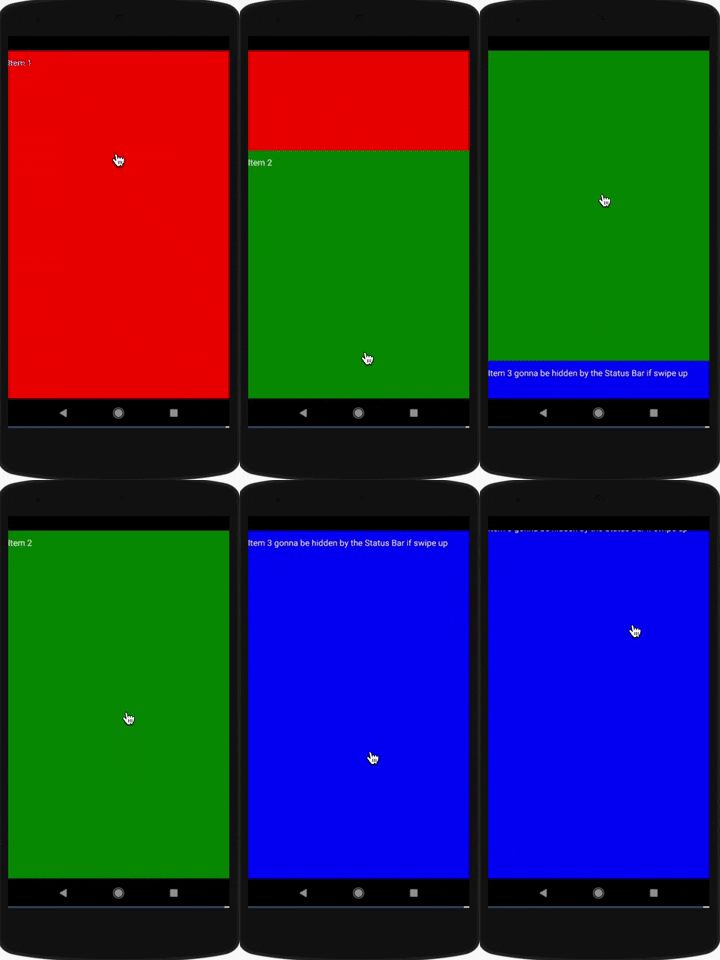
The snap function of the first and second item work fine, for the last item, if you try to scroll it up, somehow there is an extra gap (equals to the status bar height) on top and the last item is scrolled up a bit (leads to the case when content is hidden by the status bar). I added a snack below to describe it more clear.
Reproducible Demo
Snack: https://snack.expo.io/@nathan.tqn/d64873
Gif:
Steps to Reproduce
- Create an simple vertical carousel with 3 items (each item has a small text on it)
- Enable status bar (occupy an extra space on top of the screen) (Add in App.tsx file)
- Scroll through the carousel
- The snap function of the first and second item work fine, for the last item, if you try to scroll it up, somehow there is an extra gap (equals to the status bar height) on top and the last item is scrolled up a bit (leads to the case when content is hidden by the status bar)
- If I hide the status bar completely (Add in App.tsx file), the snap function works great for all of the items
Contributor guide
First steps
- Read the whole issue, then the project's contributing guide.
- Comment on the issue to say you are picking it up — it saves two people doing the same work.
- Fork the repository and make your change on a branch.
- Open a pull request that references the issue number.
Research direction
Start with the linked Snack and the App.tsx reproduction: create a three-item vertical carousel, enable the StatusBar, and compare scrolling with the status bar hidden. Trace the vertical carousel's snapping behavior under these two conditions. Done means the last item snaps without an extra status-bar-sized gap or content hidden behind the status bar.
Written by the indexing model from the issue text.
Assessment
- Tech stack
- javascript, react-native
- Domain
- mobile
- Issue type
- Bug
- Difficulty
- 3/5
- Estimated time
- 1-2 days
- Activity status
- Stale
- Clarity
- Mostly clear
- Newbie friendliness
- 35/100