types: filter-function: drop-shadow() — Not actually supported well by Safari (very buggy)
Nobody has claimed this yet.
- Dominant language
- JSON
- Stars
- 5.8k
- Forks
- 2.6k
- Avg merge
- 1d 21h
- Merged PRs (30d)
- 186
Description
What type of issue is this?
Browser bug (a bug with a feature that may impact site compatibility)
What information was incorrect, unhelpful, or incomplete?
https://caniuse.com/mdn-css_types_filter-function_drop-shadow lists drop-shadow as completely supported by Safari. However, when trying to use the drop-shadow filter in Safari, it has pretty severe stochastic rendering bugs (often wrong on first render, then correct. Sometimes flickering as the user scrolls).
What browsers does this problem apply to, if applicable?
Safari
What did you expect to see?
I expected to see a note about how Safari often renders drop-shadows incorrectly, seemingly at random per render.
Did you test this? If so, how?
https://jsfiddle.net/ftn0ph4k/2/
in Chrome:

in Safari (sometimes) — the exact behavior of how it fails varies quite a lot.
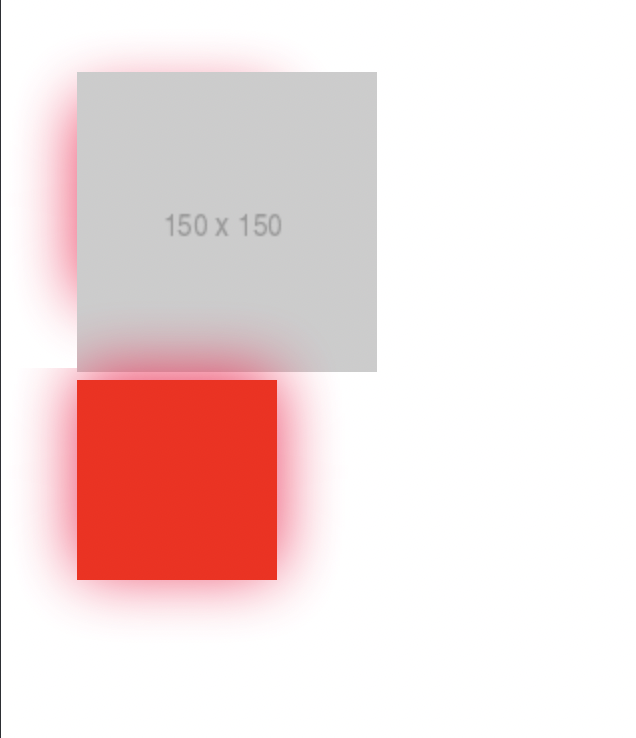
This particular render came when I added the placeholder image. I haven't yet figured out exactly when this bug happens, but it was happening so reliably on our own website in every place we were using it (still, randomly, but most of the time) that we had to stop using drop-shadow entirely.
Some more examples from our own website, that I unfortunately can't share the code for yet:
Safari, first render:

Safari, after resizing the window 1px so it re-renders:

Can you link to any release notes, bugs, pull requests, or MDN pages related to this?
Closest I've found is this. https://stackoverflow.com/questions/69170035/drop-shadow-not-showing-on-sides-on-first-load-in-safari-when-using-a-border-rad
Do you have anything more you want to share?
I'm unclear on what exact conditions cause this to happen. Our page has a lot of CSS going on (and it's unfortunately not public yet, so I can't link it here).
This applies on iOS safari as well; it has about the same rendering behavior. This does not occur in Chrome or Firefox or iOS Brave.
I'm on a Macbook Pro with an M1 Pro processor. My coworker with the same computer sees the same behavior. My old iPhone 7 also sees this rendering bug.
Latest OS is on all devices. (iOS 15.6, macOS 12.5, macOS safari Version 15.6 (17613.3.9.1.5))
MDN URL
No response
MDN metadata
No response
Contributor guide
First steps
- Read the whole issue, then the project's contributing guide.
- Comment on the issue to say you are picking it up — it saves two people doing the same work.
- Fork the repository and make your change on a branch.
- Open a pull request that references the issue number.
Research direction
Start by reproducing the linked JSFiddle in Safari and comparing its behavior with Chrome and Firefox. Review the compatibility data for the drop-shadow() filter function and determine whether the Safari rendering issue can be documented from the available evidence. Done means the data accurately reflects the reported Safari and iOS Safari behavior, with appropriate supporting details.
Written by the indexing model from the issue text.
Assessment
- Tech stack
- css
- Domain
- web-dev
- Issue type
- Bug
- Difficulty
- 3/5
- Estimated time
- 1-2 days
- Activity status
- Stale
- Clarity
- Needs clarification
- Newbie friendliness
- 35/100